
glhekmchljganpiecbdefijjkppbeinj

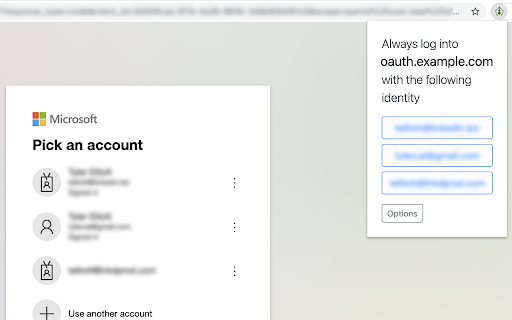

Automatically log into sites with OAuth without having to always choose the account. When you have multiple Google or Microsoft accounts (for work, home, etc) every time you try to log into a website via OAuth, like with the "Login with Google" button, you have to choose the account you want to use. This extension allows you to choose a selected account per site that you'll always want to use in the future - one fewer click! Release Notes: * 1.2.0 – Migrate to Manifest V3; add support for Google's new v3 signin flow; fix SAML detection bug * 1.1.1 – Fix a bug that did not handle encoded redirect URLs * 1.1.0 – Handle Auth in popup windows via a new context menu option * 1.0.7 – Add detection for SAML based logins * 1.0.6 – Help account choosing in Microsoft OAuth by pre-filling domains when available * 1.0.5 – Handle new Google OAuth choice format * 1.0.4 – Handle additional Google OAuth URL suffixes * 1.0.3 – Import/Export settings * 1.0.2 – Fix a bug preventing Google URLs from being parsed correctly * 1.0.1 – Add support for Microsoft OAuth * 1.0.0 – Initial release

Snap Environment Switcher
Switch between environments and modes in complex solutions like AEM. The Snap Environment Switcher Extension, also known as Exadel Environment Switcher for AEM, allows you to add projects with their corresponding environments (like DEV, QA, STG, PROD) and modes (like Publish, Edit, Admin). You can also specify relationships between environments and modes so that the environments will change alongside the modes. With Snap Environment Switcher/Exadel Environment Switcher for AEM, you can: - create an unlimited number of projects - configure several modes and environments - easily switch back and forth between your modes and environments - switch between environment domains - create several sub-environments (an environment with the same name that corresponds to another mode) - set up a relationship between your sub-environments and modes, so when you change the mode, the sub-environment and domain will change automatically, too - switch to a new mode or environment in a new tab - share plugin configurations between team members through the Import and Export operations - keep track of your current operating state—you’ll never be confused about which project, environment, and mode you’re in

Back up emails to SharePoint
This extension allows you to save your Gmail messages or labels directly to Microsoft 365 SharePoint with just one click. This tool offers various functionalities like saving individual emails or in batches, archiving all emails at once, continuous automatic saving, and organization-wide email backup. Here’s what you can do: - Save individual emails, or in batches - Label backup - Archive all your emails - Continuously save emails automatically - Setup email backup Here is how to use this extension: 1. Select the emails you want to save. 2. Click on the "Save Emails to SharePoint" icon, and select the SharePoint Site, Document Library, and folder. 3. Choose the email export options. 4. Click on "Save". Key features: - save any email to a folder in SharePoint Document Library - save entire Gmail label to a folder in SharePoint Document Library - setup real time backup of entire Gmail account to a folder in your SharePoint Document Library Choose your saving preferences: - Consolidate email conversations into a single document or separate them - Decide whether to place attachments within the email body or in separate files - Save your emails in various file formats - Customize the way your files are named to suit your organizational needs By saving Gmail emails to Microsoft SharePoint, you gain: * Enhanced Information Security: Keep your sensitive email information secure and managed within SharePoint’s robust platform. * Streamlined File Management: Organize your emails seamlessly alongside your SharePoint documents. cloudHQ. Helping your productivity, one click at a time. Visit our Website: https://www.save-emails-to-sharepoint.com/ Explore Pricing: https://www.save-emails-to-sharepoint.com/pricing Need Help? Support Page: https://support.cloudhq.net/?s=sharepoint Discover Insights. Blog: https://blog.cloudhq.net/ Google Workspace, Google Sheets, Google Drive, Google Alerts and Gmail are trademarks of Google LLC. Use of this trademark is subject to Google Permissions.

Podify - Ultimate Audience Building Platform
Elevate engagement, increase visibility, and become an influencer with Podify. Podify is a LinkedIn growth tool combining the power of content, community and newsletters. For the content part; Podify analyzes thousands of top performing LinkedIn posts along with your tone of voice to maximize your contents’ outreach while keeping your authenticity. Within the context of outreach, Podify creates relevance scores between your content and audience profiles making sure that you are targeting the right people. If you don’t want to create content from scratch, then you will find hand-crafted, unique content aligning with your target audience, optimized for maximum outreach, refined with your tone of voice, in Podify’s content marketplace. By using this authenticity, audience targeting and outreach optimization features you can create posts from PDFs or even create brand new content by repurposing one of your past LinkedIn posts. Community features come into play at this moment. By classifying your content and target audience Podify matches you with the most relevant micro-community where each member joins the discussion on LinkedIn by leaving genuine, high-value comments to your post, much like we used to do in face-to-face meetings. This engagement not only multiplies your contents’ outreach, but acts as an ice-breaker for outsiders to engage with your content. You can further distribute your content directly into your ideal customer profile's inbox by using Podify's advanced newsletter feature, just like LinkedIn does. This all happens under five minutes and turns your content into an asset. Stop feeling invisible. Podify connects you with the right audience and grows your network. Sign up now and see the results!

Launcher Tab Closer
Close leftover tabs from Teams, Zoom and Global Protect. Auto Close leftover tabs from Teams, Zoom and Global Protect. Will trigger 2 seconds after tab has finished loading.
