
gkkfhngobmbklnhnlmlgdfjoikmcfppp

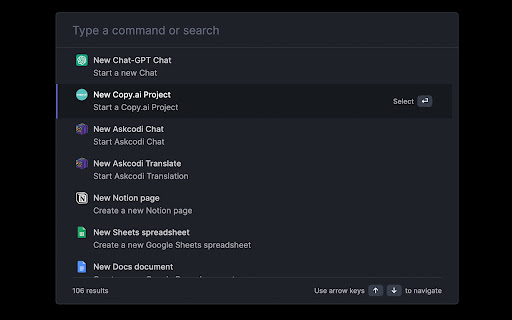
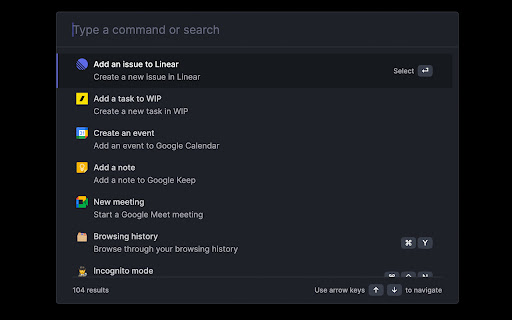
Supercharge Chrome with commands, shortcuts, and more Elevate your Chrome experience with TabBar – the ultimate tool for mastering browser commands, shortcuts, and beyond. Unleash the power of Chrome like a pro with TabBar's intuitive command interface. Effortlessly manage tabs, bookmarks, and browser history while executing a variety of actions to enhance your productivity. Key Features: 🗄 Seamlessly switch, open, close, and search tabs 📚 Browse and organize bookmarks effortlessly 🔍 Quickly search your browsing history ⚡️ Over 50 actions to supercharge your productivity 🔮 Special commands for advanced filtering and actions 🧩 Integrations with Notion, Figma, Docs, Asana, and more ⌨️ Handy shortcuts for muting, pinning, bookmarking, and more ⚙️ Advanced settings to troubleshoot browsing issues 🌙 Enjoy a sleek Dark Mode ...and much more – all for free, and no sign-in required!

Search Bookmarks, History and Tabs
Browser extension to (fuzzy) search and navigate bookmarks, history and open tabs. This extension does not collect any data, nor does it make any external requests. You can also **tag your bookmarks** including auto completions. Tags are considered when searching and can be used for navigation. It also supports searching for and navigating to your open tabs and history. Lastly, the extension allows you to configure "search engines", which will forward you to arbitrary search engines with the search term as the search query (helpful as a fallback) or directly access an entered URL. The extension is very customizable and has a dark / light theme that is selected based on your system settings. You can find more information here: https://github.com/Fannon/search-bookmarks-history-and-tabs#readme

Omni - Bookmark, History, & Tab Manager
Supercharge Chrome with commands, shortcuts, and more With Omni you can use Chrome like a pro. Manage tabs, bookmarks, your browser history, perform all sorts of actions and more with a simple command interface. FEATURES 🗄 Switch, open, close, and search your tabs 📚 Browse and manage your bookmarks 🔍 Search your browsing history ⚡️ 50+ actions to improve your productivity 🔮 Special commands to filter and perform more actions 🧩 Integrations with Notion, Figma, Docs, Asana... ⌨️ Shortcuts for actions such as muting, pinning, bookmarking... ⚙️ Advanced settings to help troubleshoot browsing issues 🌙 Dark mode ...and much more - all for free & no sign in needed! Want to self-host, add new features to Omni, or even make your own omnisearch extension? Feel free to check out the code on GitHub! 👉 https://github.com/alyssaxuu/omni Omni is built and maintained by Alyssa X (https://alyssax.com)

tabOS - Tab management, ChatGPT 4o, Docs/Images, RSS/YouTube/Reddit feeds
Enhance your New tab/Sidebar - Manage tabs, ChatGPT prompted chats, RSS/YouTube/Reddit feeds, write documents and save images. Meet tabOS - An operating system (sort of! 😇) for your browser. Add it with one click to gain a powerful new tab where you can manage your tabs and tab groups. Try it for free. Stop jumping from tab to tab, from tool to tool, losing your focus and time in the process. Declutter your browser by saving tabs not used at the moment, effortlessly create relevant tab groups, take notes anywhere, save images, and get answers from your library of AI helpers. Lay out everything on the same page to save time and discover new insights from your data. Stay on top of the news by creating and subscribing to RSS feeds, all inside your new tab. 🧑🏭 Assemble your custom-prompted AI helpers in a new tab, and then use them side-by-side with your web apps via the side panel view. Add powerful documents and note-taking capabilities anywhere. Integrate next-level, intuitive, and familiar tab and tab group management. Combined, these elements forge the comprehensive ecosystem of tabOS. 👌 Drag and drop to save and close your tabs and tab groups. Create and rearrange groups and organize them all in easy-to-use and familiar grid, column, list, and tree views. Additional features include discarding tabs, searching your library, and picking up where you left off, all within the new tab. ⭢ Tab Management: Easily handle your tabs with options to open, close, and manage them effortlessly. ⭢ Tab Groups: Organize your tabs into visually distinct groups for improved focus and organization. ⭢ Tab Folders: Further categorize your tab groups into folders for streamlined navigation. ⭢ Discard Tabs: Free up resources by discarding tabs without losing track of them. ⭢ Pin Tabs: Keep important tabs always accessible by pinning them to the browser window. ⭢ Move Tabs: Reorder and move tabs between windows and groups with a simple drag-and-drop. ⭢ Windows Management: Manage multiple cloud desktops to enhance multitasking and reduce context-switching. Bookmarks Integration: Seamless integration with your bookmarks for quick access and management. ⭢ Documents: Create and edit documents directly in your browser. ⭢ Notes: Take quick notes, save ideas, and manage to-do lists dynamically. ⭢ Markdown Support: Write and format using Markdown for clear, structured documents. ⭢ To-Do Lists: Organize tasks effectively with customizable to-do lists. ⭢ Bullet Point Lists: Make concise lists for easy readability and organization. ⭢ Code Snippets: Store and manage code blocks with syntax highlighting. ⭢ Highlight Colors: Visually prioritize information with color-coded highlights. ⭢ Images: Insert and manage images within your documents and notes. ⭢ Cloud Drive: Integrate seamlessly with your cloud storage for anywhere access to files. ⭢ AI Chats: Engage with AI-driven chat for help and queries. Custom Prompted Assistants: Tailor AI prompts to your specific workflow needs. ⭢ Vision AI: Utilize AI for image recognition and contextual actions. ⭢ ChatGPT 3.5 & 4.0 & Turbo: Choose from a range of AI versions, including the most advanced, for a personalized experience. ⭢ Global search: Powerful search across your entire workspace, including tabs, bookmarks, and cloud files. ⭢ Search open tabs: Quickly find and jump to the content within your currently open tabs. ⭢ Fuzzy search: Smart search technology that finds what you need, even with partial or misspelled queries. ⭢ Share data: Share tabs, documents, and notes easily with others. ⭢ Shared folders: Collaborate with team members using shared cloud folders. ⭢ Shared documents: Work on documents simultaneously for real-time collaboration. ⭢ Live collaboration: Interact and collaborate in live sessions with colleagues and friends. ⭢ New Tab view: A fresh perspective every time you open a new tab, with the option to pick up where you left off. ⭢ Sidepanel view: Multi-task with ease by using tabOS next to your web apps. ⭢ Web app: Access all your data from anywhere via our fully featured web app ⇨ Free Plan: Get started with the core functionalities without any cost.. Try out with an anonymous account. ⇨ Pro Plan & AI Plus Plan: Scale up as needed with extra cloud storage and AI sorting capabilities. ⇨ Automatic Daily Backups: Ensure all your data is secure and up-to-date with daily automatic backups.

Flow - Tab Manager
A new way to manage chrome tabs and windows easily. Flow is your ultimate solution for managing tabs and windows in Chrome. Whether you’re a power user or just someone who wants to keep things tidy, Flow streamlines your browsing experience. Here’s why you’ll love it: Effortless Tab Management • Create Sessions: Start fresh by initiating a new session. A dedicated Chrome window opens, marking the beginning of your focused browsing journey. • Automatic Saving: Flow takes care of your tabs in the background. Close a window without hesitation; your tabs are securely saved. • Resume Seamlessly: Reopen any session whenever you need to pick up where you left off. • Unsaved Windows: Add any open window to your sessions directly from the ‘Unsaved Windows’ section. Boost Your Workflow with Additional Features • Main Session: Designate a session as your ‘Main Session.’ When you launch Chrome, all other windows close, leaving only your essential workstream active. • Backups: Create local backups of your sessions. Flow auto-generates a backup before deleting any session, ensuring you never lose your work. • Dark Mode: Enjoy a sleek dark mode that’s easy on the eyes during late-night browsing. • Resizable Interface: Customize the extension’s size by simply dragging the bottom right corner to fit your screen and preferences. • Simplicity: Flow keeps things straightforward. • Speed: It’s fast and reliable. • Organization: Say goodbye to tab overload. Give Flow a try and experience a clutter-free browsing environment. Your feedback is invaluable in making Flow even better! What's new? 1.2.8 • Added session badge • Removed the unsaved window popup 1.2.7 • Added sessions details to view tabs and move tabs between sesssoin • Added move tabs to session in chrome context menu • Added permission view to review optional permissions for certain settings 1.2.5 • Now Discarding tabs after title is load to improve search and visibility. • Clicking on the open sessions will bring them to front. • Bug fixes. 1.2.1 • Organizing settings and added a few more settings in additional settings • Bug fixes 1.1.0 • Sessions can be opened in the current window. • Project is open source now. see about us in extension settings for more info. • Pinned tabs will be saved now. • Alert will be shown if a window is not saved as session. • Performance improvements.
