
gkdinamekianhihakaefhphphhodpgha
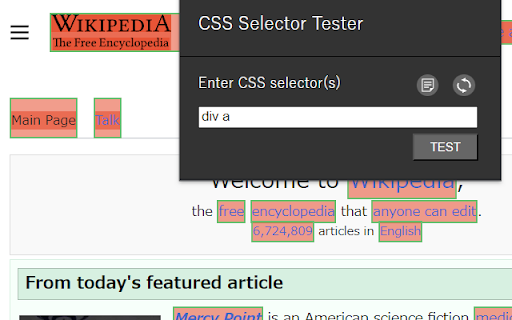


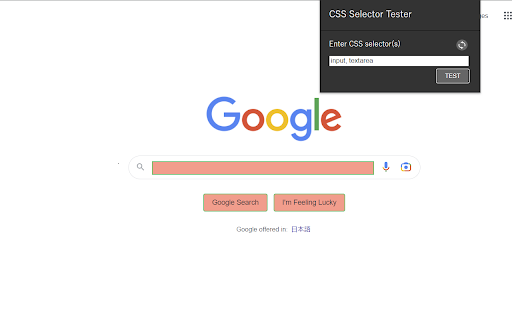

Highlight the elements matching a given CSS selector. This extension highlights elements specified by CSS selectors. For web design or web scraping, you will be able to identify elements specified by CSS selectors more easily than with the Chrome Developer Tools. It's easy to use. 1. Click on the extension's icon. 2. Type in the CSS selectors. 3. Press Enter or click the TEST button. === Release notes === Version 1.1 2023-10-06 [new feature] "History" The input history of the selector can now be displayed.

CSS Selector
A chrome extension to help you find the css selector of an element. This extension makes it easy to find the css selector of an element. It is useful when you want to find the css selector of an element in a page, but you don't want to use the developer tools. 1. Open the extension by clicking on the icon 2. Move your mouse over the element you want to inspect 3. When the element is highlighted, click to select it and the selector will be copied to your clipboard

CSS Selector for Google Chrome
Inspect elements, copy CSS selector or XPath, and record repro steps for QA, debugging, and CRO. Need to inspect element and copy CSS selector fast? CSS Selector for Chrome lets you inspect any element, copy CSS selector, XPath, or JS path, see selector stability, capture screenshots, and record bug replays for QA, debugging, and conversion rate optimization workflows without digging through DevTools. When issues happen, skip the long write-up. Inspect the exact element, copy the CSS selector with full context, record the repro steps, and share the same proof with QA, engineering, product, and CRO teams working on landing pages, funnels, forms, and experiments. What You Get - Inspect element and copy CSS selector on any page - Copy CSS selector, XPath, and JS path with precise DOM context - See selector stability before you save - Record bug replays and generate repro steps - Attach an element screenshot or full-page screenshot - Save locally or sync to share with your team - Export replay-based repro to Jira or Linear - Support CRO audits, experiment QA, landing page reviews, and conversion debugging How It Works 1. Inspect an element on the page 2. Copy CSS selector or save the element with full context 3. Record the steps that reproduce the issue 4. Sync and share with QA, engineering, product, or CRO No long write-ups. No back-and-forth. Built for QA, Engineering, Product, and CRO Built for developers, QA engineers, testers, product teams, and conversion rate optimization teams who need to: - Inspect elements accurately - Copy CSS selector, XPath, or JS path with confidence - Capture repro steps without long explanations - Share the same proof across the team - Review experiments, CTAs, forms, and landing pages with exact element-level context Instead of "I think it's this," you get: "This is the exact element. Here are the steps." Install and Move Faster Inspect elements. Copy CSS selector. Record repro steps. Ship with clarity.

SelectorsHub
Locators Plugin to Auto Generate and Verify Playwright Locators, XPath & CSS Selectors. SelectorsHub - Auto-generate Playwright Locators, XPath & CSS Selectors SelectorsHub is a powerful developer tool that automatically generates and verifies Playwright locators, XPath, and CSS selectors for web automation testing. Key Features: 1. Auto-generation: Instantly generates multiple selector types including native Playwright locators, XPath, CSS selectors, IDs, names, and more. 2. Advanced element support: Works seamlessly with iframes, Shadow DOM, SVG elements, dynamic elements, dropdowns, and complex UI components. 3. Smart suggestions: Auto-suggests attributes, text values, and occurrences to help you build selectors faster—no more copying and pasting from the DOM. 4. Error detection: Provides clear error messages indicating what's wrong with your XPath or CSS selectors. 5. Element highlighting: Automatically highlights matching elements and scrolls them into view for easy verification. 6. XPath Healing: Verify all the xpath in one shot. 7. Locators Page: Generate Locator Page in one go. How to Use: 1. Open Chrome DevTools (F12 or right-click > Inspect) 2. Navigate to the SelectorsHub tab in the DevTools sidebar, or click the SelectorsHub icon in your browser toolbar 3. Inspect any element to automatically generate all selector types 4. For Playwright locators, click the "Playwright Selectors" button, then inspect the element 5. Type or edit selectors in the input box—smart suggestions will help you complete them quickly 6. Press Enter to verify and highlight all matching elements on the page Perfect for: a) QA Engineers and Test Automation professionals, b) Web developers working with Playwright, Selenium, Cypress, or other testing frameworks c) Anyone who needs reliable, maintainable element selectors

CSS Selector Tester
Validate your CSS selector visually with ease. Easily validate your CSS selector. CSS Selector Tester makes it easy to identify your elements matching a given CSS selector. Clean, simple and intuitive to use. ✓ Highlights elements on the fly while typing ✓ Total matches based on the selector ✓ Pause or resume the highlighting of elements Useful plugin for web design or web scraping. Currently does not support the \"HTML\" Element or \"*\" selector. This extension is based on the work of Patrick Simpson.
