
gkaaffkabfmjaekemimgnajfboopmpom


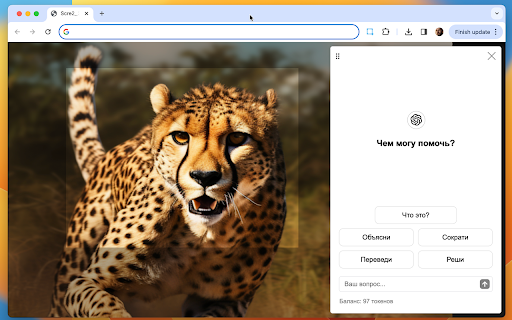
НОВИНКА: 'Спросить AI' на базе ChatGPT! Выдели область и попроси решить задачу, объяснить, перевести и т.д. Хочешь сделать скриншот области или даже всей страницы целиком? Нужно быстро записать видео экрана? Просто выдели область и мгновенно делись ссылкой на скрин или видео. --- БДЫЩЬ! НОВАЯ КИЛЛЕРФИЧА! --- Функция "Спросить AI" на базе ChatGPT 4.0! Выдели область и спроси всё, что хочешь. Например, можно решить задачку, распознать изображение, перевести текст или что-либо объяснить. AI справится без труда с любым запросом за несколько секунд! 49 токенов в подарок! 1 токен = 1 запрос. ------ Есть вопросы? Пишите нам на hello@skrinshoter.ru.

MetaPrompt - AI Prompt Engineer & Optimizer for ChatGPT & Claude
Transform unclear questions into expert prompts. Get better AI responses from ChatGPT and Claude with one click. Metaprompt: Your AI Whisperer Transform how you interact with AI MetaPrompt transforms your ChatGPT and Claude experience by intelligently enhancing your prompts. Powered by advanced GPT 4.1 models, our Chrome extension analyzes your questions and refines them to generate clearer, more precise AI responses - saving you time and frustration. Simple, Powerful Workflow 1. Type your question as you normally would 2. Click the MetaPrompt button to apply expert prompt engineering 3. Watch as your request transform into an optimized prompt that gets real results What Sets MetaPrompt Apart - Instant Optimization: Turn unclear questions into structured prompts that deliver exactly what you need - Seamless Integration: Works naturally within ChatGPT's and Claude's interface with zero learning curve - Universal Compatibility: Use our popup anywhere you interact with AI tools Choose Your Perfect Plan MetaPrompt Pro ($5.99/month) - 5000 monthly prompt enhancements - Access to larger, more powerful models for even better results Who Needs MetaPrompt? - Students seeking deeper explanations and research assistance - Professionals requiring accurate information for critical tasks - Writers looking for better creative input - Developers needing precise code solutions - Researchers formulating complex queries - Anyone tired of wasting time on unhelpful AI responses Stop struggling with AI miscommunications. Download MetaPrompt today and start getting the quality responses you deserve.

AI Chat Navigator: Navigation Sidebar, Mindmap & Export for ChatGPT & More
AI Chat Navigator is the original extension that adds a powerful, draggable navigation panel to your favorite AI chat websites — turning long threads into structured, searchable, and reusable knowledge. It works seamlessly with popular platforms such as ChatGPT and Gemini, along with five other leading AI chat platforms. It runs locally in your browser and collects no data. 2. Navigation - Conversation Navigation: Click a prompt in the main navigation panel to jump directly to that prompt-response pair in the conversation. - Response Navigation: Click a section in the response navigation panel to jump directly to that section in the response. - Real-Time Update: New prompt and response sections are captured and added automatically. - Current-Position Highlight: The navigation panel highlights the prompt currently visible in the chat and keeps it in view as you scroll, so you never lose your place in long conversations. 3. Search - Prompt & response section search: Search the current conversation by keyword to instantly locate matching prompts and response sections, with matches highlighted directly in the navigation panel. 4. Copy & Download (Per-Item + Batch) - Copy Options: - Copy in Markdown or plain text - Copy a single QA pair or the entire thread - Download Options: - Download in Markdown, TXT, or PDF - Download per QA pair or batch download all QAs - Export the mindmap as SVG or PNG (full-map export) 5. User-Friendly UI - Draggable & Resizable Panel: Position and resize the navigation panel freely to match your workflow. - Adaptive Panel Height: Panel height adjusts automatically based on the number of questions/prompts. - Adaptive Panel Positioning: Panel position auto-adjusts to stay close to the chat area and input box without overlapping either. - Clean, On-Demand Controls: Action buttons and menus stay hidden until needed (revealed on hover). 6. Multi-Platform Support AI Chat Navigator works across major AI chat platforms such as ChatGPT, Claude, Gemini, DeepSeek, and Grok. It's also compatible with Perplexity and Qwen and more platforms are planned for future releases. Across supported platforms, core workflows are available in one consistent UI. 🎯🎯🎯 Why AI Chat Navigator? Whether you are researching, coding, studying, or brainstorming, AI Chat Navigator gives you a simple workflow: find what matters, understand it quickly, and reuse it anywhere. - Find: Scan or search the thread in the navigation panel and jump directly to the exact prompt, answer, or section you need. - Understand: Open a response outline or mindmap to break long answers into a clear structure that is easier to follow. - Reuse: Copy or export one QA pair or the full conversation in Markdown, TXT, or PDF for notes, docs, and future reference. The result is less scrolling, faster comprehension, and a more consistent workflow across major AI chat platforms in a clean, draggable, theme-aware interface. Stop losing track of your best ideas in endless scrolling and start gaining instant clarity with structured navigation.

AIChatOne : AI ChatGPT Copilot (ChatHub tools)
Your AI Copilot powered by ChatGPT. Answers complex questions. Writes emails, reads articles, searches smartly. Usable everywhere. Your AI Copilot powered by GPT-5 offering you use all popular Chat LLMs with enhanced features like fast response, Integrated with Google web search, Chat search, AI characters, Prompt library, etc. You can chat with Multiple LLMs at the same time to get the best answer, and you can ask AI anything in the sidebar, Supports webapp, OpenRouter, Azure and API 🔥 AIChatOne is your all-in-one GPT-5 AI assistant. Hit Cmd/Ctrl+B to open sidebar or Cmd/Ctrl+M to open full chat page, and you're in with AIChatOne. AIChatOne offers assistance in various tasks including searching, reading, writing, translating, and more. 💪 The Key Features: 👉 Chat with AI ✔️ Multi chatbots support: chat with the different LLM models such as GPT-4, Gemini, Claude3, Perplexity etc all in one place and compare their results side by side. ✔️ Custom AI Characters: Built-in AI characters and Create your own custom AI Characters that perform a specific task ✔️ Prompt Library: a prompt base that offers a large number of prompts; just hit '/' to quickly access your saved prompts. ✔️ Real-Time Web Access: AIChatOne can answer with the latest internet info. ✔️ Voice Input and Output Support: using microphone button to communicate with the AI in multiple languages. ✔️ Chat Folders: Stay organized by creating your own Chat folders 👉 Chat and Summary ✔️ Chat with doc: Instantly feed the AI important context by uploading a doc file right into the chat and quickly grasp the core highlight. ✔️ Chat with Image: take a screenshot or upload an image and ask questions based on the content of the image, powered by GPT-4V. ✔️ Webpage Summary: get accurate summaries without having to read entire webpage articles or information. ✔️ YouTube Summary: generate a concise and accurate summary for your convenience in seconds. 📝 Writing Assistant: ✔️ Social writer: for Twitter、Reddit. Your best assistant, using AI when editing posts or replying ✔️ Write agent: just provide a topic, and AIChatOne can automatically draft outlines for you, expanding the content with references. Use it in any editbox on a webpage(Coming soon!) ✔️ Email reply: in Gmail、Outlook, AIChatOne analyzes emails content and suggests reply options, enabling you to send appropriate responses with just a click, no typing needed. (Coming soon!) 👉 Search ✔️ Powerful search and filter so you can find any of your previous chats instantly ✔️ Get AI search results in the sidebar when use google , bing , duckduckgo etc 👉 Powerful Sidebar ✔️ Ask AI anything in the sidebar 👉 Customizable ✔️ Dark Mode: Toggle between light and dark mode. ✔️ Adjusting response “temperature”. ✔️ Theme. 👉 Secure & Respect Your Privacy ✔️ Api keys encrypted and stored locally. No in-app analytics. No middle servers. Your prompts are sent directly to OpenAI 💻 How to use AIChatOne: 🔸 Click the ""Add to Chrome"" button in the upper right corner and pin it to the toolbar for easy access. 🔸 Simply hit Cmd/Ctrl+B to open sidebar or Cmd/Ctrl+M to open full chat page ,then start chatting with her. ❓ Frequently Asked Questions: 📌 What search engines are supported by AIChatOne? Currently, AIChatOne supports Google, Bing, DuckDuckGo and more search engines will be supported in the future. 📌 Do I need a ChatGPT/OpenAI account? Yes, we do not provide an OpenAI API key. 📌Is AIChatOne free to use? Yes, most features of AIChatOne is free to use, and we also have premium plans. 📪 Contact us: Any questions or suggestions? Please contact us at 💌 product@aichatone.com. Try AIChatOne now and experience the powerful features of ChatGPT-driven AI assistants! 🚀 The Ultimate All-in-One Extension for Unprecedented Productivity: AIChatOne AI Assistant Embark on a quantum leap in productivity with AIChatOne AI Assistant, a revolutionary tool that amalgamates an extensive suite of features comparable to some of the most prominent AI platforms and tools available today. This powerhouse integrates cutting-edge technology and up-to-date data, harnessing the capabilities of renowned models such as OpenAI, and Gemini AI. Picture the synergy of Bing Chat, the all-encompassing functions of Merlin and Monica, the chat with all LLMs power of ChatHub, the AI capabilities akin to Jasper.ai, and the versatility of Sider's toolkit—all seamlessly rolled into one.

ChatGPT Automation - Auto ChatGPT on chatgpt.com
Auto ChatGPT for your prompts at scale. Batch generate and auto-download responses and images on ChatGPT.com. ChatGPT Automation is an Auto ChatGPT tool built to fully automate your workflow on OpenAI's chatgpt.com. No more manually typing prompts one by one — let ChatGPT run automatically. This extension turns ChatGPT into a batch-processing engine, allowing you to auto-submit prompts, auto-generate content, and auto-download results at scale. 🔥 What ChatGPT Automation does Auto ChatGPT prompts continuously without manual interaction Batch generate AI text, images, and visual content Automatically download results with smart file naming Handle long prompt queues safely with smart random delays 🤖 Auto ChatGPT Batch Processing Queue dozens or hundreds of prompts and let ChatGPT Automation automatically: - Submit prompts to ChatGPT - Wait for generation to complete - Move to the next prompt No clicks. No babysitting. 🎨 Image to Image Transformation Batch transform and enhance images using AI with text prompts Chain mode: automatically use the previous generated image as input for the next prompt 🧩 Ingredients to Text Mode Upload reference images and batch-process them with prompts Auto-add character images based on filename matching ⚙️ Professional Automation Controls - Smart Random Delay System to avoid rate limits - Configurable min/max delay between prompts - Auto Download once generation completes with custom folder organization - Auto-rename files based on prompt content - Max Retries on failure — automatically retry failed prompts - Multiple outputs per prompt (1–4) 📊 Real-time Queue Monitoring - Live prompt queue with per-prompt status (Queued → Running → Completed) - Visual progress tracking inside the Side Panel - Retry counter per prompt ✅ Perfect for - Content creators and copywriters - AI image and visual producers - Automation & productivity users - Anyone who wants to Auto ChatGPT at scale
