
gjpdgbkjopobieebkmihgdoinbkicjck

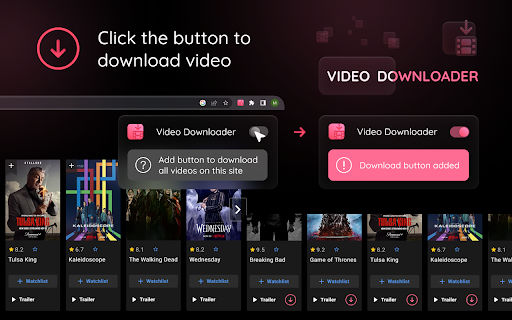
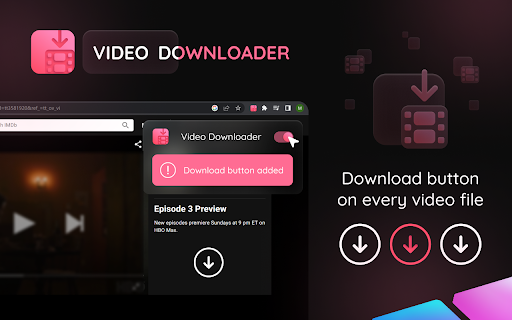
Add download button to the video files on popular websites. Click the button to save the video Provides all video files with a small button that downloads files to the devise by clicking on it. Open media websites are supported by Video Downloader Button and help to save online video to review it later. In the settings menu there is an opportunity to disable the button for more convenience usage of websites. Simply enable it again and download button will appear on the video shortly.

Video DownloadHelper
Download Videos from the Web. Download videos from the web. Easy, smart, no tracking. Best video downloader for 10+ years! Video DownloadHelper supports 1000+ websites (Dash, HLS, MPD, …), live streaming, high-definition and conversion to your preferred formats (MP4, MKV, WebM, …). Video DownloadHelper also support audio download (extract audio from videos into MP3s). Please note that this extension doesn't support YouTube.

Video Downloader for Facebook
Download Videos from Facebook Reels and Posts in a single click 💡 Features ✓ Download videos from Facebook Reels, Posts, and Watch pages ✓ One-click download — button appears directly on each video ✓ Automatically selects the highest available video quality ✓ Merges audio and video tracks for complete, sound-on playback ✓ Real-time download progress indicator on the button ⚙️ Get Started 1. Install the extension from the Chrome Web Store 2. Open any Facebook page with a video 🎬 3. Hover over the video — a download button will appear 4. Click it and the video saves to your device automatically 🎉 🔒 Data Privacy Your data privacy is our top priority. All processing happens locally in your browser — videos are downloaded directly from Facebook to your device. We never collect, transmit, or store your videos or personal data on our servers. 🛡️ ⚠️ Disclaimer FACEBOOK is a trademark of Meta Platforms, Inc. Video Downloader for FB is not affiliated with, endorsed, sponsored, or otherwise related to Meta Platforms, Inc., Facebook, or any of their affiliates or subsidiaries.

facebook video downloader - download video from facebook
Download videos and reels from Facebook easily. fast and lightweight Facebook video downloader tool for online video downloads. Facebook Video Downloader - Easily Download Facebook Videos and Reels Facebook Video Downloader is a convenient and lightweight Chrome extension that helps you save Facebook videos and Reels to your device with just one click. It’s designed to be simple, fast, and efficient, making offline viewing effortless. Hover over any Facebook video and a download button will appear automatically. Click once to start saving the video instantly. Choose from different available resolutions such as HD or SD, depending on your preference and storage needs. ⚡ Optimized for Facebook Reels Quickly download Facebook Reels with optimized detection and smooth performance. Track the download status with a clear progress indicator, so you always know what’s happening. Built to use minimal system resources, ensuring smooth browsing and stable performance without slowing down your browser. Install the extension from the Chrome Web Store. Open Facebook and navigate to any video or Reel. Hover your mouse over the video player. Click the download button that appears. Select your preferred video quality (if available). The video will be saved automatically to your default download folder. Videos in the Facebook news feed Videos on user profiles and pages Live stream recordings (after the live ends) All video processing is done locally on your device Your privacy is fully respected. Save your favorite Facebook videos, Reels, and memorable moments easily for offline viewing — anytime, anywhere.

Twitter Downloader - Twitter Video Downloader
Download Twitter videos effortlessly with Twitter Downloader. Save your favorite clips, moments, and content in just a few clicks. Twitter Downloader - Twitter Video Download: Easily Save Your Memorable Moments This powerful tool allows you to easily download any video from Twitter, whether it's a funny clip, a memorable moment, or educational material, all with one click and save it locally for viewing anytime, anywhere. Through our plugin, you can freely save various content for personal or academic use. We recommend that users do not download copyrighted content without permission. ☑️ One-Click Download, Convenient and Fast: No complicated operations, just click the "Download" icon in the bottom right corner of the video to quickly save the video. ☑️ Support for Multiple Formats:Supports downloading videos in various formats such as MP4, WebM, etc., to meet your different needs. ☑️ High-Definition Quality, Original Taste: The downloaded videos retain the original quality, allowing you to enjoy the best viewing experience. ☑️ Safe and Reliable, Privacy Guaranteed: We are committed to protecting your privacy, all download operations are completed locally, and your personal information will not be leaked. ☑️ No Password or API Required: Simplifies the user experience, no additional information needs to be entered to start downloading. ☑️ 24/7 Support: Provides technical support 24/7 to solve your usage issues. 1. Open the Twitter website or app, find the video you want to download. 2. Click the "Download" icon in the bottom right corner of the video. 3. Select the save location, and the download will start. 📝Disclaimer: This plugin is independently developed and is not associated with the official Twitter app or website. Please ensure compliance with relevant laws and regulations before use.
