
gjoijpfmdhbjkkgnmahganhoinjjpohk
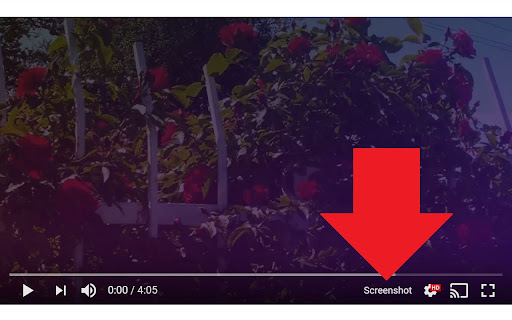
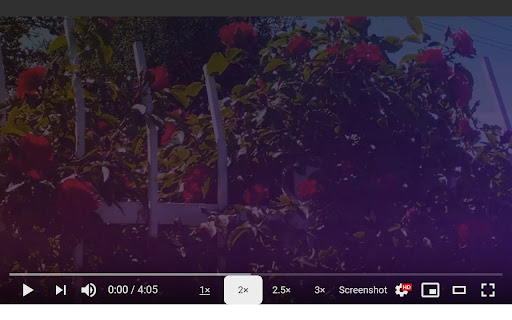
Take a screenshot of any YouTube video with one click. Adds a “Screenshot” button to the YouTube video player which saves a screenshot of the currently playing video as a file, or copies it to the clipboard, or both. Optionally with keyboard shortcuts, and buttons for changing the playback rate. New in version 3.0.0: moved to the newly required manifest v3, and removed the history permission, which should also make the screenshot button more reliable. This extension does not contain any malicious or tracking code. No viruses. No ads. Only good software. Thanks to Ari Velazquez, and Zertsu for their contributions.

Download Youtube Subtitles
Download subtitles and captions from YouTube with a single click. All subtitle languages are supported. Download subtitles from YouTube with this extension very easily. This extension places a small button below YouTube videos. This button takes you to the list of subtitles of the corresponding video when clicked! You can get .srt .vtt and .txt versions of the transcriptions. The button is placed right below the video player. Check the screenshots to see how it looks. With this Youtube subtitle downloader extension, you will be able to transcribe both native spoken captions and auto-translated subtitles of the video. Top Features: ✔️ It's totally free. ✔️ Unlimited subtitle downloads. ✔️ Most popular subtitle formats (srt vtt and txt) ✔️ All subtitle languages are supported. ✔️ Fast and secure downloads.

YouTube Screenshot
you can get youtube screenshot! YouTube Screenshot is a handy Chrome extension that allows you to easily capture high-quality screenshots from YouTube videos. With a single click, you can get the original width and height of the video capture, copy it to the clipboard, or save it as a PNG file. Whether you need a screenshot for reference or sharing, YouTube Screenshot makes the process quick and hassle-free. Install the extension and start capturing YouTube screenshots today!

YouTube Watch Thumbnails
Display a thumbnail of the video next to the channel icon on the YouTube video playback page. Click once on the extension icon and the thumbnail image hops up. Clicking on an image opens the largest thumbnail image in a new tab.

DetailedTime
YouTube動画の公開時刻を表示するやつ ◆どんな機能? YouTube動画の公開時刻を表示します。 ◆使い方 動画タイトルの横に「詳細」の文字が出るのでそれをクリックしてください。 ◆注意事項 ※ライブ配信の場合は配信開始時刻になります。 ※完璧な動作保証はできません。ご利用は自己責任で。 ※ブラウザの横幅が狭い場合・動画タイトルが長すぎる場合には「詳細」の文字が出ないことがあります。 ◆他の機能 YouTube用の自作拡張まとめ https://null.style/app ◆不具合を見つけたら 作者Twitter(@nulltypo)までご連絡お願いします。レビューには回答できません。 ◆免責事項 このChrome拡張によりいかなる損失や損害などが発生しても責任を負いかねます。ご了承ください。
