
gjjkbcjmehijifhmdpcmihcjfehpaejc
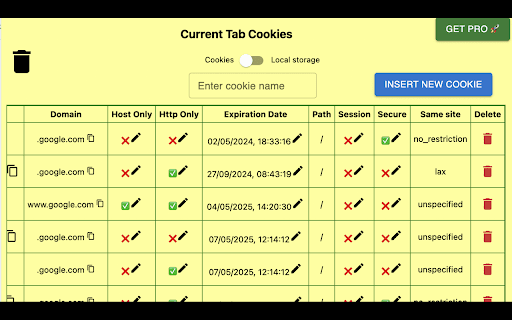

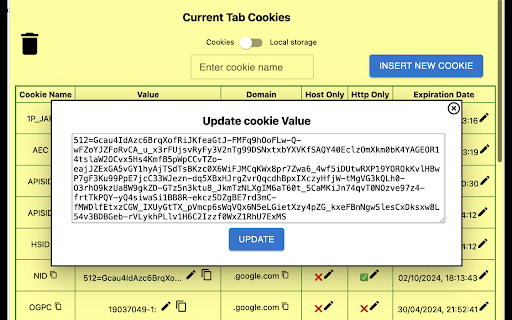
View, Edit and delete your current tab cookie and storage(Formerly Cookie viewer) Cookie Editor and Storage Manager (Formerly Cookie Viewer) is a powerful cookie editor extension designed for efficient management of cookies and storage (session and local) data in the Chrome browser. With this cookie editor Chrome extension, users can easily view, edit, and delete cookies and storage entries on their current tab. It ensures privacy and efficient management of website data with its intuitive interface and robust features. "Note: Free users will see banner ads on the homepage. If you make a purchase through any affiliate link, I may earn a commission—at no extra cost to you." Quickly view all cookies stored by a website with this quick cookies manager. Search for specific cookies or filter by name. Edit, delete cookies as needed. Live updates for cookies when they change. ⭐ Storage Management: View and manage storage (local and session) data for websites. Edit or delete storage entries. Copy local storage. Search for specific storage or filter by name. Real-time updates for storage (both local and session) when changes occur. ⭐ Privacy Controls: Intuitive and user-friendly for seamless navigation. ⭐ Performance: Lightweight, fast, and compatible with the latest Chrome versions. Regular updates to maintain optimal functionality. 👉 USE CASES ⭐ Privacy-Conscious Users: Maintain privacy by efficiently managing and deleting cookies and storage data using this cookie manager Chrome extension. ⭐ Web Developers: Streamline testing and debugging with easy cookie and storage management. ⭐ Businesses: Ensure compliance with privacy regulations by securely managing cookies and storage data. The Cookie and Storage Manager Chrome Extension is a must-have tool for anyone needing a cookie editor download option for privacy-conscious users, web developers, and businesses alike. With its robust features, user-friendly interface, and emphasis on privacy and security, this cookie editor extension is essential for managing cookies and local storage data in Chrome. 👉 What's in FREE? ✔️ View both cookie and storage values. ✔️ Edit cookie attributes like value, domain, HTTP, host-only, path, expiration date, session, and secure values. ✔️ Export cookies and storage as CSV/JSON. ✔️ Insert new cookies/storage. ✔️ Search by cookie/storage name. ✔️ Delete all cookies/storage in a single click. ✔️ Delete/Copy cookie 👉 What's in PRO? ✔️ All FREE features ✔️ No banner ads ✔️ Email support ✔️ Access to upcoming all new features and enhancement. Log 15-Dec-2025- Enhancement 10-Apr-2025 - Bug fix 7-Feb-2025 - Bug fix 5-Jan-2025: Added support for session storage. 1-Jan-2025: Minor bug fixes. 31-Dec-2024: Enhanced FREE version with more features. 29-Dec-2024: Added export cookies/storage as CSV/JSON feature. 26-Nov-2024: Bug fixes and performance improvements. 29-May-2024: V4.6 Pro version update. 11-May-2024: Cookie toggle options for pro/beginner. 28-Apr-2024: Free trial modifications. 20-Apr-2024: Minor bug fixes (V4.4). 5-Apr-2024: Minor UI enhancements. 5-Apr-2024: Introduced free trials for PRO features. 4-Apr-2024: Added the ability to edit paths and SameSite attributes. 2-Apr-2024: UI update

Local Storage
A browser extension for managing local storage. Local Storage is a handy Chrome extension that offers a user-friendly interface to view, manage, and manipulate the items in your browser's local storage. Forget about delving into the Console tab every time you need to check on your local storage. This extension provides all the tools you need at your fingertips.

Storage Editor
Editor for Local Storage and Session Storage. You can use it to edit your website local storage and session storage. ✨ Feature 1. 🙈 Preview Local Storage and Session Storage Data as a tree. 2. ✏️ Edit, Add, Remove or Clear Storage Data. 3. 🔌 Add a New Node or Data to Object or Array. 4. 🔍 Search Value or Key in Storage Data Tree.

Cookie Viewer
Lists Cookies in the given web page. The developers can use this info for debugging their web application. The users can view what… Lists Cookies in the given web page. The developers can use this info for debugging their web application. The users can view what are the cookies the given website using when are they are viewing that website.

Awesome Cookie Manager
Displays a list of all Google Chrome cookies. Allows searching, viewing, editing, saving, restoring, and deleting cookies. The Awesome Cookie Manager lets the user manage cookies in Google Chrome. (1) Search for cookies. (3) Edit cookie properties (value and expiration date). Thanks to Procyon-b for the following fixes: * incognito mode cookies * cookie with no name now editable * support for range selection * domain name max-length css only * cookie name max-length css only * save/restore list sorting fixed * filters input fields: only letters are taken into account * background page settings were not updated (restart was needed) * hide error message when a specific cookie restore is refused ("non-secure" cookie * * restored over a "secure" cookie)
