
dedhcncdjkmjpebfohadfeeaopiponca
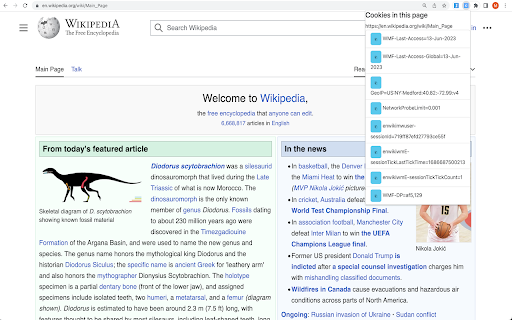
Lists Cookies in the given web page. The developers can use this info for debugging their web application. The users can view what… Lists Cookies in the given web page. The developers can use this info for debugging their web application. The users can view what are the cookies the given website using when are they are viewing that website.

Global Cookie Manager
Cookie Manager with advanced global search, editing and import/export functionality that acts on all browser cookies. Global Cookie Manager is a cookie manager extension for Google Chrome with advanced global search, editing and import/export features that act on all browser cookies. Feature list: ★ Advanced list of cookies of the Current URL, Domain or Global (browser-wide). ★ Cross-search by Name, Domain and Value. ★ Remember your last search feature. ★ Full detail view. ★ Create, modify and delete cookies. ★ JSON or CSV import and export of a single cookie or the entire list. ★ Custom settings. ★ ...and other features in development. Designed by developers for developers: ★ Focused on productivity and speed of use. ★ Facilitates website development and testing. ★ Allows to quickly check the privacy and cookie consent settings of websites. ★ Offers support to the SEO experts work. ★ It can also be used just to manually manage cookies.

Copy Cookies
Copy all cookies used in the current tab to the clipboard. This extension can be called by the shortcut key "Ctrl+Shift+K". It works as like as the export feature of the EditThisCookie (http://editthiscookie.com/). The copied cookie objects can be used by puppeteer (https://github.com/puppeteer/puppeteer).

Cookie Viewer – Inspect and Copy Website Cookies
View and copy cookies from any website with a single click. Coded by Khalil Shreateh Cookie Viewer allows you to inspect and copy cookies for any website you visit. Features: - Fetch cookies for the current site automatically. - Display each cookie's name, value, domain, path, secure, and HttpOnly status. - Copy all cookies or individual cookie values with one click.

Cookies Getter
View cookies with full details for the current tab and copy them to the clipboard. Description for Chrome Web Store: Cookies Getter is a powerful yet simple Chrome extension that allows you to view and manage cookies for the current tab with ease. Whether you're a developer, security researcher, or just someone curious about the cookies being stored on a website, Cookies Getter makes it effortless to inspect cookie details. Key Features: * View all cookies: Instantly fetch and display detailed information about all cookies on the current website, including names, values, expiration dates, domain, and more. * Cookie details at a glance: Each cookie’s full set of attributes, including httpOnly, secure, sameSite, and size, displayed in an easy-to-read format. * Copy to clipboard: Effortlessly copy the cookie details to your clipboard with a simple click, making it easy to share or save cookie information. * Simple & intuitive: The extension features a clean, user-friendly interface that makes viewing cookies quick and easy without unnecessary complexity. Why install Cookies Getter? Developers: Quickly debug or check cookies while developing websites or web applications. Security Researchers: Examine cookie properties to test for vulnerabilities, such as insecure cookies or missing attributes. Privacy Enthusiasts: Get insights into how websites store your data, helping you maintain better privacy control. Anyone Curious: If you’re curious about how cookies are being used on the websites you visit, Cookies Getter provides an easy way to view them. Get started with just a click! With just a click on the extension icon, you can access cookie details for the website you're on. It’s a must-have tool for anyone who wants to understand cookies better or manage them more effectively.
