
gingmakaicaahbfjipopapefpkehhelk
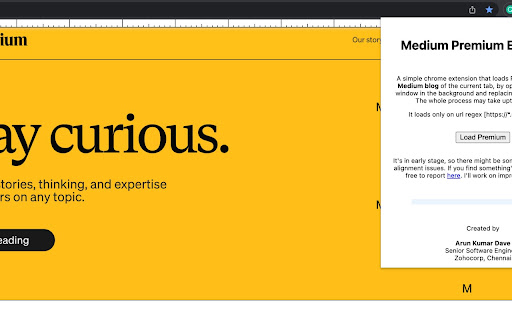
It loads Premium content of Medium blogs, by opening an incognito window in the background and replacing the content. A simple chrome extension that loads Premium content of Medium blog of the current tab

Medium Blog Summarizer - Summr.io
AI Summary for your Medium Blog Post Are you tired of spending hours reading through lengthy articles on medium.com, trying to get the main points? Do you want a quick and easy way to understand the content of a blog post without having to read through the entire thing? Look no further! Our Chrome Extension for summarizing medium articles - Summr.io - Medium Blog Summarizer is here to help. With this extension, you can get a summary of any medium blog post with just one click of a button. Simply click the "Summarize" button within the Chrome browser and a summary of the blog post will be displayed. This is an incredibly useful tool for busy individuals who want to get information from the blog posts but may not have the time to read through every article in full. Not only is this extension convenient and time-saving, but it's also easy to use. Simply install it on your Chrome browser and you'll be ready to quickly and easily understand the main points of any medium blog post. Don't waste any more time struggling to understand lengthy articles – try our Chrome Extension for summarizing medium blog posts today!

Freedium
Read Medium articles for free. Freedium: Free Medium and an Enhanced Reader 📱 Usage: 1. Navigate to any Medium article 2. Click the "Read for Free" button that appears 3. Enjoy your enhanced reading experience 4. Save interesting articles to read later Freedium transforms your Medium reading experience with powerful features designed for avid readers. Unlock the full potential of Medium with our smart, user-friendly extension. 🔑 Key Features: • Read member-only articles freely • Save articles to your reading list • Track your reading progress • View personal reading analytics 🔒 Privacy & Security: • No login required • Respects your privacy • No intrusive advertisements • Transparent data collection 💪 Perfect for: • Avid Medium readers • Students and researchers • Professional developers • Tech enthusiasts • Knowledge seekers ▎ v1.1 ▎ • Now works on Medium publication vanity domains (uxdesign.cc, towardsdatascience.com, etc.) via canonical-URL detection ▎ • Redirect target updated to freedium-mirror.cfd (the old mirror went offline) ▎ • New "Read this article for free" button in the popup — use it if the in-page banner didn't show ▎ • More reliable paywall detection with a retry ladder and fallback signals ▎ • Reading stats now count unique articles, and the "money saved" calculation is based on articles read ▎ • "Saved to Reading List" toast confirmation when using Read Later ▎ • Donations now accept USDT (BSC BEP20) ▎ • Cleaned up dead code and miscellaneous bug fixes 📚( Coming Soon... v2) Enhanced Reading Experience: • Dark Mode and Sepia Mode for comfortable reading • Customizable font size and line spacing • Article progress tracking • Estimated reading time • Quick navigation with table of contents • Back-to-top button 🎯 (Coming Soon ... v3) Smart Content Management: • Bookmark articles for later • Add personal notes and highlights • Filter content by keywords and authors • Track reading statistics • Offline reading support 💡 Coming Soon - Sky is the limit: • Cross-device sync • Advanced analytics dashboard • Personalized article recommendations • Achievement system • Text-to-speech support • Enhanced accessibility features

Free Medium Reader
Read members-only articles on Medium.com directly on the page. Free Medium Reader provides an enhanced, distraction-free reading experience for Medium articles directly within your current tab. Key Features: Integrated Reader Mode: View content in a clean, professional overlay without leaving the page. One-Click Activation: Instantly format articles for better readability with a single click. Seamless Interface: Includes a built-in top bar with easy exit options to return to the original view at any time. Smart Detection: Automatically identifies Medium articles and custom domains to provide utility where you need it. This utility tool is designed to help researchers and readers access information efficiently and manage their reading workflow better.

Medium Parser
Read medium based articles for free. Access Medium membership articles for free with the Medium Parser browser extension! It lets you read member-only articles on medium using Google Web Cache or Archive.is. Plus, it can even find articles from external publishers and provide links to read the full content through Google search. Enjoy your free reading! Source code: https://github.com/Xatta-Trone/medium-parser-extension Support/Donate: https://www.paypal.com/paypalme/imonzurul?country.x=US&locale.x=en_US
