
gigphmfpfhfjiaagigcpfpbdiipmibnf
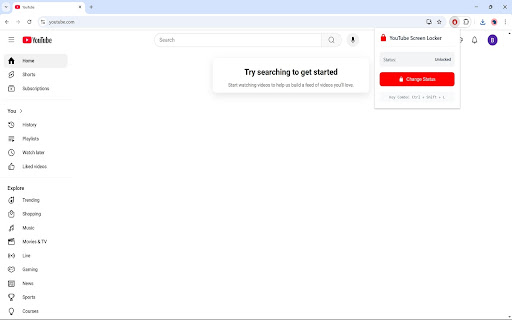


No more accidental clicks while you're watching videos. Introducing the YouTube Screen Locker Extension Problem: Are you tired of accidental clicks and taps ruining your video watching experience? Whether it's your pet, a curious child, or just an accidental nudge from you, these interruptions can be frustrating. Solution: Our YouTube Screen Locker is here to ensure your video sessions remain undisturbed! Features: - Simple Setup - Just install the plugin, and you're ready to go. No login needed. - Compatible with Mac, Windows, and Linux. - Activate or deactivate the lock with a simple keyboard shortcut or a click on our logo. - Works both in fullscreen and windowed mode. How to Use: To Lock the Screen (Two ways) - Keyboard Shortcut: Press "Ctrl + Shift + L" on Windows or "Cmd + Shift + L" on Mac while viewing a video. - Extension Icon: Alternatively, click on the extension's icon in your Chrome toolbar. Upon Locking - A temporary notification bar labeled "Screen Locked" will appear at the bottom right of your screen for 5 seconds. You can make this bar reappear by hovering your cursor over that area To Unlock the Screen (Two ways) - Keyboard Shortcut: Use the same keys, "Ctrl + Shift + L" on Windows or "Cmd + Shift + L" on Mac. - Extension Icon: Click the extension icon again to unlock the screen. ****************************************************************** Changelog: 1.1 (1/8/2025) - Fixed an issue where the status would not update when changed using the key combination for the first time.

Pro YouTube Ad Blocker
Block ads on YouTube for a seamless viewing experience. Tired of sitting through ads before every video? Pro YouTube Ad Blocker removes all types of ads from YouTube and skips ads on Hotstar, giving you a clean, distraction-free viewing experience. 🎥 Video Ads — Pre-roll, mid-roll, and post-roll ads are gone 🖼️ Overlay Ads — No more banners popping up over your video 🏠 Homepage Banners — Clean homepage without promoted content 📄 Feed Sponsored Cards — Removes sponsored videos from your feed 🔍 Search Ads — No promoted results when you search 📌 Sidebar Ads — Blocks display ads next to the video player ⚡ Shorts Ads — Ad-free Shorts browsing 🛒 Merch & Promos — Hides merch shelves and promotional overlays ⏩ Automatically skips ads on Hotstar so you get straight to your content 🔘 Master toggle to enable/disable everything in one click 🎛️ Individual toggles for each ad category — block only what you want 💾 Settings sync across your devices ⚡ Lightweight — minimal impact on browser performance 🔒 Privacy-first — no data collection, no tracking, no analytics 🧩 Simple & clean UI — set it and forget it 🆓 Completely free Download now and take back your viewing experience! 🎉

YouTube NonStop
Use Youtube nonstop extension: auto click "Continue Watching". Watch videos nonstop without pauses! It is youtube auto pause blocker ⏩ Our extension is the ultimate solution for uninterrupted video playback. Say goodbye to annoying interruptions forever with our instrument. 🚀 This powerful youtube nonstop extension automatically handles every pause prompt so you can enjoy endless watching. It works perfectly on desktop and keeps your videos flowing without any manual clicks. Nonstop youtube extension ensures seamless playback whether you are watching in: ✔ a tab, ✔ full screen, ✔ theater mode. 👩💻 Tired of constant breaks? Auto pause blocker eliminates all inactivity pauses instantly. With paused continue watching handled in the background, your experience stays completely smooth 🤝 ⚡ Bypass still watching popup without any hassle and keep the content playing nonstop. Keep playing nonstop is what millions of users love about this lightweight tool. 🔑 Key benefits include: 1. Full compatibility with YouTube 2. Also with YouTube Music 3. Instant auto resume 4. Zero manual intervention ⏸️ Youtube video paused continue watching extension removes every frustrating dialog box automatically. ☺️ Disable auto pause and enjoy long playlists or background music without breaks. 🙅 👆 Auto click youtube continue watching activates silently every single time the prompt appears. 👍 Perfect for: ➤ late-night binge sessions, ➤ long working hours, ➤ focus work with background videos. 🎵 Youtube music nonstop extension shines when you want hours of music without any pause prompts. Our product prevent stop is simple yet extremely effective for daily use. 🦸 YouTube auto pause blocker activates the moment YouTube tries to interrupt your session. 💥 Advantages: ♦️ Never see “still watching» popup again ♦️ Bypass paused popup is done automatically ♦️ Your video never stops unexpectedly. ♦️ Nonstop enjoyment on any device 🛠️ Auto continue video plays perfectly even when you step away for a moment. Youtube nonstop autoplay combined with smart detection creates the best viewing flow possible. ❎ Disable inactivity pause once and for all with this must-have browser add-on. 📈 This extension allows: ▸ prevents from freezing ▸ resume after inactivity ▸ auto click continue watching 🔄 Youtube nonstop extension still there ensures the video stays alive even during long inactivity periods. ▶️ Nonstop playback is smoother and more reliable than ever before. 🛋️ Remove paused dialog completely so nothing breaks your immersion. 💻 Autoplay without stop lets you queue long videos and playlists effortlessly. 🔅 Main features at a glance: 💠 Silent auto-click technology 💠 Works on regular videos and YouTube Music 💠 Lightweight with zero performance impact 💠 Supports full screen and miniplayer modes ✈️ Enjoy true freedom with youtube keep playing nonstop during work, study, or relaxation. ✏️ Additional advantages: • No need to keep the tab active all the time • Seamless background playback support • Regular updates for maximum compatibility 🎼 Youtube video paused continue watching extension is designed specifically to solve this common annoyance: ➡️ perfect for students, professionals, and casual viewers alike. ➡️ prevent stop inactivity while cooking, exercising, or multitasking around the house. ➡️ bypass «still watching» popup and stay fully immersed in your favorite content. 🍾 Youtube music nonstop extension is a game changer for long listening sessions. 📝 Also suitable for: - prevent pause activates, - get consistent performance, - never miss a second, - hands-free experience, - focus on what matters. 🤝 This keep playing extension is lightweight, fast, and extremely user-friendly. 🫴 Try youtube nonstop extension today and transform how you watch videos forever.✅ 💎 Whether for entertainment or productivity, nonstop playback youtube chrome sets the new standard. ✂️ Remove paused dialog and enjoy pure uninterrupted streaming pleasure. ❇️ Autoplay without stop works flawlessly for hours of continuous content. 🎯 Final list of supported use cases: 1️⃣ Long movie marathons 2️⃣ Background study music 3️⃣ Workout playlists 4️⃣ News and podcast videos 5️⃣ Relaxing ambient streams 💪 Youtube paused continue watching is now a thing of the past with this powerful tool. 💯 Get youtube nonstop extension and experience video the way it was meant to be enjoyed — without any pauses.

Screenshot YouTube
Take a screenshot of any YouTube video with one click. Adds a “Screenshot” button to the YouTube video player which saves a screenshot of the currently playing video as a file, or copies it to the clipboard, or both. Optionally with keyboard shortcuts, and buttons for changing the playback rate. New in version 3.0.0: moved to the newly required manifest v3, and removed the history permission, which should also make the screenshot button more reliable. This extension does not contain any malicious or tracking code. No viruses. No ads. Only good software. Thanks to Ari Velazquez, and Zertsu for their contributions.

YouTube Playlist Quick Delete
Adds a delete button directly on videos in your playlist. Saves you a few clicks since you won't have to use the action menu again! Feature requests are always welcome! If you need any help with this extension, feel free to contact me. You can buy me a beer, if you feel like it: https://www.buymeacoffee.com/ytken v0.2.6: Fix button color not adjusting based on the currently selected Youtube theme.
