
giaolcgipopikbjonacmaokkeiaolmfp

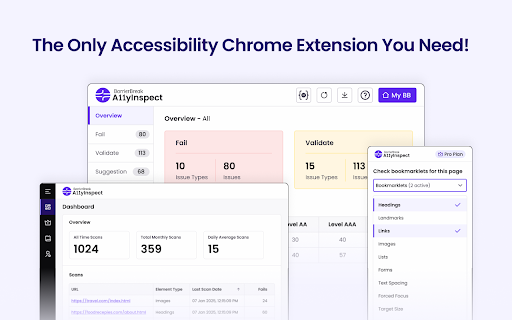


Your fastest path from accessibility issues to clean, shippable code. Test for WCAG, EN 301 549, and more. Save 40% of your time by using automated accessibility tests to detects issues faster, boosts accuracy and provides more coverage to meet accessibility standards. Why choose A11yInspect as your automated accessibility tool? - Exhaustive Rulesets - 600+ accessibility checks. A11yInspect has a less than 1% false positive rate and maximizes coverage across 30 Success Criteria in WCAG. - Global Accessibility Standards - Results grouped by Web Content Accessibility Guidelines (WCAG) Conformance Levels. Test for Section 508, EN 301 549, GIGW 3.0 and IS 17802. - Detailed Analysis - Test a web page or a specific element for accessibility. Issues categorised as Fails, Validates & Suggestions with Success Criteria and Severity mapping to prioritise accessibility fixes. - Design Tools - A11yInspect includes a accessibility color contrast checker as per WCAG, CSS overview, unit converter and color combination guide to help you build accessible designs. You don't even need to register to get access to A11yInspect Free and start testing your first page for Accessibility. A11yInspect Free gives you: - Highlight Code - One-click and A11yInspect highlights the accessibility issue along with the code. As simple as that! - Wide Range of Bookmarklets - Need help with your manual accessibility checks as per WCAG? We got you covered with a bookmarklet that allows you to test for Headings, Tab order, Grayscale, Target size, Text spacing, Forms and so much more.. - Key Code Attribute - Based on the issue, A11yInspect identifies the relevant part of the code to help you evaluate the accessibility of the element. If you want to save time in accessibility testing:, invest in A11yInspect Pro for: - Download Audit Reports - Share reports with your team of the accessibility audit to meet WCAG, Section 508, EN 301 549 & IS 17802. - Download Screenshots - Save time & effort with Download a screenshot that captures the accessibility issue. We don't only give you the screenshot, we highlight the accessibility issue too. - View Your Scan Log - Want to know which pages you conducted an accessibility test for, come check your scan logs. Free Plan Includes: - Test Unlimited Pages for Accessibility - Wide Range of Accessibility Bookmarklets - Key Code Attributes - Test for Global Accessibility Standards - WCAG, EN 301 549, IS 17802 - In-built Accessibility Color Contrast Checker for WCAG - Color Palette & Fonts Overview Upgrade to Pro for: - Dashboard to View your Accessibility Scan Logs - Download Screenshots - Pause Script Feature - Download an Accessibility Audit Report in Excel Improve Accessibility Coverage: Only approx. 40-45% accessibility issues can be identified with automated accessibility testing. Remember, to conduct manual accessibility testing and include people with disabilities using assistive technology like screen readers, screen magnifiers, speech recognition tools. If you want the power to create manual accessibility issues - Integrate A11yInspect with A11yNow (https://www.barrierbreak.com/a11ynow/). Log Manual accessibility Issues along with your automated test results. Support If you have any questions, check out the A11yInspect - Accessibility Testing tool knowledge base (https://a11yinspectdocs.barrierbreak.net/). By installing the A11yInspect - Accessibility Testing Tool extension, you agree to and acknowledge: https://www.barrierbreak.com/privacy-policy/ https://www.barrierbreak.com/terms-of-service/

DigitalA11Y Tublets
DigitalA11y Tublets aid developers, testers, and designers in viewing accessibility information on web pages. Introducing DigitalA11Y Tublets, your go-to companion for swiftly identifying accessibility flaws in code semantics. Whether you're a developer, accessibility expert, or any professional in the accessibility sphere, this extension is tailor-made for you! What sets DigitalA11Y Tublets apart? It empowers you to: 1.Illuminate semantic structures like tables, landmarks, headings, and lists. 2.Pinpoint form fields and relevant defects. 3.Highlight images with or without alt text, aiding in evaluating the meaningfulness of alt text values. 4.Spotlight CSS background images, enabling you to assess the necessity for text alternatives. 5.Assist in conducting keyboard testing with focus highlights. 6.Highlight anchor tags lacking href attributes. 7.Identify elements utilizing the tabindex attribute. 8.Recognize elements employing the HTML title attribute. 9.Facilitate testing for WCAG 2.1 SC 1.3.5 Autocomplete, ensuring proper autocomplete attributes in form fields. 10.Aid in testing WCAG 2.2 SC 2.5.8 Target Size (Minimum). 11.Support testing for WCAG 2.1 SC 1.4.12: Text Spacing. 12.Simplify evaluating the focus order of web pages with intuitive ease. 13.Identify the language of the page and its segments. What more does it offer? It's absolutely free! This tool is a time-saver during manual accessibility audits. For novices and non-screen reader a11y testers, it's the ideal starting point! Remember, DigitalA11Y Tublets is here to streamline your accessibility analysis process, making it efficient and accessible for all.

axe DevTools - Web Accessibility Testing
Accessibility Checker for Developers, Testers, and Designers in Chrome ★Digital accessibility testing right in your browser: The Axe DevTools Extension is an automated accessibility testing tool that helps you find and fix accessibility issues early in web development right in your Chrome browser. It helps ensure your team gets fast, accurate, actionable results so you can save time on costly reworks, and create digital experiences that are compliant and work for everyone. ★Leverage the global standard in automated web accessibility testing: The free version of the Axe DevTools Extension gives you the tools to conduct page-by-page, automated accessibility testing—all run on Axe-core, the global standard in automated web accessibility testing. With the free browser extension, teams get a useful introduction to accessibility and a quick, automated way to catch defects, all while benefiting from the same reliable and consistent results trusted by industry leaders around the world. ★Find and fix even more accessibility issues with AI and automated testing: Upgrade to the pro version of the Axe DevTools Extension to move faster, smarter, and further streamline workflows with AI-enhanced features, intelligent guided testing, component-level checks, the ability to test entire user flows, central administration, deduplicated results, Jira integration, and more. Dev teams can use this pro version of the browser extension to fix a majority of issues before production by combining traditional test automation with AI, reducing remediation costs and saving time. It’s great for teams who want to check specific pages, groups of pages, or workflows for accessibility issues. To learn more about the Axe DevTools Extension visit https://www.deque.com/axe/devtools/extension Use of this extension is governed by this license agreement https://www.deque.com/terms-of-use/axe-ext/ and the privacy policy linked under the developer information Data collection information can be found here: https://docs.deque.com/devtools-server/4.0.0/en/data-collection#axe-devtools-browser-extension-free Upgrading to the Axe DevTools Extension pro plan gives you more control over what data is collected.

BrowserStack Accessibility Toolkit
Automate accessibility compliance. Detect issues 8X faster with Spectra™ & AI. Test JAWS, NVDA, VoiceOver & TalkBack on real devices BrowserStack offers an all-in-one Accessibility Suite to help teams shift-left accessibility to easily comply with EAA, ADA & more. With one line of code, integrate WCAG checks into CI/CD. Use Spectra™ & AI agents to auto-detect 1.7X critical issues across 40+ WCAG criteria. Install now and unlock seamless Web Accessibility Testing for free! ➤ Why choose the BrowserStack Accessibility Suite? ✓ Seamless CI/CD Integration: Add accessibility checks to your existing test suite with a single line of code change—no complex setup or workflow disruption required. ✓ Uncover critical accessibility issues in user workflows that other tools often miss: The Spectra™ Rule Engine and AI agents can automatically detect 1.7× more WCAG issues than legacy tools, covering over 40 WCAG success criteria, including advanced checks such as Focus Visible and Reflow. ✓ Real-World Screen Reader Testing: Test with actual screen readers (JAWS, NVDA, TalkBack, VoiceOver) on real devices without the overhead of maintaining device labs or slow virtual machines. Use advanced features that help you automate screen reader testing alongside CI/CD. ✓ Shift Left for Faster Development: Integrate accessibility testing early in your design and development workflows, preventing 40% of issues before they reach production and avoiding costly late-stage fixes. 🔍 Workflow Analyzer: Identify and fix accessibility issues 8X faster. Scan user workflows across multiple web pages and states in one go. Get deduplicated issues grouped at the component level by severity and WCAG criteria. 🎯 Assisted Test: Detect complex accessibility issues with assisted tests on web pages or components by answering simple questions —no WCAG expertise required. 📱 Screen Reader Testing on Real Devices: Using a MacBook Pro but want to test website accessibility using NVDA or JAWs on Windows? BrowserStack can help you do that. Validate user experiences directly with real screen readers across Mac, Windows, Android, and iOS devices. Eliminate the need for expensive device procurement and maintenance while ensuring comprehensive accessibility coverage. ⚡ Intelligent Issue Management: Our suite automatically eliminates duplicate findings and organizes issues by severity and component, streamlining your debugging workflow and reducing cleanup time. View the issue summary, accessibility score, and WCAG, ADA, and EAA conformance summaries to drive compliance. 📊 Comprehensive Reporting: Generate detailed, auto-consolidated reports and dashboards that provide full context about accessibility issues across your entire application. Share insights as shareable public report links within your team or with stakeholders of your choice. 🔧 Component-Level Insights: Pinpoint the exact source of accessibility issues with detailed interaction logs and component mapping, enabling faster resolution and better prioritization of critical fixes. 🚀 Zero-Setup Integration: Start testing without complex configurations. Our browser extension integrates seamlessly within your existing workflows. Launch your target webpage in any browser, open DevTools (right-click and select "Inspect"), then navigate to the Accessibility Suite tab to begin comprehensive accessibility testing.

Accessibility Insights for Web
Accessibility Insights for Web helps developers quickly find and fix accessibility issues. The default keyboard shortcut to launch Accessibility Insights for Web is [Ctrl+Shift+K]. If that doesn't work, follow these instructions: 1. Select Shift+Alt+T to move focus to the Chrome address bar 2. Select the Left arrow key to move focus to the Accessibility Insights for Web extension. 3. Select the Space key to open the extension.
