
ghomhhneebnpahhjegclgogmbmhaddpi
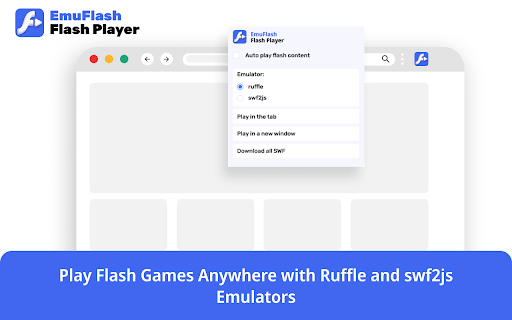
Play Flash Games Anywhere with Ruffle and swf2js Emulators in EmuFlash Flash Player 💡 Overview EmuFlash is a browser extension designed to bring back Flash content using advanced emulation technology. It integrates the Ruffle and swf2js emulators to provide seamless Flash content playback. ✨ Key Features - Emulate Flash content with Ruffle and swf2js emulators. - Run inline Flash content manually or let our extension handle it automatically. - Download all SWFs easily. 🔄 How to Use 1. Enable Flash Content: By default, inline Flash content is not automatically played. You must enable "Auto play Flash content" or manually activate playback via the extension popup. 2. Minimal Test of the Functionality: - Open https://webbrowsertools.com/test-flash-player/ - Open the extension's popup and select "Play in the tab" - The page should display Flash content with bees. 3. 🌟 Showcase of the Functionality: - Visit the Internet Archive at https://archive.org/details/armorgames - Browse and play thousands of classic Flash Player games (success rate may vary). 🎮 Use Cases - Play classic Flash games from archived websites. - Access legacy Flash-based educational resources. - View old animations and interactive media that require Flash Player. - Recover Flash-based tools that are no longer supported. 🧑💻 Who Benefits from EmuFlash? - 🎮 Gamers: Revive nostalgic Flash games. - 📚 Educators & Students: Access old educational Flash content. - 🏛️ Developers & Archivists: Restore and preserve Flash Player-based projects. - 🌍 General Users: View Flash animations that are no longer supported in modern browsers. ❓ Why Choose EmuFlash? - 🏆 User-Friendly: Simple setup with both manual and automatic playback options. - 🔄 Reliable Flash Player Emulation: Uses Ruffle and swf2js for high compatibility. - 🌐 Open Access to Flash Content: Browse and play Flash files easily. - 🔧 Actively Maintained: Regular updates for improved compatibility and performance. 🔒 Disclaimer EmuFlash is an independent browser extension and is not affiliated with Adobe Flash Player or any Adobe products.

Flash Player that Works!
Flash Player is an emulator that runs your favorite flashes using Ruffle emulation engine. All games, videos, and other files are converted into an alternative format in order to open them in a browser. An easy to use extension that allows users to run any games or other SWF files using a JS emulator and existing content will simply work, without additional settings or applications. If you are bored you should definitely add this app to your Chrome. Play the games such as classic games, retro games, latest games, pacman, sonic, street fighter and other amazing games. How the extension works: 1. Go to a site with flash games. 2. Enable the player itself in the pop-up extension window (red button "Enable Flash Player Emulator") 3. Important: Reload the site page. 4. Click on the Play button. 5. Start playing. Our app detects any flash-content on a web page (which is displayed in a pop-up window - green circle) and then replaces standard file playback errors "Plugin Adobe Flash Player is no longer supported" with the "Play" button, which you can click to open the game. We uses two open-source to JS libraries (Ruffle and SWF2JS) as its emulation engine. Warning This a helper tool for Google Chrome users. Extension is not officially affiliated with products Adobe Flash Player or any others Adobe products. Flash logo® are registered trademarks of Adobe Inc. Now you no longer need to download additional applications or utility, use old versions of extension.

Flashback Flash Player
Step into the Past: FlashBack Extension Revives Your Favorite Flash Content Introducing FlashBack: Unleash the Power of Flash Content Revival! - Emulate Flash content effortlessly using advanced Ruffle and swf2js emulators. - Take full control: Choose between manual playback for inline Flash content or let our extension handle it automatically. - Swift and simple downloads: Access and download all SWFs with ease. 1. If you find that things aren't working as expected, keep in mind that the extension doesn't emulate inline content by default. You have two options: either activate this feature through the "Auto play flash content" setting, or simply click a designated button on the webpage or within the popup to activate it. 2. Test on https://www.ultrasounds.com/ We want to clarify that FlashBack is designed to be a valuable browser extension and is not officially affiliated with Adobe Flash Player or any other Adobe products. Our aim is to enhance your browsing experience with effortless Flash content emulation.

Flash Player - Emulator for Flash Files
Flash Player runs flash files using Ruffle and swf2js emulators. Play your favorite flash games online! SWF emulator for free! Flash Player - Flash File Emulator is a tool that lets you run your favorite Flash content using Ruffle and swf2js. It converts Flash games, videos, and other files into a compatible format that can be opened in your browser. Our extension uses two open-source emulator engines: The extension always tries to open the emulation window the same size as the actual Flash object, however, you can resize the window to the proper size anytime. Flash Player is a free extension that supports all formats, including HD flash files. If you’ve found a game on your favorite website that won’t run due to the "Adobe Flash Player is no longer supported" error, this Chrome tool is exactly what you need. 1. Visit a site with flash games. 2. Click on the extension logo. 3. Choose your emulator: Ruffle or swf2js. 4. Click the Play button. 5. Enjoy your game! Note: Flash Player is a helpful tool for Google Chrome users. Please note that our extension is not officially affiliated with Adobe Flash Player or any other Adobe products.

Flash Player for the Web
Easily play flash content across the web! Flash Player for the Web is an extension that lets you play flash content across the web via a JavaScript flash emulator. Toolbar popup has an ON|OFF switch to enable or disable the addon. This extension uses the Ruffle emulator (https://github.com/ruffle-rs/ruffle) to compile and play flash. Toolbar popup has an ON|OFF switch to quickly enable or disable the addon. By default, the addon is disabled. Please navigate to a webpage with flash content, then, open the toolbar popup and press on the - ON - button (with red F symbol). All the flash content should start to play. Please note that there might be some bugs in playing flash as this addon is still a work in progress. To turn off the addon, please press the - OFF - button via the toolbar popup. To report bugs, please open the addon's homepage and fill out the bug report form: https://mybrowseraddon.com/flash-player-for-the-web.html
