
ghnomdcacenbmilgjigehppbamfndblo
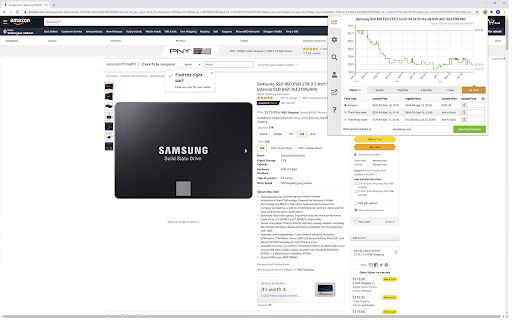

Get camelcamelcamel.com functionality in your web browser. Click on the Camel icon in your address bar to see historical pricing data or setup watches and get an email when the price drops. For support, email support@camelcamelcamel.com.

CardPointers X: Credit Card Rewards Made Easy
Maximize your Amex/Chase offers, cashback & all of your credit card rewards on every site. Love saving money? CardPointers helps you get the most out of your credit card offers and category bonuses, automatically. Auto-add every one of your Amex, Chase, BoA, Wells Fargo, US Bank, and Citi offers with CardPointers, and then the extension will help you use them, automatically. Everyone loves Amex and Chase Offers, but they're normally a pain to activate, one by one -- now you can automatically activate every offer as soon as you log in -- even the same offer across multiple eligible cards, all without having to ever share your bank logins. There's full support for American Express, Chase, Citi. Bank of America, US Bank, and Wells Fargo. CardPointers also gives you a new way to view all of the offers across all of your cards, sort and filter every one of them by value, minimum spend, category, and more, and activate just the ones you want with a single click -- you're always in control. Do you keep forgetting to use your offers or never remember which credit card to use to earn more points when you're shopping online? Now any time you're on a website where you have an activated offer or a category bonus on your card, you'll see all of the offer & card details floating on the bottom of the site in the Shopping Pointers bar so you'll know which card to use, automatically.

Behind The Overlay
One click to close any overlay on any website. Close any overlay on any website with a single click or keys. Use keyboard shortcut on Windows ctrl+shift+x or on MacOS cmd+shift+x (think about x as the close button you can use on any website). Once you get used to the keyboard shortcut, you'll be using it all the time and gonna love it ! ; ) Important features: * It works on any website. It doesn't rely on a static list of rules, as some other extensions. * It doesn't require any permissions. * No performance impact on your browsing. It will only activate when triggered. * (NEW) Also removes blurred backgrounds and unlocks the scroll bar. Important changes 0.2.2 - 05/01/2024 Update to make it work with the latest versions of Chrome that only supports manifest v3. 0.2.1 - 16/03/2022 Better handling for the scrollbar unblocker thanks to @ricobl on github (issue #23). 0.2.0 - 24/04/2021 Removes blurred backgrounds and improved scroll detection thanks to @sandsmark on github (issue #29). 0.1.3 - 18/06/2014: A keyboard shortcut is now available and activated by default: For windows, linux: CTRL+SHIFT+X For MacOS: CMD+SHIFT+X To remember X key, think of X as a close button. The scrolling enabler now got better, thanks to jordansexton on github. Improving the algorithm for finding overlays. --- Reach out on Github to make suggestions: https://github.com/NicolaeNMV/BehindTheOverlay Now an Firefox extension is also available ! I'm using this extension myself and happy to share it with everyone !

FBA calculator for Amazon Sellers : SellerApp
Is FBA the better choice for a product or FBM? Analyze profits with a single click . A trusted choice by 6-figure Amazon sellers. Researching and calculating the cost of goods sold, shipping fees, Amazon fees, and other expenses is crucial for your business. Understanding your true profit margins per unit ensures you make informed decisions, maximize profits, and scale your business successfully. A. Why use the SellerApp Amazon FBA Calculator? - The free Amazon FBA calculator provides multiple benefits for Amazon sellers, including: 1. Estimating all expenses upfront, including Amazon FBA fees, shipping charges, and seller fees. 2. Choosing products with lower fees to maximize profit margins. 3. Determining exactly how much you'll earn per sale, including total revenue and net profit. 4. Evaluating whether a product is worth selling by comparing expected revenue and costs. 5. Deciding between FBA and FBM based on estimated fees and profitability. Additionally, the FBA calculator extension gives you quick insights into: 1. Net profit 2. Net margin 3. Return on investment (ROI) B. How to use the SellerApp FBA Calculator? - If you're wondering how to use the FBA revenue calculator Amazon, follow these simple steps: 1. Install the SellerApp Amazon FBA Fee Calculator. 2. Visit Amazon.com and open the product listing you're interested in. 3. Launch the SellerApp FBA calculator for Amazon sellers. 4. Enter key cost factors, such as Cost of Goods Sold (COGS), shipping fees, fulfillment fees, and storage fees. The calculator will instantly generate your net profit, margin, and ROI, helping you make data-driven decisions. A. Is the FBA calculator free? - Yes! The SellerApp Amazon FBA calculator is 100% free to use. Just click the "Install" button to get started. B. Is the Amazon revenue calculator accurate? - The SellerApp FBA revenue calculator uses real-time data to provide highly accurate estimates. However, actual costs may vary due to Amazon’s dynamic pricing and fee structures. C. Is there any hidden cost for the Amazon seller fees calculator? - Absolutely not! The Amazon FBA fee calculator is completely free. D. How do I calculate the profit margin on Amazon FBA? - To calculate your profit margin, subtract all costs (COGS, fulfillment fees, and other expenses) from your total sales, then divide by the total sales price. Amazon determines FBA fees based on three key factors: product weight, size (dimensions), and category. You can learn more about the Amazon FBA price calculator and fee breakdown in our blog. Don't miss out on maximizing your profits! Use the SellerApp FBA Calculator today. For any questions, contact us at support@sellerapp.com.

RevSeller
Product research tool for third-party Amazon sellers that estimates FBA fees, margin, ROI, and details about Variations. Amazon seller tool that estimates FBA fees, margin, ROI, and details about Variations. We make product research for 3rd party sellers on Amazon.com easier. Variation Viewer allows you to see the prices, offers and important data for variations on products like shoes and clothing. In stock, out of stock, price gaps and more. ** For the extension to work you need to create an account on RevSeller.com first and complete SP-API setup. Works on Amazon's .com and .ca marketplaces (currently not available for other marketplaces). Free trial for 30 days with no payment info required, then an annual subscription option. After adding the extension, please go to https://revseller.com to signup. Not Affiliated With Amazon.com or its Subsidiaries
