
ggmpijajgbagacnnnlghjjlneigfdbmh
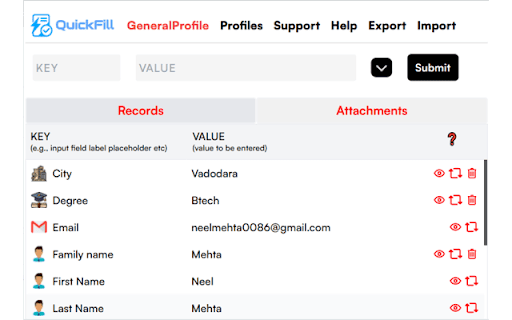


Okay hear me out — I made a Chrome extension because I'm sick of typing the same stuff on every form ever… Okay hear me out — I made a Chrome extension because I'm sick of typing the same stuff on every form ever created by mankind. Name, Email, Address, Phone, LinkedIn etc etc. You know the drill! 💥 Introducing QuickFill A super simple autofill tool that just gets it done. No complicated setup, no tech wizardry. Just install, add your data once, and boom 💣 — one click to fill forms anywhere. ✨ Why You'll Love It ⚡ Create and manage multiple profiles tailored to your needs 🔄 Switch between profiles instantly with a single click 🌍 Works on any website — wherever forms exist or details are required 🔐 Privacy first: your data always stays 100% on your device (We cant access your data) 🔹 Smart Features That Save Time & Effort 1️⃣ Intelligent Auto-Fill ✨ Detects and identifies form fields automatically. 📝 Assigns appropriate data based on your saved details. ⚡ Completes forms instantly, eliminating repetitive work. 2️⃣ Advanced Profile Management 📂 Save multiple profiles for different needs—work, personal, clients, or custom categories. 🔄 Switch between profiles seamlessly for different forms. 🎯 Assigns the correct details based on form structure. 3️⃣ Quick Access & Editing 🔍 Instantly view saved data when filling out forms. 📋 Easily copy and paste details if needed—no more hunting through notes. ✏️ Modify or update stored data anytime with just a few clicks. 4️⃣ Secure & Private 🔒 Your data stays on your device—no cloud storage, no tracking. 🚫 No third-party access or hidden data collection. 🛡️ Full control over what is stored and used. 🛠️ How theQuickFill Simplifies Your Workflow ✅ Saves time by eliminating manual data entry. ✅ Reduces errors with precise field detection and data matching. ✅ Keeps everything organized with structured profiles. ✅ Enhances productivity by streamlining form-filling in just one click. 🚀 Why Choose theQuickFill? 💡 Smart Detection & Matching Algorithms – just intelligent automation. 💼 Perfect for professionals, students, and daily web users who want to speed up online interactions. 🔐 Privacy First – Your information remains secure on your local device, with no external access. ✨ Download theQuickFill today and experience truly effortless form-filling!

AutoFill Form Extension
AutoFill Form Helper is a powerful and easy-to-use Chrome extension designed to streamline your online form-filling experience.… AutoFill Form Helper is a powerful and easy-to-use Chrome extension designed to streamline your online form-filling experience. Whether you frequently fill out forms for work, shopping, or online registrations, this extension will save you time by automatically populating text fields, emails, phone numbers, dates, and more with a single click. Key Features: Instant AutoFill: Quickly fills out forms on any webpage with pre-defined data, reducing manual typing. Supports Multiple Data Types: Handles various form field types including text, email, phone numbers, dates, and URLs. Randomized Data Selection: Automatically selects a data set from your predefined options, giving a unique form fill each time. Seamless Integration: Works on all major websites and web applications, providing a smooth and hassle-free experience. Lightweight and Fast: Minimal impact on browser performance with quick data filling. How It Works: 1. Navigate to any webpage with a form. 2. Click on the AutoFill Form Helper icon in your Chrome toolbar. 3. Click the "Fill Form" button in the popup, and watch as the form fields are automatically populated with your pre-defined data. Ideal For: Users who frequently fill out online forms and want to save time. Professionals who need to fill out repetitive forms as part of their job. Anyone who wants a quick and easy solution for form data entry. Privacy Policy: AutoFill Form Helper does not collect, store, or share any personal data. All form-filling actions are performed locally on your device. Support & Feedback: We’re always looking to improve. If you have any questions, feedback, or need support, feel free to reach out to us. ## What's New in Version 1.1: - Improved form auto-filling logic to support more data fields. - Added support for rich text editors (TinyMCE, CKEditor, etc.). - Enhanced UI performance and bug fixes.

Easy Fill
Quickly fill a form on any website in some clicks only. You can also make notes or text draft without leaving browser window. It makes filling a form on any website easy and quick. You can store any form data to fill on any website . It shows a widget on screen when user clicks extension action. From there you can copy any input value with singe click and fill it anywhere on that page. User can also make a note of any text draft of email, cover letter etc. for using it later in extension popup.

QuickFill - Your Ultimate Form Autofiller
QuickFill simplifies the process of filling out online forms. Say goodbye to repetitive typing and hello to QuickFill! QuickFill - Your Ultimate Form Autofiller QuickFill is a powerful Chrome extension designed to streamline the process of filling out online forms, saving you time and effort. Tired of repetitive typing? QuickFill is here to help! With just a few clicks, you can effortlessly complete forms with your saved information. 1. Efficiency and Speed: QuickFill automates the form-filling process, significantly reducing the time you spend entering the same information over and over. 2. Free and Open Source: QuickFill is completely free to use and open source, allowing you to review and contribute to its development. 3. User-Friendly Interface: The extension features an intuitive interface that makes it easy to manage and use your saved information. Say goodbye to tedious form filling and hello to QuickFill! Install QuickFill today and experience the convenience of effortless form completion. Visit our GitHub repository for more information and to contribute.

Autofiller Pro — Personalized Form Filler for Chrome
Autofiller Pro auto-fills forms with secure, custom, or random data to boost your productivity on forms, sign-ups, and more. Tired of manually entering the same details every time you fill out a form? AutoFiller Pro is the best autofill extension for Chrome, designed to automate and simplify form completion. Whether you’re signing up for new accounts, completing checkout pages, submitting job applications, or testing web forms, AutoFiller Pro helps you fill forms automatically! ✔ Automatic Form Autofill – Save time with AutoFiller Pro’s auto form filler, which instantly fills names, emails, addresses, phone numbers, ZIP codes, and more. Say goodbye to repetitive typing! ✔ Custom Autofill Settings – Personalize and manage your autofill data easily. Assign unique values for different websites or use global defaults for smart form completion. ✔ Inspect & Assign Mode – With intelligent form mapping, visually assign autofill fields by clicking on them. No complicated setup—just click, assign, and go! ✔ Website-Specific Autofill – Store different autofill values for different websites. AutoFiller Pro recognizes the domain you’re on and fills forms with the right data every time. ✔ Lightning-Fast Form Automation – Optimize your workflow with AutoFiller Pro’s fast, seamless form automation for Chrome. Autofill login forms, checkout pages, survey forms, and more with one click! ✔ Works on Any Web Form – AutoFiller Pro is compatible with all types of forms, including registration pages, contact forms, job applications, order forms, and multi-step sign-ups. ✔ Simple Setup & Easy Management – A clean, user-friendly dashboard makes it easy to add, edit, or remove autofill data. Quickly search, filter by domain, and manage settings with ease. ✔ Built-In Tutorial & Support – New to form autofill tools? No worries! AutoFiller Pro includes a step-by-step guide to help you get started in minutes. - Productivity seekers who want to speed up form-filling and online registrations - Web developers & testers needing an auto form filler for testing purposes - Frequent shoppers & job applicants tired of typing the same details repeatedly - Anyone looking for a reliable and customizable Chrome autofill extension 1. Fast and accurate form-filling for any type of online form 2. Highly customizable settings with domain-specific autofill 3. Smart form recognition for improved accuracy 4. A lightweight, high-performance Chrome extension 5. The best alternative to built-in browser autofill 🚀 Get the Best Autofill Extension for Chrome Today! 🚀 Don’t waste another second manually entering your details. Download AutoFiller Pro now and experience fast, smart, and reliable form automation for Chrome. 🔹 Start saving time—install AutoFiller Pro for free and simplify your browsing today! - Improved Autofill Logic: Smarter field detection avoids search bars and irrelevant inputs for better accuracy. - Visual Updates: New icons and promotional visuals to match the refined brand experience. -Performance Improvements: Faster field mapping, optimized script loading, and smoother Chrome integration.
