
eadgghbabhmfbmpfednhihdidnlfdlgb
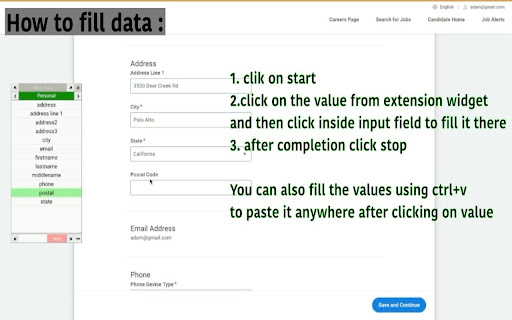


Quickly fill a form on any website in some clicks only. You can also make notes or text draft without leaving browser window. It makes filling a form on any website easy and quick. You can store any form data to fill on any website . It shows a widget on screen when user clicks extension action. From there you can copy any input value with singe click and fill it anywhere on that page. User can also make a note of any text draft of email, cover letter etc. for using it later in extension popup.

Easy Scraper - One-click web scraper
A free web scraper for instant results. Scrape any website with one click. No coding required. Easy Scraper is the easiest web scraper you’ll ever use. With just a single click, extract data from any website and streamline your data analysis, research, and content aggregation tasks. - Scrape lists: Scrape any list, on any website, with a single click. - Scrape details pages: After extracting a list of URLs, scrape each URL and extract data from each page. - Easy to use: Navigate to your desired webpage, click the extension icon, and watch as data is magically organized and ready for use. - Instant export: Conveniently save your scraped data in CSV or JSON, facilitating easy integration with your projects or databases. - Dynamic content handling: Skillfully manages JavaScript-rendered content, ensuring you capture data from even the most complex sites. - Privacy focused: Operates locally on your browser, ensuring your data remains private and secure without being sent over the network. 1. Install the extension with a single click from the Chrome Web Store. 2. Navigate to any website from which you wish to scrape data. 3. Click the extension icon to activate the scraper. 4. Customize your scrape by changing the list and scraping speed if desired. 5. Export your data in the format of your choice and you're done! - Lead generation: Effortlessly collect contact information and leads for your sales and marketing initiatives. - Market research: Quickly gather product details, prices, and reviews. - Data analysis: Compile data sets from various sources for analysis. - Content creation: Aggregate content for research or inspiration.

Easyfill: Text Expander and Snippet Manager
Quickly insert saved text snippets anywhere on the web, reducing the need for repetitive typing. Easyfill: Supercharge Your Typing with Smart Text Expansion Easyfill is the ultimate text expansion tool that saves you time and eliminates repetitive typing. With over a million keystrokes saved, it's the perfect companion for professionals, students, and anyone looking to boost their productivity. ✓ Snippet Management - Create, edit, and delete text snippets effortlessly ✓ Category Organization - Keep your snippets neatly organized for quick access ✓ Lightning-Fast Expansion - Use customizable trigger symbols to instantly expand your text ✓ Powerful Search - Find any snippet in seconds with our built-in search feature ✓ Import/Export Functionality - Easily backup and restore your snippets and categories ✓ Auto-detect Mode - Let Easyfill automatically recognize your snippet triggers ✓ Customizable Trigger Symbol - Set your preferred symbol for snippet expansion ✓ Dynamic Date and Time - Insert current date and time using {date} and {time} variables Easyfill works seamlessly across all websites, making it the perfect tool for: 📧 Email Composition - Insert common phrases, signatures, or entire email templates 📝 Content Creation - Quickly add frequently used text blocks or formatting 💼 Customer Support - Respond faster with pre-written answers to common questions 🎓 Academic Writing - Insert citations, formulas, or standard paragraphs with ease 💻 Programming - Expand code snippets or documentation comments instantly ★ User-Friendly Interface: Get started in minutes with our intuitive design ★ Works Anywhere: Use Easyfill in any text field across the web ★ Boost Productivity: Save hours each week by eliminating repetitive typing ★ Reduce Errors: Ensure consistency and accuracy in your communications ★ Customizable: Tailor Easyfill to your specific needs with flexible options == Privacy and Security == Your privacy is our top priority. Easyfill operates locally on your device and does not collect or transmit any of your personal data or snippet content. Easyfill needs the permission to "access data on all websites" to work on all the text fields/inputs in any website. == Get Started with Easyfill == Transform your typing experience today! Install Easyfill and start saving time with every keystroke. Whether you're a busy professional, a student, or anyone who types regularly, Easyfill is your key to enhanced productivity. For questions, support, or feedback, please contact us at easyfillapp@gmail.com. Visit our website for more information and documentation: https://easy-fill.vercel.app/ Enjoying Easyfill? Please rate us 5 stars and spread the word!

QuickForm - Autofill & Form Filler
QuickForm is a free form autofill Chrome extension and form filler that lets you fill out any online form in one click. Unlike browser autofill or other auto fill extensions, QuickForm works on complex web apps: React, Angular, Vue, dynamic SPAs, internal tools, staging environments, and enterprise portals. 🔴 How It Works: 1. Activate Record Mode on any web form 2. Fill it out naturally - QuickForm saves every field automatically 3. One click to autofill that form anytime, instantly and accurately 🔥 Record Mode - Automatically detect and capture form fields. No manual configuration needed. 🖱️ Auto-Click - Automate clicks between form steps, buttons, and navigation. ⏳ Smart Delays - Set timed pauses for pages with loading states or dynamic content. ✅ All Field Types - Input, textarea, checkbox, radio buttons, select dropdowns, date pickers, and more. 🏎️ Multiple Profiles - Create different profiles for different forms or environments. 📄 Duplicate Profiles - Clone and modify profiles for similar forms. 🔗 URL-Specific Profiles - Link profiles to specific websites for automatic form filling. 📥📤 Import/Export - Backup, share, and transfer profiles between devices. 🎨 Autofill Animation - Customize the speed of form filling. ⚡ Fast Access - Fill forms from the toolbar icon or right-click context menu. 🎯 Built For: - QA testers who fill the same test forms hundreds of times - Developers working with admin panels, staging forms, and internal tools - Job seekers filling out repetitive application forms across multiple sites - Data entry teams who need fast, accurate, repeatable form filling - Anyone who's tired of typing the same information into forms - Works where others fail - Supports React, Angular, Vue, and dynamic web apps that break generic autofill tools. - Record Mode means zero setup - No CSS selectors, no field mapping, no technical knowledge needed. - 100% free - No premium tier, no paywalled features, no usage limits. - No account required - Install and start using immediately, no sign-up. Note: Profiles are stored in plain text locally, so ensure your device is secure to prevent unauthorized access. Automate form filling in Chrome today. Download QuickForm, the fast, free, and private form filler and autofill extension trusted by 30,000+ users 🌟

FillApp: AI Form Filler & Data Entry
Fill web forms and PDFs on any site with one click using prompts or snippets. Automate workflows & data entry with Agent Mode. Fill web forms, PDF forms, and automate browser workflows in your Browser with AI. FillApp runs inside your browser session. Save your data as snippets, then fill any form on any site with one click. For bigger tasks, Agent Mode plans and runs multi-step workflows across tabs, with every action visible on screen. What FillApp does • Fill Mode: Fill web forms and browser-embedded PDF forms in one click using saved snippets or a short text prompt. Supports text fields, dropdowns, checkboxes, date fields, and long text blocks. • Agent Mode: Describe a task in plain text. FillApp plans the steps, opens the tabs it needs, clicks, types, uploads files, submits forms, and shows every action on screen as it runs. Works across multiple sites in a single task. You can pause or stop at any point. • Assist Mode: Read a page, PDF, or image and pull out the data you need. Use the extracted fields directly in a fill or agent task. Key features • Reusable snippets for any data you enter repeatedly across forms and sites • File uploads handled as part of automated workflows • Multi-tab navigation, clicking, typing, and form submission in a single agent task • Side panel workspace for chat, screenshots, and file attachments • Runs in your existing browser session, no credential sharing needed • Confirmation prompts before sensitive actions like submitting or deleting Privacy and control FillApp operates entirely inside your browser. It does not run background monitoring and does not store or transmit your session data. You control what gets automated, when it runs, and when it stops. Start with the free trial, fill a few forms, then automate a full workflow when you are ready.`
