
ggjjjpfggpdhamicpcfllpcdobmpplbm
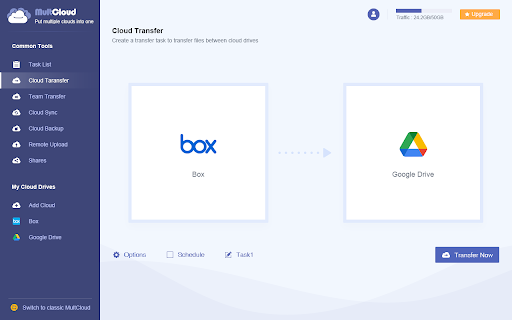
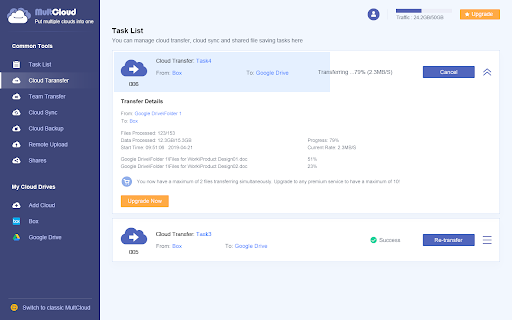
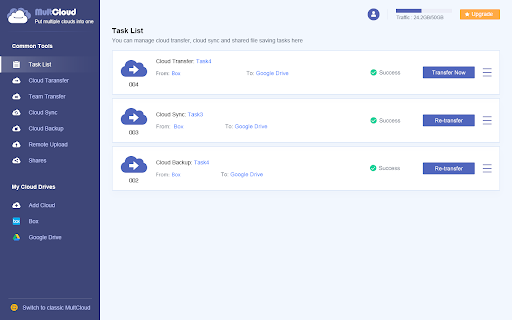
This extension lets you directly transfer files from Box to Google Drive without download and upload. How do you usually transfer files from one cloud to another? Usually, the most traditionally way we use is to download files from one cloud drive and then manually re-upload them to another cloud drive. This way is effective when the files are not particularly large. But if you have a large amount of files, then it is rather unwieldy to rely on this way. With this extension, you can: 1. Migrate Box to Google Drive with no download and upload. 2. Sync files from Box to Google Drive to boost your productivity in real-time way. 3. Back up your Box data to Google Drive to add a layer of insurance to data security. Highlights of this extension: ✔️ Integrate more than 40+ leading cloud storage services, including Google Drive, Google Photos, iCloud and more. ✔️ Manage multiple cloud accounts in one console. ✔️ Automatic transfer/backup/sync and greatly boost your productivity. ✔️ Transfer/sync/backup files in the background even though your browser is closed. ✔️ Transfer/sync/backup files offline without going through your local computer. ✔️ Transfer/sync/backup lots of files in one go without transferring them in batch. ✔️ Get rid of your poor network connection and enjoy competitive transfer speed. This extension is especially great for: 1.Project Managers and Team Leads: 👉Transfer all project-related documents to your cloud and keep it organized. 👉Setup an automatic transfer task to your Google Shared Drive for collaboration with your team. 2.Teachers and Students: 👉Transfer some essential documents from a shared account to personal account. 3. Anybody who needs to migrate files from one cloud to another directly and don’t want to use download and upload way, this is for you. We all know not one size fits all, especially for those who own multiple cloud accounts. But with these flexible features, you should be covered with this extension added by MultCloud. MultCloud, a free web-based cloud storage manager, aims to boost your productivity.

Basecamp: Sprint, Task Management
Sync daily tasks or work between Basecamp & Moon HRM. Use filters & enhanced features for seamless collaboration. From organizing tasks and tracking sprint progress to viewing work through smart cards and flexible filters, every element is built to simplify how your teams plan, execute, and stay aligned. View ongoing, completed, and on-hold tasks, manage workflows, and stay on top of your project deadlines. Get instant access to pinned projects, real-time activity tracking, and quick updates. Always know what’s happening and what truly needs your attention. It makes sure no information remains scattered. Project managers and team leaders can track the progress of the Basecamp sprints and todos using our extension. They can check and take necessary steps to meet the project timeline. Here’s why you should choose our extension for your Basecamp project management and time tracking over other traditional software. Centralized dashboard: Get a complete overview of your workspace from a unified dashboard. Direct access to key project details and everything that matters. Hey section: Never miss a beat with “Hey section,” which provides updates from across the team. For uninterrupted visibility, you can also enable it as a sidebar on your left, so that nothing slips through the cracks. Latest activity: Keep a close eye on recent activities across different projects. See updates, changes, and contributions, helping you stay aware of how work is progressing in real time. Sprint progress and status: Observe how your sprint is advancing with a clear view of task status and upcoming stages. Understand the current status at a glance and assure everything is progressing as planned. Task filters: Smart filters to refine your task view and concentrate on what matters most. Sort tasks based on whatever criteria you want and quickly access relevant work without distractions. Project list: Zoom into all your projects in an organized list that makes navigation pretty much easier. Switch between projects and keep track of ongoing and completed work without confusion. Smart card view: Users can visualize tasks in a structured card layout that highlights details at a glance. Such a format makes it very easy to oversee and act on tasks with better clarity. Work Summary: Review a comprehensive summary of work done across tasks and projects by different team members. Take a closer look at whether efforts are being utilized in the right way. Connect with Moon HRM: Directly link an advanced HRM software, Moon HRM, with Basecamp in order to align project activities with employee management. Organize tasks, teams, and monitor performance without any extra effort. Download Basecamp: Sprint, Task Manager Extension & follow these steps. 1. Open Basecamp and log in to your Basecamp account 2. In the top right corner of the screen, click on the sign-up button 3. Choose Moon HRM while signing up 4. Complete the sign-up process by filling in the required details. 5. Start adding projects and managing workflow with time log reports Why integrate with Moon HRM? Basecamp: Sprint, Task Manager integration using Moon HRM is best for managing the workflow of your team members. It helps track each sprint’s card or to-do status management and the time to complete the assigned tasks. Once integrated with Moon HRM, it automatically syncs the time log for each employee as per the tasks completed or the time dedicated to each task. Using Moon HRM integration, the project manager can closely monitor each sprint’s progress, thereby checking the performance and status of each employee’s tasks.

Accessibility Checker for GitHub Markdown
Highlight accessibility issues as you write Markdown on github.com. Highlights accessibility issues as you write issues, pull requests, discussions, comments in Markdown editors on GitHub.com. After installation, the extension will automatically highlight known issues, including missing 'alt' text, empty links, incorrect link syntax, skipped heading levels, duplicate headings, and more. Navigate to or hover over an issue to learn more about it.

Transfer Google Photos to iCloud
No need to download or export first and re-uplpad, just directly transfer Google Photos to iCloud online by using MultCloud MultCloud is a free web-based tool that enables you to easily transfer, migrate, backup, sync or move files from one cloud to another and access all your online files on different clouds with a single login. Over 40 cloud services supported (both iCloud Photo and iCloud Drive are supported). Some use scenarios: * Transfer photos from Google Photos to iCloud Photo * Migrate or move data between two iCloud Drives * Backup iCloud Photos to NAS * Sync OneDrive with Google Drive * Transfer Google Drive to iCloud Key Features: * Directly transfer files from one cloud to another for free. * File transfer in background, allowing you to close browser. * Transfer cloud data offline without going through your computer. * Schedule automatic data transfer between two cloud services. * Real-time cloud-to-cloud sync. * Convert emails to PDF and save to local or cloud drives.

Transfer Google Photos to another Account
This extension lets you directly transfer photos from one Google Photos to another account with no download and upload. How do you usually transfer pictures from one Google Photos to another? The most logical way is to download photos from one cloud to your computer and re-upload them to another account. But given the amount of data and time this approach requires, it's clearly not the best course of action. However, with this Chrome extension, you can: 👉🏻 Move your Google Photos to another account seamlessly with no download and upload. 👉🏻 Back up your photos from one of your Google Photos to another to add a layer of insurance to data security. 👉🏻 Sync photos to another account in real-time way so that you can manage your photos across devices. Highlights of this extension: ✔️ Integrate 40+ leading cloud storage services, even the iCloud. ✔️ Manage multiple cloud accounts in one console. ✔️ Automatic transfer/backup/sync greatly boost your productivity. ✔️ Transfer/sync/backup files in the background even though your browser is closed. ✔️ Transfer/sync/backup large files in one go without transferring them in batch. ✔️ Get rid of your poor network connection and enjoy competitive transfer speed. This extension is especially great for: 🧑📸Photographers. Always need to take photos and share photos to their clients. 👨👩👧👧 Family members. Sometimes need to share important moments to family members. 😁 Anybody who needs to need to transfer photos from one cloud to another directly with a large number of photos and don’t want to use download and upload way, this is for you. We all know not one size fits all-especially for those who own multiple cloud accounts. But with these flexible features, you should be covered with this extension added by MultCloud. MultCloud, a free web-based cloud storage manager, aims to boost your productivity.
