
gfokpehmpglhpnkbemchimpondfebeab
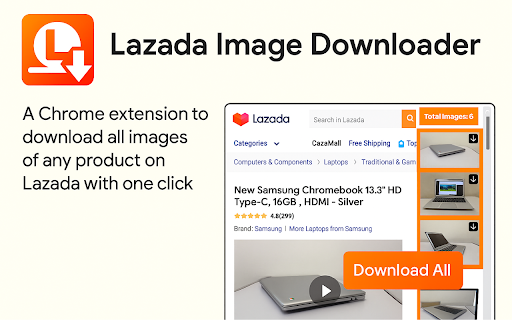
Activate this extension to download any type of images from Lazada Website with just one click. Fed up with having a hard time trying to download images from Lazada? The Lazada Image Downloader chrome extension allows the user to download any image from lazada website with the single mouse click. Perfect for every shopper, marketer, and content creator it lets save high-quality images of products, ads, and visual content directly on the device for an easy image-saving experience. Key Features for this Chrome Extension One-Click Image Download: Lazada prompt the shoppers to download an app in order to save images with a single click. Supports All Image Types: Images, banners, and all the other visuals can be downloaded with great ease. High-Quality Image Downloads: This way you are confident you get the best quality images depending on your needs. Install the Extension: Download the Lazada Image Downloader extension to your browser. Activate the Extension: To enable the extension, use a left mouse click on the icon. Browse Lazada: In order to download the images proceed to the Lazada.com website to examine the pictures you are interested in. Click to Download: It as simple as clicking on the picture and that particular picture will be downloaded to your gadget. This Extension is extremely helpful for people who merely want to have their favorite images from the Lazada website without figuring out how to in a short period of time. Be it a common buyer who wants to monitor products, a marketer collecting the visuals of products for advertisements, or a content creator who uses pictures for posts – this extension is good for everyone. With one mouse click you can download any image which makes it ideal for sorting and storing images you require in one place. It can be handy for a shoppers to download relevant product images for future use, to marketers who are compiling images to use on promotions and campaigns, and to the content creators in need of product images for their IG page, site, or blog. It is equally beneficial for everyone undertaking product research or assembling a compilation of images, downloads images efficiently.

Image downloader - Imageye
Find and download all images on a web page with Image downloader. With this Image Downloader, you can find, browse, convert and download all the images present on a web page. Additionally, you can: - Filter based on pixel width and height - Filter based on URL - Bulk download all images at once - Select which images you want to download - Check the size of each image - Copy the URL of the original image - Choose between various layout options - Support all major websites (Instagram, Facebook, Twitter, ...) - Perform a reverse image search - Convert .webp to .jpg - Convert any image type to webp, jpg or png (If you are a web dev and you need to convert all the images of a webpage you can now do it in one click) - Side Panel - Sort by Position in page - Capture selection (beta) Imageye - Image Downloader is a tool that helps you find the images published on a web page. The images may be protected by copyright and you should always assume that they are. Before reusing an image, make sure you check its license and the specific terms of reuse. Do not use any image, illustration or photograph without researching its copyright status first.

Lazada Downloader - Save Lazada images with one click
👏🏻 Lazada Downloader helps you easily save and download various images of Lazada products with one click. # Features ✓ Download main, variant, description images. ✓ Save all images (main, variants, descriptions) with one click. ✓ Best possible quality of images. ✓ Organize downloads with subdirectories. ✓ Save images as a ZIP file. ✓ Export image detail paths as CSV files. ✓ Open download folder after saving images. # Data Privacy All data is processed in your local computer, it never passes through our web server and no one knows what you have saved.

Lazada Image Saver - Download Product Images
Download all Lazada high-definition product images in batches with one click Are you still frustrated by manually right-clicking and saving Lazada product images one by one? Say goodbye to the hassle! Lazada Image Saver is the ultimate solution you've been looking for. Designed for e-commerce sellers, designers, and all Lazada users, it allows you to download high-definition product images in bulk with just one click. This lightweight, powerful, and user-friendly browser extension will revolutionize the way you get high-definition product images from Lazada, significantly boosting your productivity. 🌟 Core Features and Unique Benefits We understand your time is valuable. That's why we've eliminated unnecessary features and complex settings to provide you with the purest, most efficient downloading experience. ✅ One-Click Batch Download With just one click, you can preview and save all the main and variant images from your Lazada product page right in the extension window. Whether you're downloading a single image or saving a batch, it's a breeze. ✅ Highest Image Quality Guaranteed Our intelligent scraping technology automatically parses and downloads the highest resolution original images, ensuring every image you get is crystal clear and ready for use in marketing, design, or print projects. ✅ Smart Folder Organization Downloaded images will be automatically saved in a folder named "Lazada Downloads/Product Title," keeping your assets organized and clutter-free. ✅ Ultra-Simple User Interface No complicated panels, no tedious settings. All operations are performed in a refreshing, intuitive pop-up window. Install and use right away, with no learning curve. ✅ Security and Privacy Prioritized We respect your data privacy. All image parsing and downloading processes are performed locally on your computer; none of your information passes through our servers. Install the extension: Click the "Add to Chrome" button to add the assistant to your browser. Open a product page: Visit any Lazada product detail page you're interested in. One-click download: Click the extension icon in the top-right corner of your browser. In the pop-up window, select and download the image you need. It's that simple! Ready to boost your efficiency? Whether you need to add new products to your online store, create marketing posters, or simply save your favorite designs, the Lazada Image Saver is your best choice. Install now and experience unprecedented convenience! Technical Support and Feedback: If you have any questions or feature suggestions, please feel free to contact us via email: 8123202@gmail.com Disclaimer: This plugin is independently developed and is not affiliated with Lazada.

DownPictures - Universal Image Downloader
Download product images and videos from major e-commerce platforms with one click. Supports Amazon, AliExpress, JD, and more. ## Short Description An efficient media asset collection tool for global e-commerce and social platforms. Extract high-definition product images, SKU variants, and videos with one click. Now supporting SHEIN, with optimized watermark-free downloads for social media content. ## Detailed Description DownPictures is a professional resource acquisition expert designed for e-commerce operators, content creators, and global shoppers. Powered by intelligent recognition technology, we provide deep compatibility with major domestic and international platforms. Whether you are managing traditional e-commerce stores, exploring cross-border markets like SHEIN, TEMU, and AliExpress, or seeking inspiration on social media, DownPictures delivers a seamless experience for extracting high-quality original images and videos. We simplify the material collection process, helping you stay ahead in content creation and business competition. ### 💡 Exclusive Tip: Split Screen / Dual Monitor for Double Efficiency! **Highly Recommended**: Use **Split Screen** (or **Dual Monitors**) to display the browser window and extension window side-by-side to experience our exclusive **Immersive Collection** feature. **👇 Mode Illustration:** ```text [ Browser Window ] [ Extension Window ] ┌──────────────────┐ ┌──────────────────┐ │ Browsing Product │ ⚡ │ Auto-Sync Data │ │ (No Clicks Need) │ ──→ │ (Real-time Grab) │ └──────────────────┘ └──────────────────┘ ``` **Why is this better?** Powered by **Smart Real-time Sync Technology**, you don't need to repeatedly open and close the extension. Just keep the extension window open. As you switch between different products in the browser, the extension will **automatically detect and immediately grab** all high-definition assets from the current page. **Browse and download simultaneously**, saying goodbye to tedious manual operations! #### 📢 Ads Declaration - This extension may display relevant ads to support development and maintenance #### 🖼️ Multi-type Image Download - **Product Main Image**: Automatically identify and extract product display main images, supporting high-definition original image downloads - **SKU Images**: Acquire product images corresponding to different specifications and colors, fully displaying product variants - **Detail Page Images**: Capture all images on product detail pages, including description and display images - **Smart Deduplication**: Automatically filter duplicate images to ensure downloaded image resources are not redundant #### 🎥 Video Resource Acquisition - **Main Image Video**: Extract video resources from product main image positions - **Detail Video**: Acquire video content from detail pages - **Video Information Display**: Show video resolution and file size information #### 📊 Image Information Display - **Size Information**: Display pixel dimensions (width × height) for each image - **File Size**: Acquire and display image file size, supporting both actual size and estimated values - **Batch Preview**: Provide image preview functionality for convenient viewing and selection #### 🎯 User Experience Optimization - **One-Click Download**: Support batch selection and one-click download of all selected images - **Download Management**: Real-time display of download progress with support for failure retry - **Smart Classification**: Automatically categorize and store by image type for easy management - **History Record**: Save browsing history for convenient viewing of image resources from previous pages #### 🔒 Security & Reliability - **Minimal Permissions**: Only request necessary website access permissions without collecting personal privacy information - **Local Processing**: All data processing completed locally without uploading to servers - **Compliance Design**: Strictly adhere to browser extension development specifications and platform policies #### ⚡ Efficiency & Intelligence - **Smart Recognition**: Automatically adapt to page structure changes across various platforms for stable extraction - **Lazy Loading Processing**: Optimized for modern web page lazy loading techniques to ensure complete image acquisition - **Performance Optimization**: Utilize efficient resource acquisition and processing methods without affecting normal web browsing #### 🌐 Strong Compatibility - **Multi-Platform Support**: Perfectly adapt to mainstream e-commerce platforms - **Browser Compatibility**: Support mainstream browsers such as Chrome and Edge - **Responsive Design**: Interface adapts to different screen sizes for consistent user experience #### 👩💼 Merchant Applications - **Competitive Analysis**: Collect competitor product images for market analysis - **Material Organization**: Quickly acquire product materials for promotional and marketing purposes - **Data Backup**: Backup your own product images and video resources #### 🛍️ Buyer Applications - **Product Collection**: Save favorite product images for convenient future viewing - **Price Comparison Reference**: Collect similar product images for comparative analysis - **Sharing Materials**: Acquire high-quality product images for social sharing 1. **Install Extension**: Install 当图 DownPictures extension from Chrome Web Store 2. **Visit Product Pages**: Open product detail pages on any e-commerce platform 3. **Launch Extension**: Click the extension icon in the browser toolbar 4. **Select Resources**: View and select required images and videos in the popup interface 5. **Start Download**: Click download button to save selected resources locally We highly value user privacy and commit to: - Only collect public image and video links from product pages - Do not collect any personal identity information - Do not share user data with third parties - All data processing completed locally ### Changelog 1.0.114: Fixed Alibaba.com main image extraction. 1.0.113: Fixed Amazon image scraping issue. 1.0.112: Fixed Alibaba.com main image extraction. 1.0.111: Optimized JD.com and 1688 image extraction. 1.0.110: Fixed context menu on Taobao and 1688 pages. 1.0.109: Optimized Pinduoduo title and image extraction. 1.0.108: Optimized Pinduoduo SKU extraction and UI tips. 1.0.107: Updated Dangdang main image extraction. 1.0.106: Added Dangdang main, SKU, detail image and video download support. 1.0.105: Optimized AliExpress image extraction. 1.0.104: Optimized TikTok SKU and variant image extraction. 1.0.103: Optimized Made-in-China main image extraction. 1.0.102: Fixed Taobao and Tmall image display issues. 1.0.101: Optimized Pinduoduo image and color variant extraction. 1.0.100: Optimized Xiaohongshu (RED) video extraction and fixed Yupoo image display. 1.0.99: Optimized Tmall, Taobao, and Pinduoduo Wholesale downloads. 1.0.98: Fixed JD main image and Pinduoduo detail page issues. 1.0.97: Enhanced JD.com main image extraction and stability. 1.0.96: Optimized Alibaba.com main, SKU, and detail image downloads. 1.0.94: Fixed JD.com image download issues. 1.0.93: Added Newegg platform support. 1.0.92: Added Macy's support and optimized Pinduoduo extraction. 1.0.91: Fixed TikTok image extraction issue. 1.0.90: Optimized Rakuten detail image extraction. 1.0.89: Fixed VIP.com SKU color image scraping. 1.0.88: Optimized Pinduoduo detail page extraction. 1.0.87: Added custom content selection and export for images/videos. 1.0.86: Optimized multilingual display and Sina Weibo extraction. 1.0.85: Optimized 1688 and Alibaba detail page downloads. 1.0.84: Optimized Sina Weibo image and video download stability. 1.0.83: Fixed Xiaohongshu downloads, path mapping, and file renaming. 1.0.82: Optimized page loading speed and file naming conventions. 1.0.81: Optimized Taobao, Tmall Global, and Tmall Supermarket downloads. 1.0.80: Improved sidebar width detection and 1688 video extraction. 1.0.79: Added smart sidebar width detection and adjustment reminders. 1.0.78: Optimized adaptive display sizes for images and videos. 1.0.77: Added sidebar sync download and right-click context menu. 1.0.76: Added right-click context menu image download feature. 1.0.75: Fixed batch downloads, file renaming, and 1688 video extraction. 1.0.74: Added Sina Weibo image and video download support. 1.0.73: Fixed Kuaishou extraction and optimized Mercado Livre scraping. 1.0.72: Fixed Mercado Livre image and video extraction. 1.0.71: Fixed Alibaba.com video extraction issues. 1.0.70: Fixed JD.com video extraction issues. 1.0.69: Fixed Pinduoduo SKU image scraping stability. 1.0.68: Fixed Shopee video URL slash issue and improved accuracy. 1.0.67: Fixed Goofish extraction and added HEIC format support. 1.0.66: Optimized Rakuten SKU variant image extraction. 1.0.65: Fixed Taobao SKU switching issues and optimized Temu extraction. 1.0.64: Fixed Taobao/Tmall SKU data residue and cross-page pollution. 1.0.63: Fixed Xiaohongshu background scraping and visibility issues. 1.0.62: Fixed Taobao/Tmall SKU extraction and display flickering. 1.0.61: Fixed Xiaohongshu extraction and optimized multilingual display. 1.0.60: Fixed Pinduoduo Wholesale image sorting and flickering. 1.0.59: Optimized Xiaohongshu extraction, ZIP packaging progress, and download speed. 1.0.58: Optimized AliExpress detail page extraction accuracy. 1.0.57: Fixed JD.com product image sorting order. 1.0.56: Fixed JD.com video extraction and download stability. 1.0.55: Fixed Taobao/Tmall video download and image format issues. 1.0.54: Added Mercado Livre platform support. 1.0.53: Fixed Taobao, Tmall display stability and Pinduoduo Wholesale scraping. 1.0.52: Added Alibaba International Chinese domain support. 1.0.51: Fixed Alibaba International SKU image scraping. 1.0.50: Fixed historical data merge order and AliExpress merge issues. 1.0.49: Fixed Douyin (TikTok) historical image scraping. 1.0.48: Added Pinduoduo Wholesale main, SKU, detail image and video support. 1.0.47: Fixed Douyin (TikTok) product image URL scraping. 1.0.46: Added Rakuten Japan main, SKU, detail image and video support. 1.0.45: Added Etsy support for product image extraction. 1.0.44: Added bulk zip download and fixed browser compatibility. 1.0.43: Added Goofish (Xianyu) platform support. 1.27.42: Added Suning.com platform support. 1.0.41: Added Wayfair support for product image extraction. 1.0.40: Enhanced multilingual support for international users. 0.0.39: Fixed Made-in-China image scraping issue. 0.0.38: Added Walmart support for product image extraction. 0.0.37: Fixed detail page high-definition image downloads. 0.0.36: Added TikTok platform support. 0.0.35: Optimized Amazon and JD.com scraping accuracy. 0.0.34: Fixed Xiaohongshu (RED) image and video extraction. 0.0.33: Fixed inactivity wake-up for Taobao, Tmall, and Temu. 0.0.32: Added eBay and Baoniuniu support; optimized batch downloads. 0.0.31: Fixed Kuaishou e-commerce image compatibility. 0.0.30: Added Four Seasons Constellation (571xz.com) support. 0.0.29: Added Douyin and Yiwugo support; optimized Vipshop and Made-in-China. 0.0.28: Added 17zwd (17huoyuan) support. 0.0.27: Added Coupang and VVIC support. 0.0.26: Optimized Taobao image crawling speed and stability. 0.0.25: Added Ozon platform support. 0.0.24: Added mydepot platform support. 0.0.23: Fixed AliExpress image protocol issues. 0.0.22: Added DHGate platform support. 0.0.21: Added AliExpress and SHEIN support; optimized image display. 0.0.20: Added SHEIN support for main, SKU variant, and detail images. 0.0.19: Added TEMU and AliExpress support. 0.0.18: Added Xiaohongshu (RED) support for watermark-free downloads. 0.0.17: Enhanced 1688 video detection and stability. 0.0.16: Added QR code sharing for Taobao and Pinduoduo. 0.0.15: Upgraded core parsing engine for Taobao, Tmall, JD, and 1688. 0.0.14: Fixed web compatibility for JD.com and Tmall. 0.0.13: Optimized Taobao SKU and JD.com scraping. 0.0.12: Optimized JD.com detail page and SKU images. 0.0.11: Fixed JD.com main and detail image errors. 0.0.10: Enhanced stability and optimized Amazon image grabbing. 0.0.9: Optimized Taobao and Tmall extraction logic. 0.0.8: Added Vipshop support and optimized 1688 crawling. 0.0.7: Added English and Chinese bilingual support. 0.0.6: Refactored engine architecture and optimized Pinduoduo crawling. 0.0.5: Added Alibaba International and Made-in-China support. 0.0.4: Added 1688 platform support. 0.0.3: Added JD.com and Pinduoduo support. 0.0.2: Optimized Taobao and Tmall image recognition. 0.0.1: Initial release: Taobao & Tmall image and video downloads. We continuously optimize product features and regularly update to adapt to platform changes and user needs. **DownPictures** - Your e-commerce platform image and video download expert, making material collection simple and efficient! !
