
gflankmgolakfdeiponkgmbhbhpdmjlg
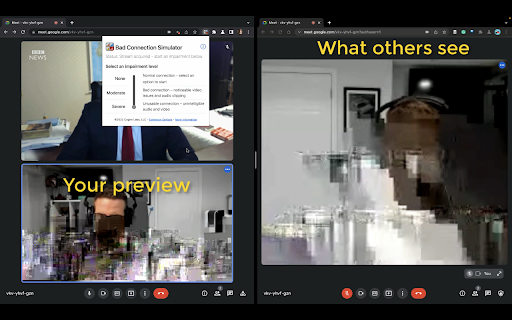
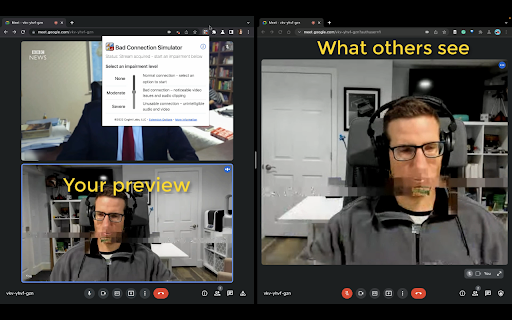

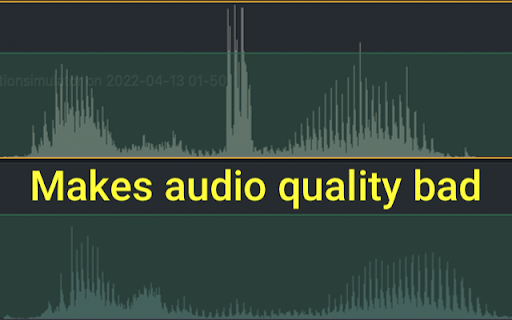

The perfect excuse to off of video calls Stuck on a video call you want to get out and need a good excuse? The Bad Connection Simulator Chrome Extension simulates a bad connection with just a click! → Works with any web-based video calling app → Easy to use - just install the extension, no other installations required → 3 levels of impairment - none, moderate, and severe → Evades low bandwidth adaptation used by video calling apps HOW TO USE 🍰 1. Install the extension from the Chrome WebStore 2. Join your video call 3. Click the Bad Connection Simulator icon and select your impairment level 4. Adjust as needed throughout your call Verified with Zoom, Google Meet, Microsoft Teams, Facebook Messenger, Google Duo, Jitsi Meet, Whereby. Make sure to use the web-version of your video calling app. Bad Connection Simulator also needs to run inside a tab. THREE LEVELS OF IMPAIRMENT Adjust your impairment depending on your needs: 1️⃣ NONE - Normal connectivity 2️⃣ MODERATE - will show some visual impairments and audibly degrade your audio quality. Others will notice you are having some connection issues. 3️⃣ SEVERE - unusable connection with obvious visual artifacts and unusable audio. Now it is safe to drop off Star with moderate to signal you may have connection issues then switch to severe when you’re ready to drop. Decrease or stop the impairment at any time. FOR BEST RESULTS You have to join from Chrome or Edge! Bad Connection Simulator only works on Chromium-based Desktop browsers like Chrome or Edge. Also note, many web calling apps prefer to send you to their native desktop application instead of taking the call from the browser. Make sure you do not click through to the Desktop app. Turn off virtual backgrounds Don't use the virtual background feature. Usually this will not be altered, so your video will look impaired but the virtual background won't be. How it works ℹ️️ Bad Connection Simulator extension inserts itself after your webcam and microphone streams. Unlike other impairment simulators, everything is contained in the browser and controlled by the extension. Modern video calling systems are designed to deal with bad connections and will try to adapt to reduce any impairments. Bad Connection Simulator applies realistic impairments directly to the source video stream before it is transmitted. Video conferencing systems see a normal stream, so they do not make any adjustments while your video and audio come through like garbage! Explanation for Nerds 🤓 Bad Connection Simulator makes use of WebRTC Insertable Streams. After a getUserMedia call, the source streams are routed through WebCodecs where the stream is re-encoded with simulated packet loss and latency. Then the stream is passed to the video calling app where it is displayed and can be passed to a RTCPeerConnection.

Meet Soundboard
Add a soundboard to your Google Meet calls with custom audio clips and sound effects. Meet Soundboard is a powerful Chrome extension that transforms your Google Meet experience by adding a customizable soundboard directly to your browser. Perfect for teachers, presenters, streamers, and anyone who wants to add engaging audio elements to their video calls. ### Advanced Sound Management - Upload and manage custom audio files (up to 10 seconds each) - Support for up to 16 sounds per collection - Individual volume control for each sound - Custom emoji assignment for visual organization - Drag-and-drop reordering of sounds for quick access - Right-click context menus for quick actions (edit, move, delete) - Custom confirmation modals for safe deletion ### Smart Collection System - Create multiple sound collections for different purposes (work, fun, presentations, etc.) - Right-click context menus on collection tabs (rename, delete) - Reorder collections via drag-and-drop - Export collections as ZIP files for backup and sharing - Import collections from ZIP files to restore or share setups - Intelligent collection management with safety confirmations ### Revolutionary Favorites System ⭐ - Pin your favorite sounds from any collection for instant access - Dedicated "Favorites" tab that's always first - Support for up to 20 favorite sounds (more than regular collections) - Drag-and-drop reordering of favorites without affecting original collections - Smart navigation - "Go to sound" feature to find original location - Visual star indicators on favorite sounds ### Enhanced User Interface - Clean, modern interface with smooth animations - Dark mode toggle for comfortable use in any lighting - Specialized context menus for different areas (sounds vs collections vs favorites) - Visual feedback with active states and hover effects - Responsive design that adapts to different screen sizes - Improved emoji picker with better organization and visual cues ### Professional Audio Integration - Seamless integration with Google Meet's audio system - Automatic audio format validation and processing - Support for multiple audio formats (MP3, WAV, OGG) - Optimized for low-latency playback - Volume normalization and control ## 🎯 Perfect For ### Educators & Teachers - Add sound effects to make lessons more engaging - Use audio cues for transitions between activities - Create themed collections for different subjects - Quick access to favorite educational sounds across all lessons ### Content Creators & Streamers - Enhance live streams with sound effects - React to chat messages with custom audio - Create professional audio branding - Instant access to your most-used sound effects via Favorites ### Business Professionals - Add professional sound effects to presentations - Use audio cues for meeting transitions - Create branded audio elements for company meetings - Organize sounds by project and keep favorites readily available ### Gamers & Friends - Add fun sound effects to casual calls - React with audio during gaming sessions - Create themed collections for different games or activities - Star your best reaction sounds for quick access during intense moments ### Smart Data Management - Local storage for privacy and performance - Safe data migration system that protects existing collections - Intelligent localStorage-based favorites system (no database conflicts) - Cross-device synchronization (when logged into Chrome) - Import/export functionality for easy sharing ### Multilingual Support 🌍 - Full internationalization with support for 6 languages: - English, Spanish, Portuguese, French, German, Italian - All user interface elements properly translated - Dynamic language detection based on browser settings ### Performance & Reliability - Lightweight extension with minimal resource usage - Optimized rendering system for better performance - Memory-efficient favorites management - Stable performance during long video calls - Enhanced error handling with user-friendly messages 1. Install the extension from the Chrome Web Store 2. Open a Google Meet tab in your browser 3. Click the Meet Soundboard icon in your toolbar 4. Upload your first audio file (drag & drop or click to browse) 5. Customize the sound name, emoji, and volume 6. Right-click on sounds for quick actions 7. Star your favorites for instant access 8. Click any sound button during your call to play it instantly - Google Chrome browser (version 88 or higher) - Active Google Meet tab - Audio files in MP3, WAV, or OGG format (maximum 10 seconds each) - Microphone permissions for Google Meet - All audio files are stored locally on your device - Favorites stored in secure localStorage (no external servers) - No audio data is sent to external servers - Works entirely within your browser's security sandbox - No personal data collection or tracking - Safe data migration protects existing user collections ## 💡 Tips for Best Experience ### Audio Setup (CRITICAL for Best Results) - **Use Headphones**: For optimal performance and to prevent audio feedback, we strongly recommend using headphones or earbuds during your calls - **Disable Google Meet's Noise Cancellation**: Turn off noise cancellation in your Google Meet settings (Settings > Audio). This prevents Meet from filtering out your sound effects as background noise - **Adjust Input Volume**: Lower your microphone input if sound effects seem too loud relative to your voice ### Organization Tips - Use the Favorites system to keep your most-used sounds accessible across all collections - Right-click on sounds for quick editing and management - Use "Go to sound" feature to find where your favorite sounds are originally stored - Create themed collections for different use cases - Use descriptive names and relevant emojis for easy identification ### Backup & Sharing - Export your collections regularly as backups - Note that Favorites are device-specific and don't export (by design for privacy) - Share collection ZIP files with colleagues for consistent setups ### Performance - Keep audio files under 10 seconds for optimal performance - Use the dark mode toggle for comfortable extended use - Take advantage of drag-and-drop reordering for better workflow - **Favorites System**: Revolutionary way to organize your best sounds across all collections - **Enhanced Context Menus**: Right-click functionality throughout the interface for quick actions - **Multilingual Support**: Full translation into 6 languages for global accessibility - **Improved Safety**: Custom confirmation dialogs and comprehensive data protection - **Better Navigation**: Smart "Go to sound" feature for easy location finding - **Visual Enhancements**: Dark mode, better feedback, and modern UI improvements - **Expanded Audio Support**: Multiple audio format compatibility for maximum flexibility This extension brings the fun and functionality of a professional soundboard directly to your Google Meet calls, making your virtual interactions more engaging, professional, and entertaining than ever before!

Voice Changer for Chrome (by noise-box)
The ultimate voice changer for Chrome to use with Google Meet, Zoom, and more! VOICE BOX Free real-time voice changer and effects soundboard NOTE: Open the extension in a tab with any URL, except for the Chrome homepage and the Chrome Web Store This extension allows you to add funny effects to your voice in real-time. By enabling the extension for a Chrome tab and accepting the use of the microphone, the extension will offer you a set of effects to apply to the voice in real time, including: - Squirrel - Dragon - Echo - Reverb Each effect comes with customizable settings (volume, pitch, etc...) You can use the voice changer in google meet (sharing tab to share the sound) and also in the web version of Skype, Discord, Viber, Teams, etc...

FreezeCam
FreezeCam lets you freeze your webcam on any video call — Zoom, Teams, Meet, and more. Free: Freeze your camera instantly with one click. PRO: Lag simulation, pixelated video effect, fake reconnect screen, video recording, and upload your own video loop.

Slow Internet Simulator
Surf like it’s 1997 — this plugin slows down the web with nostalgic dial-up vibes. Created by Absurd.website This extension intentionally slows down web page loading to simulate the nostalgic experience of dial-up internet from the 90s. It affects all websites visited by the user. Created for fun, retro inspiration, or to help focus by reducing fast, distracting web browsing. Made by absurd.website. Note: This extension does not collect any personal data or interact with servers. It operates entirely in your browser.
