
gfdghfeelbgnjencoggmheenliblidab

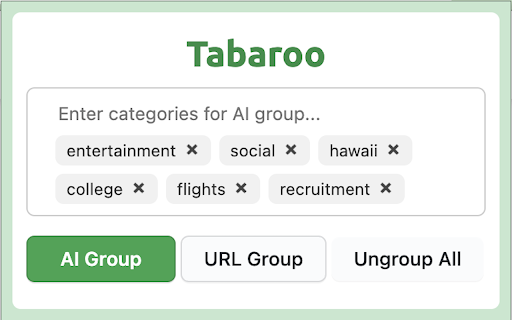
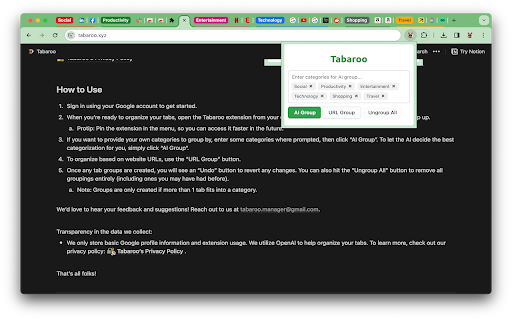
Tabaroo uses AI to effortlessly organize your tabs. Welcome to Tabaroo - the smart Chrome extension powered by OpenAI's ChatGPT and advanced language models. Say goodbye to tab chaos and hello to effortless organization! Why Tabaroo? 1. AI-Powered Organization: Tabaroo's intelligent auto-grouping feature neatly arranges your tabs into user-defined or AI-suggested categories. 2. Flexible and User-Friendly: Easily revert any changes with an "Undo" button. Not satisfied? "Ungroup All" to start fresh. 3. Enhanced Privacy: We value your privacy. Learn about our minimal data collection in our privacy policy. Hop into organized browsing with Tabaroo – where every tab finds its pouch! 1. Quick Setup: Sign in with your Google account. 2. Access Tabaroo: Find it in your extensions menu (Tip: Pin it for faster access!). 3. Customize Your Groups: a. For personalized categories, enter your chosen categories when prompted, then select “AI Group”. b. To let AI determine the best categorization, simply click on “AI Group”. c. For URL-based organization, use the “URL Group” button. 4. Stay in Control: Modify groupings anytime with “Undo” and “Ungroup All” options. 5. Note: Groups are only created when more than one tab fits a category. We’d love to hear your feedback and suggestions! Reach out to us at tabaroo.manager@gmail.com. Transparency in the data we collect: We only store basic Google profile information and extension usage. We utilize OpenAI to help organize your tabs. To learn more, check out our privacy policy at tabaroo.xyz.

Group your tabs++
Effortlessly manage your tabs through user-defined configurations or let our advanced AI intelligently group them for you. Welcome to Group Your Tabs++! Tired of getting lost in a sea of tabs? Group Your Tabs++ is here to help you organize and streamline your browsing experience! With exclusive features and built-in AI, this extension is designed to boost productivity, organization, and control over your tabs in an easy and intuitive way. Key Features: AI-Powered Automatic Grouping: By entering your OpenAI API key in the extension settings, you enable automatic tab organization into groups, helping you gather related content and save time. With AI’s support, tab grouping becomes more intuitive and efficient. Customizable Group Configuration: Create your own groups with specific names, colors, and orders to organize your tabs however you like. The drag-and-drop interface allows for easy group rearrangement. Set keywords and tags for each group, and the extension will automatically sort your tabs into them. Need to delete a group? Just click the minus icon. Group Saving and Importing: In the Data Settings menu, you can save your groups and AI-generated groups and easily import them into other browsers. This way, your organization remains consistent no matter where you’re browsing. Enhanced Tab Search Dashboard: With the shortcut Control + Shift + F (or Command + Shift + F on Mac), you can access an efficient search dashboard. Quickly find open tabs by entering a search term or directly selecting a group. If there are no open tabs matching your search term, you can open a new tab directly from the dashboard. Group Your Tabs++ was developed for anyone looking to optimize their browsing experience and avoid tab overload. Try it out and see how it can transform your browsing, saving you time and helping you quickly access the content that truly matters! Try Group Your Tabs++ now and take your browsing to the next level!

Harbor - AI-Powered Tab Manager | Organize Tabs in Kanban
AI-powered tab manager with smart grouping and Kanban view. Organize your browser tabs efficiently and share with the world. v2.0 Major Update - Google Drive Sync Support! - Share your collected webpages with the world - Quickly search for your desired Tabs or Collections right in the interface ## Kanban-style Tab Management UI - 🎯 Manage tab collections through drag-and-drop in a Trello-like kanban board - 🔄 Restore tab collections to browser windows with one click - 💾 Local-first: Your tab data is primarily stored on your local device. Import and export anytime - 🔒 Automatic local file backup ensures your tabs are always accessible and never lost ## Instant Tab Organization in Popup Window - 🤖 AI-powered smart tab grouping - 🌐 Automatic tab grouping by domain - 🗑️ One-click duplicate tab removal for current window - 💾 Save All Tabs: Quickly save tabs to Harbor while preserving "tab group" structure ## Third-party App Sync: From "Temporary" Tab Collections to "Permanent" Bookmarks - 🔗 Supports syncing tabs with Notion and Raindrop, allowing you to permanently save important tab collections. Through this sync functionality, Harbor helps seamlessly combine temporary tab management with long-term information storage.

AI Group Tabs
Group your tabs with AI A Chrome extension helps you group your tabs with AI.

Tab Manager - Smart Tab By NoteGPT AI
Tab fixed, open tabs and reopen closed tabs in a Click. Using AI chrome manager to summarize tabs, easily collect and manage tabs. Feeling exhausted from the inefficiency of switching between apps and tabs? Have a lot saved, but always struggling to find what you need? Knowledge base overloaded, making it difficult to read and in-depth comprehension? Smart tab by NoteGPT is your all-in-one bookmark manager, the best AI knowledge & tab manager! Effortlessly build a personal knowledge library, streamline information collection and management, and leveraging AI to uncover fresh insights. Features ● Save Browser Tabs:With one-click Smart tab by NoteGPT is able to save your browser links, or open it when you’re ready to resume your task. ● Sync Tabs:Sync your tabs between computers to keep your work organized, no matter how many devices you use or where they are. ● Manage Tabs:Suspend tabs, rearrange tabs/links with drag and drop, and rest easy knowing that every tab is automatically saved. And you can create spaces and collections limitlessly to effectively organize and manage tabs. ● AI Search(AI Q&A):Ask a direct question, our Smart Search gives you a concrete answer pulled from your saved tabs and browser tabs you are opening, and shows the references tabs. It understands what you tell it and help you connect, organize, and offer fresh insights. ● AI Summarize:Summarize your card and collection to extract key information, help you quicker comprehension and handling of information. 10X faster learning with AI! ● Your Personalized AI Knowledge Library:A space organizes everything. Say goodbye to information chaos and hello to organized knowledge! It doesn't just store your content—it understands it. Why choose Smart tab by NoteGPT? ● It's more than just a tab manager or a personal knowledge library, it's your AI-driven database. Utilize AI to extract, summarize, and analyze content for you. Provide key concepts and ideas, unearth fresh insights. A better way to build your AI knowledge management! Perfect for ● Teams that work in the cloud ● Students and teachers in need of knowledge management ● Anyone expecting AI and tab management capabilities How to Use ● Install our Smart tab by NoteGPT and create your account. ● Pin the extension! ● Click the extension icon in toolbar, select what space you would like to save the tab to, then you can easily collect it. ● Go to the workspace of Smart tab by NoteGPT to view all your saved tabs. Then you can read and manage them in your personal knowledge library. Privacy Policy We respect your privacy and therefore we never sell access to your data. That includes your searches, your browsing history and your personal information.
