
gepikfbdcmfjpbepamooklkocjliggaa

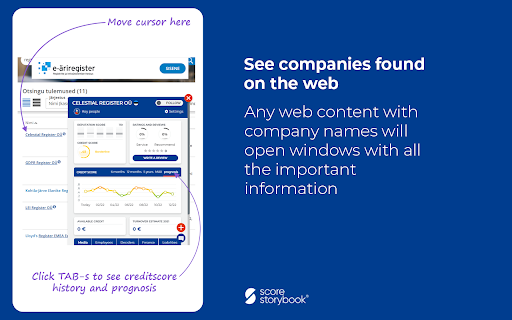
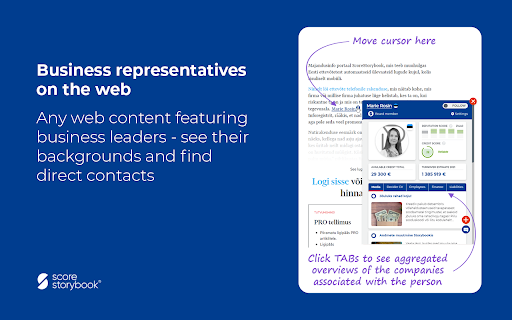

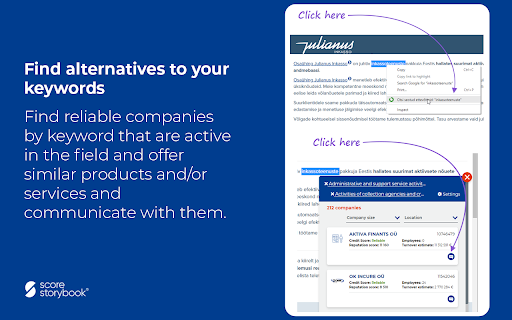
Storybook WEB tells you which company's website you are currently visiting and how trustworthy it is today. When you browse around a website, the browser bar always shows credit bubbles in the colors of the traffic light, indicating the trustworthiness of the website owner. Clicking on the score bubble opens an information window with the company's brand and background image - aggregated data of the company from registers, open data and from all over the web space, which we enrich with background information about significant credit and financial capabilities in real time. PS! There is no need to make costly data interfaces to the software. Valued information is now always available in real time - anywhere on the web and in applications that need information to find customers, assess the background of companies, identify contacts and individuals, or get lists of similar companies by product / service. Some usecases for Storybook WEB: * e-shop reliability assessment - when buying from an e-shop with a high risk score, there is a higher probability of not receiving the ordered goods or the e-shop is delayed in completing the delivery. However, you can also read the comments added by other e-store users and leave your rating there if you wish. * Assessing the reliability of suppliers - by reading the descriptions of goods and services, you can view the reliability of the supplier and the future forecast of your credit score, or find other reliable suppliers of similar products / services by products / services. * Assessing the credibility of the employer - by looking at the brand background of a potential employer, you can view active job advertisements and assess the ability of company to pay wages and, if desired, contact them through a chat window. * The background of customers, suppliers, employers, board members is visible everywhere on the web. If you use a browser-based CRM, ERP, etc. application, you can see real-time information about companies and board members in small information windows. It is also easy to find companies that offer similar products / services based on keywords. * Monitoring the progress of the company - in order to receive weekly overviews of the events taking place in the company, companies can be monitored. * The Web Browser extension works globally - you can order a credit report from any international company. Reports can be selected from companies in 81 countries. Storybook WEB helps you make good and right decisions with real-time, up-to-date information - anytime, anywhere. NB! The credit score model (accuracy 99.5%) has been developed by Estonian data researchers. The model has been developed using machine learning methods that incorporate self-learning algorithms and are able to identify hidden relationships and make predictions based on them.

Apiary - Web Highlighter & Annotator
Highlight and take notes directly on what you read online and instantly share them with friends and colleagues. Easily highlight and take notes on what you read online and then easily save them for later and share them with friends and colleagues in one click. Apiary is a free to try chrome extension based product that allows you to easily highlight and take notes on what you read online. After you have annotated something online it will be saved to your Apiary account where you can then organize in any way you like with our folder system. You can than easily share directly from the website where you took the notes or from your Apiary account later on with anyone you want. Just highlight and get a shareable link you can send to anyone with one click. When using Apiary on a website or email online you have two options. You can choose to just highlight some text or you can highlight and add a comment to that highlight. Allowing you to save and share you favorite parts and current thoughts while reading it with others. You can view your annotations live by clicking the chrome extension and having the Apiary sidebar appear showing all the highlights and notes you have made on that page. Or you can view them later in your Apiary account where we save all the contents of what you were reading and the highlights and notes you took. Allowing you to get the full context of whatever you were taking notes on. Annotate, save, and share what you read online instantly today. ----------------------------------------- Key Features: Web and Email Highlighting Take Notes On What You Read Online Apiary Account Access With Organization Systems Quick and Easy Shareable Notes Private Notes That Only You Can See Automatically Saving Notes ------------------------------------------- How To Use: In order to use the Apiary Chrome Extension you will need an account with Apiary. Please visit www.myapiary.io to create an account today. 1) Create An Account On Apiary (www.myapiary.io) 2) Download Chrome Extension 3) Sign Into Chrome Extension w/ Your Apiary Account 4) Select Text (Left Click & Drag) You Wish To Annotate 5) Click On Apiary Popup To Either Highlight Or Take Note On Selected Text 6) Delete An Annotation By Clicking On A Highlight And clicking Delete Icon 7) Share Your Notes For A Page By Clicking The Apiary Share Button On Bottom Left Corner Of Window 8) View A Note By Either Visiting Your Apiary Account Or By Clicking View On A Currently Annotated Web Page ------------------------------------ Pro Tips: 1) Make Sure You Are Logged Into Apiary Chrome Extension If You Are Having Issues Annotating 2) Organize Your Notes Into Folders On Apiary To Easily Find Notes Later 3) Share Your Notes With Friends By Clicking Share Button And Sending Link To Friends. --------------------------- Got Feedback? Please reach out to us at support@myapiary.io If you find bugs please let us know at https://forms.gle/rHvoLZwaXfVcbAMJ7. If you have a feature request please let us know at https://forms.gle/vguFD2Rxi2FCsSQi8. By installing the extension, you agree to Apiary's Terms of Service, Privacy Policy, and Community Guidelines (which can be found here: https://www.myapiary.io/term-services and https://www.myapiary.io/privacy-policy)

CrecenTech Utilities
It's a simple chrome extension which will hide password showing method.It will also hide code inspection with all ways like short cut keys etc.

Estlex
Estlex plugin allows to use Estlex functions on websites of Riigi Teataja and Riigikohus. For more information please contact info@estlex.ee

Faro
Save pages with highlighted taglines - Bookmark manager ⨯ web highlighter Chaos in your bookmarks? Can't find what you want? They end up gathering dust? Or you don't even try and end up with 100s of open tabs? Faro is made to fix that! It's the simplest way to save & keep track of pages. With it, even thousands of saves don't get overwhelming. When saving, you highlight a sentence to act as a tagline. It helps you remember what the page is about and why you saved it. If unsure - just save whatever sentence you're reading. All saves appear on your dashboard. They come most-recent-first by default, so you don't forget what you recently saved. You can pick up your reading where you left off - no need for a separate reading list. You can also pin & archive to further arrange it. Organize them with tags. Since you're reminded what you saved and why, you can do it later. It makes your saves much easier to manage than bookmarks. Faro supports nested tags (eg: recipes/vegan), so combines the best of tags and folders. Clicking a save takes you right back to your highlight - especially useful for longer articles. Also: ➣ export to bookmarks to keep them if you uninstall Faro ➣ copy links to highlights and share them or paste into Notion, Obsidian, etc. ℹ️ About your data: When installing you can read: "it can read and change all your data on all websites" The only information that ever gets uploaded (when signed in) when you use it to save: ➣ Open page address ➣ Saved highlight/quote - what's visible in the sidebar ➣ Timestamp ➣ Debug info e.g. errors The extension also keeps track the currently open tab for each window - to update the sidebar as you navigate - but doesn't save or upload that data.
