
geenipmnncdadogjkpolcjpehkiohlej

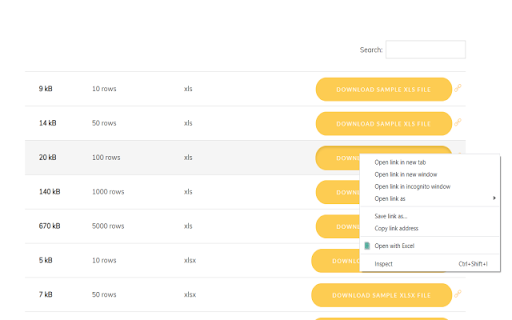


Convert your Microsoft Excel spreadsheets to PDF today Want to convert Microsoft Excel spreadsheets into PDF format? You can do so now after you install our software extension. To begin using our software extension, here are the steps you need to do. Install our software extension "Converter for Excel" Once you install our software, please refresh all your existing Chrome Tabs/close Chrome browser and restart Chrome browser. Choose the XLS/XLSX/CSV file link you wish into PDF to convert via the right click context menu button. Its that simple, just use the right click context menu to choose our extension when you want to convert a Excel spreadsheet to PDF. Disclaimer: Please note this extension is NOT made by Google and is made by an independent development team. All copyrights belong to their respective owners. Google doesn’t endorse or sponsor this Chrome extension. This extension is not owned by, it is not licensed by and is not a subsidiary of Google Inc.

Excel to Google Sheets
Convert an Excel or CSV file into Google Sheets by dragging and dropping it into your browser Convert Excel files and CSV files into Google Sheets for free! 🟢 Avoid unnecessary clicks and save time 🟢 Easy setup - just install the extension and log in with your Google account, and you're ready to go 🟢 Supports both Excel and CSV Troubleshooting: 1. Drag and drop doesn't work on the Google Search page 2. If you're using an old tab that was open before you installed the extension, reload the tab 3. If you're having a problem with authentication, try clearing your browsing data in Chrome Please reach out to pepechulimited@gmail.com with any product feedback or requests and leave a review if you like the extension 💛

XlsWork XLS editor for spreadsheets
Create and edit XLS spreadsheets with an editor online XlsWork is a XLS and XLSX editor that lets you edit your spreadsheets directly on the web browser. It is an spreadsheet editor from which you can perform various editing operations like in any desktop editor, print the edited spreadsheets keeping all the formatting details or download them onto your computer hard disk drive as XLSX, ODS, CSV, or PDF file. Moreover, it scans and collects the webpages you browse in the Internet. These webpages are uploaded to our servers in order to know if they contain XLS or XLSX files that can be edited using our extension integrated with our online app. - File formats supported: * XLS File extension for a spreadsheet file created by Microsoft Excel * XLSX Default file extension for a spreadsheet file written in Microsoft Office Excel 2007 (or later versions) * ODS File extension for a spreadsheet file used by OpenOffice and StarOffice suites, an open standard for spreadsheets * CSV Comma Separated Values File format used to store tabular data (numbers and text) in plain-text form - Create a new spreadsheet or open an existing one - Cut/copy/paste data - Undo/redo your actions - Manage sheets - Cell text formatting - Set font type, size, style, and colors - Add hyperlinks - Clear text, format in a cell - Editing cell properties - Add borders - Align data in cells - Merge cells - Change number format - Editing rows/columns - Insert or delete cells, rows, and columns - Sort and filter data - Work with functions - Insert function - Use named ranges - Operations on objects - Insert images - Insert chart - Insert and format autoshapes - Insert text objects - Manipulate objects - Math equations - Insert equations - Spreadsheet co-editing - View file information - Save/print/download your spreadsheet - Advanced settings of Spreadsheet - Editor View settings and navigation tools - Search and replace functions

Open Excel
AI Excel viewer & XLSX editor. Open XLSX/XLS files in browser, edit and save locally. AI tools for formulas and data cleaning. Open Excel is a fast, lightweight Excel viewer and editor for your browser. Open .xlsx and .xls files without Microsoft Excel, work with multi-sheet spreadsheets, edit cells and formulas, save your work locally, and use AI tools to understand, clean and improve spreadsheet data. Designed for everyday Excel tasks, Open Excel helps you view, edit, review and export spreadsheets directly from Chrome. ✔ What you can do ✦ Open Excel files in your browser Open .xlsx and .xls files by drag & drop or file picker. View multi-sheet workbooks and zoom for comfortable reading. ✦ Edit spreadsheets Enable editing with a quick sign-in and work with common spreadsheet actions: cell editing, formulas, basic formatting, data formats, sorting and filtering. ✦ Save and export Save your working copy locally in the extension, reopen recent files faster, download as .xlsx, or print / save as PDF from your browser. ✦ Use AI for spreadsheet work Use the AI sidebar to audit spreadsheet structure, clean data, rewrite selected text, generate formulas and ask custom questions about your spreadsheet. ✦ Review AI changes before applying AI suggestions are not applied automatically. For editable AI actions, you review the suggested changes first and apply them only when you choose. ✦ Open in Google Sheets Optionally send your file to your own Google Drive and open it in Google Sheets for online editing and sharing. 🤖 AI tools for Excel Open Excel includes an AI spreadsheet assistant built for practical Excel workflows: • Audit — review spreadsheet structure, data quality, formulas and potential issues • Clean — normalize selected data, such as extra spaces, casing and obvious label issues • Rewrite — improve selected spreadsheet text while keeping row and cell alignment • Formula — generate formulas for selected data and place them in safe output cells • Custom — ask questions about a selection, sheet or workbook Viewing is available without sign-in. Editing, AI and cloud-related features may require sign-in. Free AI requests are available for signed-in users, with higher limits available on Pro. Open Excel is built for fast local viewing and editing. Local files are processed in your browser by default, and core file workflows are designed to keep working even when cloud or AI services are not used. 🔒 Privacy and data • Local by default: open and edit local Excel files in the browser. • AI is optional: spreadsheet context is sent for AI processing only when you choose to use AI features. • Google Sheets is optional: if you choose “Open in Google Sheets”, the file is uploaded only to your own Google Drive. • Cloud features are optional and available for users who want cloud files and version history. Open Excel keeps a small local list of recently opened files for quick access. You can remove individual items or clear the list anytime. 1. Click the Open Excel extension icon 2. Drag & drop an Excel file or select it from your device 3. View the spreadsheet instantly 4. Sign in to enable editing and AI tools 5. Save locally, download as .xlsx, print / save as PDF, or open in Google Sheets Open Excel makes it easier to open, view, edit and improve Excel files directly in your browser — with AI tools when you need them.

OpenOffice Calc online for xls spreadsheets
Create and edit xls and xlsx spreadsheets with OpenOffice Calc online OpenOffice Excel online for XLS spreadsheets is an extension that allows to create, edit and view any Microsoft Excel spreadsheet in both xls and xlsx formats. It is a spreadsheet processor integrated with our file manager to manage only XLS file types with this desktop app. The OpenOffice Excel main features are: - Wizards that guides you through choosing and using a comprehensive range of advanced spreadsheet functions. - Flexible cell formatting options: rotating contents, templates, backgrounds, borders, and many more. - Possibility to cross-tabulate and summarise. - Creating formulas using words. - The Intelligent Sum Button inserts a sum function or a subtotal automatically, depending on context. - Range of templates from Extensions repository for ready-made spreadsheet solutions. - Advanced Styles and Formatting. - Save your spreadsheets in OpenDocument format, the new international standard for office documents. But you are free to use your old Microsoft Excel spreadsheets, or save your work in Excel format or use Portable Document Format (.pdf). - Integrated with a file manager to save, upload and download xls files. This extension uses the platform http://www.offidocs.com. It is an integration with an Open Office Linux desktop application. In concrete, it is a desktop app running through our OffiDocs API. It is available for free online users but it also allows the integration with premium users and on-premises OffiDocs deployments where the OffiDocs OpenOffice Excel is installed. IMPORTANT: This extension scans the URLs browsed in order to detect XLS files. The XLS files detected appear in a list located in the extension popup that are retrieved from our servers. The scanning is performed from our servers so your URL are reported to our system. No personal data is collected. This scan can be disabled with a checkbox that appears in the extension popup. If you disable this scanning, this functionality is not available so then the extension functionality is very limited.
