
gedoaajonjaiigaefeaanpfmhnadkgkm


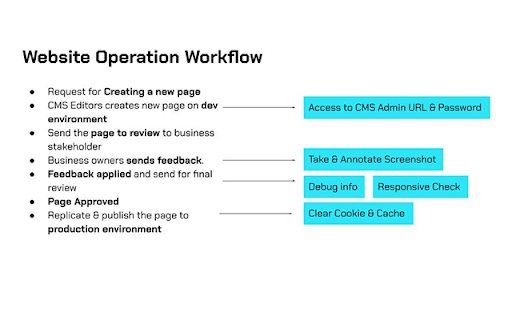
All-in-one tools for website migration project, operating website and SEO tools. Welcome to Breeze: The All-In-One Chrome Extension for Website Management If you manage websites, it's time to declutter your extensions and simplify your workflow with Breeze.bar. This chrome extension is packed with essential tools for managing everything from website structure to SEO, all in one place. Whether you're clearing cache, editing live text, or checking meta descriptions, Breeze makes it easy. Out of the Box with Breeze: Clear Cache & Cookies: The clear cache extension helps you clear cookies, local storage, and cache—either for a specific website or across your entire browser. Choose from custom time ranges like "Last Hour," "7 Days," or "All Time." SEO Panel: Easily check the meta title and meta description of any website, with a character count feature to ensure they fit Google’s standards. Ideal for content managers and marketers who need to review titles without using complex tools. Download Media: Download images, videos, fonts, and brand colors directly from a webpage. The tool even lets you extract SVG icons and hosted MP4 files (except from YouTube). Mobile View Switcher: Quickly toggle between mobile and desktop views without resizing your browser window. This feature allows you to check website responsiveness across multiple breakpoints, ensuring your site is optimized for different devices. LiveEdit: Edit visible text and see changes in real-time without needing CMS access. Perfect for testing content updates before going live. Take Screenshots + Annotate: Capture full-page or focused screenshots and add annotations. Developers will love the added debug info, including page size, resolution, and more. Cookie & Cache Clear Extension The Breeze clear cache chrome extension lets you remove cookies, cache, and local data with a single click. Whether you're troubleshooting a website or performing GDPR compliance checks, Breeze gives you full control over what’s stored on your browser. You can even export cookies as a CSV, Excel, or PDF file to document the dropped cookies for compliance purposes. SEO Information at Your Fingertips Forget about diving into source code or using expensive SEO tools to check page titles or descriptions. Breeze’s meta title checker and meta description checker let you see on-page SEO instantly. Plus, a handy character count tool ensures your meta tags won’t get cut off in Google search results. Download Media from Web Pages No need for separate tools to download media files. With Breeze, you can grab images, videos, and icons directly from any page. Whether it's a JPG, PNG, SVG, or hosted MP4, Breeze makes downloading media a breeze (pun intended!). Mobile Responsive Layout Checker Test how your website looks across devices with the mobile view extension. You can toggle between desktop and mobile views to check layout responsiveness without needing access to physical devices. Future updates will include Google Analytics data for top device sizes, making it even easier to optimize your site. LiveEdit: Edit Text on Any Page For marketers and content editors, the LiveEdit feature is a game-changer. Edit visible text on any page without logging into a CMS. Once you're happy with the changes, share the updated content with developers to implement. Plus, Breeze’s built-in page grid outlines the structure of your page, ensuring every element is perfectly aligned. Screenshot + Debug Information for Developers Go beyond a simple screenshot with Breeze's screenshot tool. Capture the entire page or a specific area, and add annotations such as arrows, numbers, or text. Share detailed debug info, including page size, resolution, and browser data to help your development team address any issues quickly. Breeze Chrome Extension: Key Features Clear Cookies & Cache: Efficiently clear browser data, including specific cookies, cache, and local storage. SEO Panel: Instantly check meta titles, meta descriptions, and character limits. Media Download: Download images, videos, fonts, and brand colors directly from the webpage. Mobile View Switcher: Test website responsiveness across different breakpoints. LiveEdit: Visually edit webpage text without CMS access. Screenshot Tool: Take annotated screenshots with debug information for developers. Why Choose Breeze? With Breeze, you don’t need multiple extensions cluttering your toolbar. From clearing cookies and cache to checking website meta data, Breeze is the ultimate chrome extension for website management. Plus, with additional features like LiveEdit and the mobile view switcher, it’s built for marketing and non-technical teams—but even developers will appreciate its versatility. Breeze is the only website migration and operation tool designed specifically for agencies and marketing teams, helping you stay productive and ahead of the curve. Get Started with Breeze Visit www.breeze.bar to learn more and start managing your websites with ease. Don't forget to install the clear cache extension and mobile view extension for an all-in-one solution.

Page-oscope by MobileMoxie
Compare rendered & un-rendered page code of mobile & desktop pages. Great for SEO's validating page code for Mobile-First Indexing. Summary: Sometimes it can be hard to know exactly what code is being sent to a mobile phone, but now, with Mobile-First Indexing, it is critical for SEO. This tool lets you see the visual page rendering right next to the code - with views for rendered HTML and JavaScript, unrendered HTML and a Diff Checker view that will let you see what is added and what is removed after JavaScript is executed. It is even geo-aware, incase you are modifying content for users in different countries! Use this free mobile emulator plugin from MobileMoxie to easily test your landing pages to understand how they are working for mobile users an mobile search engine bots! Validate Responsive Design: Mobile Responsive Design is critical for a good user experience, but it is now also critical for good SEO rankings. If you are not sure how your pages look on a mobile phone, or what is added and what is removed in the mobile rendering, then this tool is for you! Mobile SEO is now critical to over-all search rankings, and if you are not looking at your pages on a variety of different phones, you could be missing out on potential conversions that directly impact your success metrics and your companies bottom line! Validate International Landing Pages: Does your page adapt to meet the needs of users in different countries? That can be tough to test - especially for mobile, but this plugin solves the problem! Just set the country to wherever you want to test, to make sure that you know how changes to language, currency, shipping information, measurements and other localizations are impacting your users - Great for designers, developers and digital marketers of all types! Are you in a highly regulated industry that has different requirements and laws that you have to abide by in different countries - no problem! This tool can help you make sure that the website is adapting to meet the different regulations in each country you serve! How have you lived without this tool until now? Ensure that Mobile Website Visitors Are Happy: This tool is great for SEO's but also great for developers, CROs, UI/UX Experts and SEM Professionals who need to test mobile landing pages. If you are doing PPC, and spending money to send searchers to a landing page, you need to be sure that landing page works well on a mobile device! This plugin lets you see how your landing page looks on Android and iOS mobile phones, as well as on desktop. Confirm Edge SEO Modifications: If you are using an Edge server or CDN to modify what is served to mobile devices, sometimes it can be tough to know exactly what the finished code actually looks like when everything is compiled and sent. This mobile emulator extension lets you interact with the mobile page, but it also lets you see the mobile page code in the same screen - rendered, unrendered and a comparison mode that highlights how execution of JavaScript change the page. If you are troubleshooting mobile problems or SEO and indexing problems that might be caused by an errant rule on an Edeg server, then this is the tool you need to help!

Edit Website Extension
Edit Live Websites Text On The Fly Edit texts in live website by clicking the extension. Steps to use the extension: 1) Go to any website. 2) Click on the extension. 3) Start editing texts in the website like h1 tags or p tags or any tags. 4) Click on tht extension again to close edit mode & done! Good for quick website text editing only & share with colleagues or friends.

Web Editor
Forget about all the Code chaos and Customize your website in a handy way Customize your website, Create your designs. Forget about all the chaos and design your website with your imaginations, in a handy way. The web editor is the tool that provides you with an enhanced way to inspect any website elements, alter their properties, insert contents, design, and visualize the way you want to see them. You don’t need to hold a bunch of technical knowledge. Instead, this tool will do the job for you..

SEOcrawl SEO Extension
SEOcrawl is an SEO Extension that allows you to analyze the most important SEO Factors (metadata, headings...) in a single click. SEOcrawl is an SEO extension whose main objective is to help you in your day to day to be more efficient, agile and get better results for your projects. SEO title and meta description previewer and its appearance in search results. Summary of all headings (h1, h2, h3), recommendations for improvements and error identification. Identification of all the internal and external linking of the url with their respective anchor text, link status code... Section dedicated 100% to hreflang codes and to ensure that all your international SEO strategy is well implemented. Preview of Facebook and Twitter social tags (open graph and twitter tags) to ensure that our page is correctly previewed on social networks. Real-time check of the Search Console indexing API for a given url (status code, canonical declared and read by Google, last Google crawl and much more... The star! Discover all the keywords for which a url ranks and its detailed performance with trends directly from the browser by visiting that particular url. Discover from 0 to 100 the health status of that url with a list of recommendations of errors, warnings and all explained in detail so you can act immediately and improve the health of your website in a few steps.
