
geaffgbbnknlakljecclnkofiffmbdbk
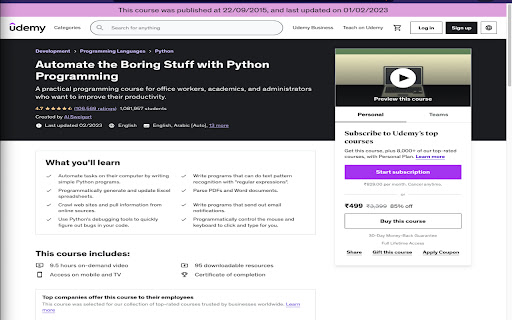

🎉 Enhance Your Udemy Experience with This Extension! 🚀 How to Use: 1. Install the extension. 2. Visit any Udemy course page. 3. The extension will show a 📅 "Published Date" and "Last Updated Date" banner at the top! 🤔 Tired of Misleading "Last Updated" Dates? Do you often visit Udemy course pages and think: "The 'Last Updated' date looks recent, but the course content feels OLD"? ✨ This extension solves that problem! It displays the original publish date of the course 🕰️ so you can decide if the course is still relevant for your needs. 💡 Pro Tips: - 🔍 Always read the course description carefully - 🎥 Watch the intro video to gauge content quality - 📊 Compare publish date with last update to assess course maintenance ⚡ Make smarter decisions with this simple tool! Download now and take control of your learning experience. 🌟 📝 Recent Updates: ✅ Fixed compatibility with latest Udemy site changes ✅ Improved banner reliability and performance ✅ Updated popup interface with more details 👨💻 About the Developer: Made with ❤️ by amanks.dev

Udemy - Improved Course Library
Adds current ratings and other detailed information to all courses in your Udemy library. This extension adds additional course information to the courses in your Udemy library. It uses the Udemy API to retrieve additional information about the courses in your library and adds the following elements to each course: • The total runtime • The rating • The total number of ratings • The number of enrolled students • The date of the last update • Info about available subtitles Additionally it displays a thin colored strip at the bottom of the course card, from red (3.5 stars and below) to green (5 stars). This should give you a good idea of which course is worthwhile and which you might want to archive instead. Note: If a course has stopped enrollment and is no longer publicly visible, no stats are available for that course. If you like the extension, I'd appreciate a review! ★★★★★ This extension is open-source: https://github.com/tadwohlrapp/udemy-improved-course-library Udemy is a trademark of Udemy, Inc. This browser extension is not a product of Udemy, Inc. and is not affiliated with Udemy, Inc. in any way.

Udemy Remaining Time Calculator
Udemy Remaining Time Calculator: Optimize Udemy learning with real-time progress updates. Features: • See time left for entire course. • Track section progress effortlessly. • Works with any Udemy business account • Ultra lightweight Chrome extension focused only on essentials. No tracking, no analytics, no unnecessary background work. Just fast and clean performance. • Fully open source and community driven. If you have an idea, improvement, or want to contribute, feel free to jump in and help shape the project together 💙 Hey everyone! 🌟 Exciting news! 🚀 We've got an awesome extension to share with you - it's all about keeping track of your Udemy course time! 🕒✨ But guess what? It's not just an extension, it's a cool, open-source project that's ready to grow with YOUR help! 🌱💻 Join us on this amazing journey by contributing to the project on GitHub: https://github.com/edenizk/udemyRemainingTimerExtention🤝🌐 Your coding skills are super welcome, but don't worry if coding isn't your thing! 🙌💡 Drop your fantastic ideas here: https://github.com/edenizk/udemyRemainingTimerExtention/issues/new 🚀🌈 Let's make this extension even more awesome together! 🚀🎉 #OpenSourceMagic ✨🌟 Features: Real-Time Section Progress: Keep tabs on your course advancement with the ability to see the exact time remaining for the current section. Stay in control and make informed decisions on your study strategy. Holistic Course Countdown: Plan your learning journey effectively by accessing the total time left for the entire course. Gain a comprehensive overview and manage your schedule efficiently to meet your academic goals. Visual and Text generated by AI 🙂 Disclaimer: This extension is not developed or endorsed by Udemy. It is an open-source tool created independently. This extension is not affiliated with, supported by, or connected to Udemy in any way. Be aware that any issues or concerns related to its functionality are the sole responsibility of the extension's developers. If you have any questions, concerns, or if you wish to request the removal of this extension, please contact us via email at edenizk.work.sub@gmail.com. We will promptly address your inquiry and take appropriate action.

Udemy Enhancer
A useful tool to improve the user experience of Udemy. This extension offers features to improve your user experience on the Udemy website. Attention: These features only appear on the lecture page. Current features: 1. The user can extend video size to fill the entire webpage, similar to Youtube's theater mode. 2. Picture-in-Picture 3. The user can use the mouse to capture an area and then take a screenshot of the selected area. Press Ctrl+C to cancel. 4. The user can adjust the video play speed. To set the minimum and maximum speed and the slider interval, right-click the extension icon and select the option page to update. Udemy may update its code and make the extension features not working. If you encounter any issues or want to contribute to the extension, please visit the repository and open an issue. https://github.com/a90100/udemy-enhancer If this extension greatly improves your experience, please consider giving it a five-star review! If you encounter any issues, please let me know. Thank you!

Udemy Time Remaining
Chrome extension that modifies the Udemy course page, displaying the time remaining after each section Supercharge your time management within the Udemy platform! Expand the Udemy interface to display for each section and lecture, how much time is left to finalize the course. The extension also visually marks the section progress with progress bars, and highlights which sections have already been completed, so that they can be easily distinguished, in case you go through the course in a non-linear order. Additionally it adapts to the playback speed updating the times accordingly. This extension is designed to seamlessly integrate with, and react to the Udemy interface. Features: * Display the time-based course progress inside Udemy's progress popup. * Display accurate course, section, and lecture durations. * Display remaining time for each section, and lecture. * Display remaining time for each section and lecture, considering the user progress. * Display remaining time for each section and lecture, considering the playback speed. * Display a progress bar for all sections or just the current section. * Highlight completed sections in a distinguishable color. * Fully configurable settings, so that you can toggle or tweak all the features. The way this extension works is, for every section and lecture, using that section or lecture as the point of reference, it displays how much time is left on the section and the course, from that reference point downwards. Considering or not considering the completed lectures underneath (in case you are completing the course in a non-linear manner) depending on whether or not that feature is enabled. Otherwise, if you are just interested in your current progress, and time left in the entire course, you can either check it any time, by checking Udemy's progress popup, or enable the "focus on current lecture only" mode, which will display the time left in the course and section, only in the current lecture. You can read the release notes in the Extension settings popup, to know more about these features. Notes: * This extension does not currently work with Udemy for business, it only supports standard Udemy. If you're a business interested in the extension, and can provide access to the Udemy for business product, please reach out to us, and we'll be happy to implement support for it. * Please bear in mind that Udemy's native interface rounds the estimated durations of the lectures, but this extension calculates the remaining times based on the real accurate estimated durations (to the seconds) of the lectures as reported by Udemy's API. The extension can optionally show the real estimated duration of each lecture and section through the extension settings. * The extension underwent a massive update in order to make it more functional. If you detect any issues with it please let us know in the email indicated at the Extension Details section below, or using the extension settings' "contact us" link, so that we can address it. Dislaimer: * This extension is not associated with, nor endorsed by Udemy. All product and company names are the registered trademarks of their original owners. The use of any trade name or trademark is for identification and reference purposes only and does not imply any association with the trademark holder of their product brand.
