
gdpfncddojccckefniplicdpceecfkmo


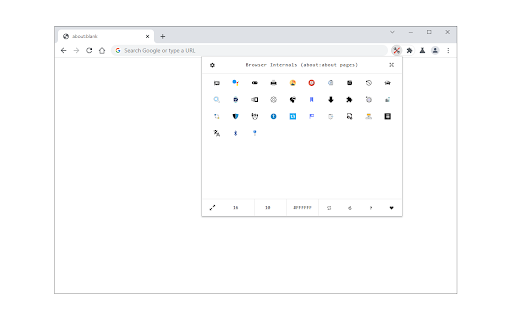
Browser Internals (formerly known as Under the Hood) is a browser extension to give you access to all internal pages (i.e. about:about) in your browser. To operate with this addon, just open the toolbar popup and click on the desired icon. Left-click will open the page in a new inactive tab, and the middle click opens the page in an active tab. Few features: 1. Icons are drag-able. Simply drag and drop icons to your desired position. 2. Expand button shows all the hidden icons. 3. Icon size and popup background color can be changed through the settings toolbar. 4. You can adjust the popup size through the settings toolbar. 5. All settings are auto-saved to the memory. Note: to report bugs, please fill the bug report form on the addon's homepage (https://mybrowseraddon.com/under-the-hood.html).

Page to Popup
See your desired website in the toolbar popup. With the Page to Popup extension, you can easily see your desired website in the browser's toolbar popup (mobile or desktop views). Once the addon is installed, please open the options page and add the desired website (the complete URL). One desktop view and five different mobile views are available to choose from (iOS, Android, Windows Phone, Tizen, and Firefox OS). You can also adjust the popup size (width and height) and block ads within the popup. To report bugs, please fill out the bug report form on the addon's homepage (https://mybrowseraddon.com/site-to-panel.html).

WebAPI Blocker
Easily block (nullify) undesired Web API(s) and improve your privacy. WebAPI Blocker is a lite addon that lets you easily block and nullify a desired web API. Simply open the toolbar popup UI and choose an API from the drop-down list (top left side). Then, click on the (+) button to add the item to the API list. Once you add an item, you can remove it from the list by clicking on the "remove" button next to each item. Moreover, you can deactivate an item by removing the checkmark from the list. There is also a "reload" button at the top toolbar to reload the active tab. On the right side, you can add desired domains to the whitelist table. Please enter a domain name in the input field and then click on the (+) sign to add it to the table. To remove a domain, please click on the cross sign next to each item. Note: please be careful when you block (nullify) a web API. Because certain API(s) may cause websites to not fully load or even make them unresponsive. Therefore, please do enough research before disabling an API. To report bugs, please fill the bug report form on the addon's homepage (https://mybrowseraddon.com/webapi-blocker.html).

Privacy Guard & Manager
Easily control settings in your browser to improve your privacy. Privacy Guard & Manager is a browser extension that helps you increase your privacy by adjusting a few privacy settings in your browser. Please open the toolbar popup UI to see the list of available settings (around 15 items in total depending on your browser version). Each set has a drop-down list; click on the list to choose the desired value for that item. Once an item is changed, it will be saved to the memory automatically. Moreover, when you hover on any item within the toolbar popup, a description is shown at the bottom of the UI. Please read this description before changing any option. Note: you may see less/more than 15 items in the popup. This is due to the browser or OS version. Some items may become available or be removed in the future updates of your browser. Note: To report bugs, please fill the bug report form on the addon's homepage (https://mybrowseraddon.com/privacy-guard.html).

Shortcuts for Chrome
Navigation menu of Chrome URLs: internal pages of the Google Chrome browser. Chrome browser navigation is optimized for non-technical users. For users who want to inspect what is happening with indexedDB, service workers, or Bluetooth devices etc., this menu brings shortcuts to those hard-to-find, internal browser pages. This menu lists all Chrome URLs in a single, flat list, configurable menu. This application is free and open-source software, built by Chrome users for Chrome users. ✔️ Pin your favorites on top for fast access ✔️ Drag and drop pinned links to change their order ✔️ Discover hidden browser features you never knew existed ✔️ Automatically matches dark/light mode based on browser setting
