
gdldalmlkonchgdhlmiapffchggpgnlg
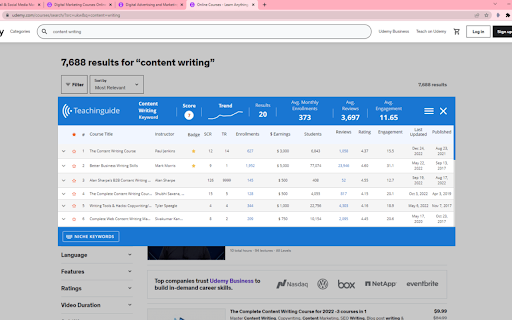

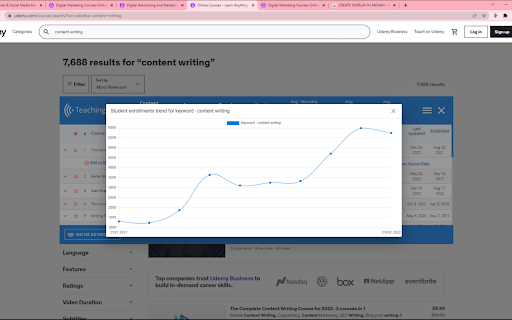
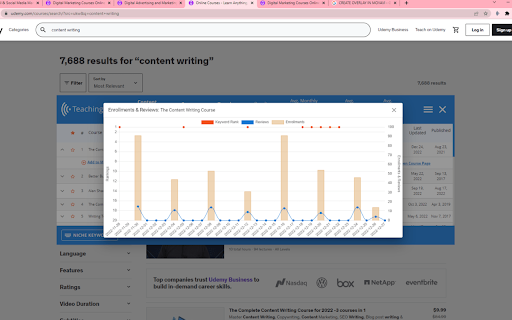
Udemy course research is easy with Teachinguide. Extract ranks, sales volume, course opportunities with a few clicks. The Teachinguide Chrome Extension provides Udemy educators and instructors the ability to research content directly on the Udemy website. The Chrome Extension extracts a great deal of student demand side data, and synthesizes those to render very useful information such as your competitor's earnings, as well and topic, keyword and course ranks, sales volume, course opportunities, trends, visualizations and much more with a few clicks. By using this extension, you agree to Teachinguide’s Terms & Conditions available at https://www.teachinguide.com/terms

Udemy Watcher
Udemy Watcher: Enhance Your Udemy Learning Udemy Watcher is a lightweight browser extension designed to streamline your Udemy learning experience. It simplifies course management, boosts productivity, and improves efficiency. - One-Click Video Management: Instantly mark videos as watched or unwatched. - Picture-in-Picture Mode: Watch lectures in a floating window while multitasking. - Course Progress Tracking: Monitor completed/total minutes with a visual progress bar. - Export Udemy Notes as PDF: Save your Udemy notes as a PDF file for easy access and reference. - Display Course Creation Date: Adds the original "Created At" date to course pages for better relevance assessment. - Keyboard Shortcuts: Control features with quick commands (e.g., mark watched or toggle PiP). - Enhanced UI: Sleek popup for easy navigation. - Multilingual Support: Available in 8 languages, including English, Spanish, and Japanese. - Seamless Integration: Works flawlessly with Udemy’s interface. - Optimized Performance: Reduces distractions for focused learning. Transform your learning journey with Udemy Watcher save time, stay organized, and complete courses faster.

Udemy - Improved Course Library
Adds current ratings and other detailed information to all courses in your Udemy library. This extension adds additional course information to the courses in your Udemy library. It uses the Udemy API to retrieve additional information about the courses in your library and adds the following elements to each course: • The total runtime • The rating • The total number of ratings • The number of enrolled students • The date of the last update • Info about available subtitles Additionally it displays a thin colored strip at the bottom of the course card, from red (3.5 stars and below) to green (5 stars). This should give you a good idea of which course is worthwhile and which you might want to archive instead. Note: If a course has stopped enrollment and is no longer publicly visible, no stats are available for that course. If you like the extension, I'd appreciate a review! ★★★★★ This extension is open-source: https://github.com/tadwohlrapp/udemy-improved-course-library Udemy is a trademark of Udemy, Inc. This browser extension is not a product of Udemy, Inc. and is not affiliated with Udemy, Inc. in any way.

Udemy Time Remaining
Chrome extension that modifies the Udemy course page, displaying the time remaining after each section Supercharge your time management within the Udemy platform! Expand the Udemy interface to display for each section and lecture, how much time is left to finalize the course. The extension also visually marks the section progress with progress bars, and highlights which sections have already been completed, so that they can be easily distinguished, in case you go through the course in a non-linear order. Additionally it adapts to the playback speed updating the times accordingly. This extension is designed to seamlessly integrate with, and react to the Udemy interface. Features: * Display the time-based course progress inside Udemy's progress popup. * Display accurate course, section, and lecture durations. * Display remaining time for each section, and lecture. * Display remaining time for each section and lecture, considering the user progress. * Display remaining time for each section and lecture, considering the playback speed. * Display a progress bar for all sections or just the current section. * Highlight completed sections in a distinguishable color. * Fully configurable settings, so that you can toggle or tweak all the features. The way this extension works is, for every section and lecture, using that section or lecture as the point of reference, it displays how much time is left on the section and the course, from that reference point downwards. Considering or not considering the completed lectures underneath (in case you are completing the course in a non-linear manner) depending on whether or not that feature is enabled. Otherwise, if you are just interested in your current progress, and time left in the entire course, you can either check it any time, by checking Udemy's progress popup, or enable the "focus on current lecture only" mode, which will display the time left in the course and section, only in the current lecture. You can read the release notes in the Extension settings popup, to know more about these features. Notes: * This extension does not currently work with Udemy for business, it only supports standard Udemy. If you're a business interested in the extension, and can provide access to the Udemy for business product, please reach out to us, and we'll be happy to implement support for it. * Please bear in mind that Udemy's native interface rounds the estimated durations of the lectures, but this extension calculates the remaining times based on the real accurate estimated durations (to the seconds) of the lectures as reported by Udemy's API. The extension can optionally show the real estimated duration of each lecture and section through the extension settings. * The extension underwent a massive update in order to make it more functional. If you detect any issues with it please let us know in the email indicated at the Extension Details section below, or using the extension settings' "contact us" link, so that we can address it. Dislaimer: * This extension is not associated with, nor endorsed by Udemy. All product and company names are the registered trademarks of their original owners. The use of any trade name or trademark is for identification and reference purposes only and does not imply any association with the trademark holder of their product brand.

Udemy Price Tracker
Track Udemy course prices and get notified of discounts 📊 Track Your Favorite Courses Keep an eye on Udemy course prices with our powerful price tracking extension. Simply browse Udemy, find a course you're interested in, and click the track button to start monitoring its price. 🚀 How It Works: 1. Install the extension 2. Browse Udemy courses 3. Click "Track Price" on courses you're interested in 4. Get notified when prices drop 5. Never miss a great deal again! ⚙️ Smart Features: • Intelligent price monitoring system • Clean and intuitive interface • Minimal resource usage • Privacy-focused design • Regular updates and improvements 💡 Perfect For: • Students looking for course deals • Lifelong learners • Professional development • Skills enhancement • Budget-conscious learners 📌 Note: Prices on Udemy can change frequently. Our extension helps you catch the best deals when they happen, saving you money on your learning journey. 🆓 100% Free: This extension is completely free to use and always will be. No hidden fees, no premium features, just pure value for the learning community. 🔧 Technical Details: • Lightweight extension • Minimal browser impact • Regular performance updates • Compatible with all Udemy courses • Works with Chrome 88+ 💪 Support: Having issues or suggestions? Contact our support team for quick assistance. 🌐 Updates: We regularly update the extension to ensure compatibility and add new features based on user feedback. Join thousands of smart learners who never miss a Udemy course deal. Install Udemy Price Tracker today and start saving on your education! 📚✨
