
gdbjlnocejnbinagihejclkjipfaigna
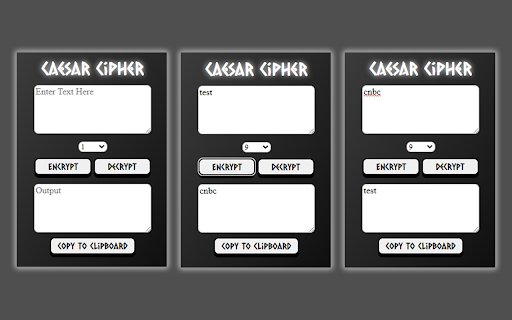
Encrypts and decrypts messages using the Caesar Cipher encryption technique. The Caesar Cipher, named after Julius Caesar, is an ancient encryption/decryption technique that shifts the alphabetical position of every letter in a message by a specified amount, or key. Encrypted messages can be sent by the sender to other receivers to be decrypted as long as the two parties agree on a numbered key first. Although a very insecure method of encryption by today's standards, users can have fun sending and receiving encrypted messages using this extension.

MarkBook
Revolutionize your browsing experience with our cutting-edge Chrome extension! Say goodbye to the hassle of traditional bookmarks and welcome a new era of effortless organization. This innovative tool allows you to mark tabs and easily search through them, not only by URL or title but also by the captivating content within each article. Upgrade your browsing today!

BBR Helper
This provides some advanced stats (game score, simple player rating and game box plus-minus) on multiple pages for NBA, WNBA, G-League, international leagues and college basketball. Including: - average stats by season on the player page - average stats by playoff series on the player page - average stats by player on the team_season page - average stats by player on the team_player page - average stats by player on the season_player page - single game/half/quarter stats by player on the game_boxscore page - single game and average stats on the gamelog and split pages - top 5 and top 20 average stats players on the season page - top 20 average stats players on the team_season page - top 20 average stats seasons rankings on the player page - top 50 career stats rankings on the player page - multiple stats rankings on the leader page - player awards column on team season page gBPM = (-0.55 * fga + 1.04 * fg3 + 1.39 * fg - 0.25 * fta + 0.79 *ft + 0.17 * orb + 0.27 * drb + 0.24 * (trb - orb - drb) + 1.34 * stl + 0.43 * ast + 0.64 * blk - 0.34 * pf - 0.95 * tov) / g """ , where orb is treated as 0.3 * trb and drb is treated as 0.7 * trb approximately when stats are not complete in early years.

WHAM! Was Human or Automated Message?
Mark those "spammers" easily so they don't spread all over the network. It's very easy to use. If you think the message you receive is spam, just report it. If several people have reported it, it will appear as reported, so you will know that this message has been sent to hundreds of people. The icons are only available on those people who wrote to you first, and only on their first messages. Claim a clean network, where, if they want to sell you something, they don't treat you like a flyer in a mailbox. It works even with similar messages, even if you change the name, or the company name, or some phrase (which is what mass mailing bots allow you to do), Wham detects similar messages when someone reports them.

Today's Dollars - Inflation Calculator
Today's Dollars💰 is an inflation calculator that allows you compare the purchasing power of a specific dollar amount across different years. **Updated with March 2026 data** Features: - Simple and intuitive interface 👌 - Enter dollar amount, including decimals 💲 - Select the base year and target year; data going back to 1913 📅 - Calculate the equivalent value based on the CPI-U inflation data from BLS* 🔢 - Copy the result to your clipboard with just a single click 📄🖱️ - Save your results to the collapsible Calculation History panel 🔖 - Light and Dark theme support 🌞🌙 - Inputs, theme, calculation history is saved even when extension is closed. ✅ - Clear inputs and history items easily ❌ How to Use: 1. Install the Today's Dollars extension from the Chrome Web Store. 2. Open the extension popup by clicking on the extension icon in the toolbar. 3. Enter the dollar amount in the amount field. 4. Select the base year and target year from the dropdown lists. 5. As you type or select years, the result amount will automatically be displayed. 6. Click the copy icon to quickly copy the result to your clipboard. 7. Click flip years button to flip calculation. 8. Click save button to save the result to the history panel. 9. Click the history icon in the bottom right corner to see Calculation History data. 10. Choose between a light or a dark theme from the toggle on the top-right corner. 11. The reset icon at the top-left corner will clear your previous selections, and amount, but keep your theme preference. What does this calculation mean? 🤔 Let's use the example of $35 and the years 1979 and 2025. Due to inflation and changes in the cost of living, the amount of goods or services that $35 could buy in 1979 would require $153.15 in 2025 to purchase the same quantity of items. 😮 If we reverse the years in that calculation (2025 and 1979), what $35 could buy in 2025 would have been roughly equivalent to what $8 could buy in 1979. So even though you have $35, it's like having only $8 in terms of what you can actually buy with it. 💸 Support me. I don't collect data. I don't have ads. If you feel giving, buy me a coffee :D https://buymeacoffee.com/ashhhh * Disclaimer: 1. Today's Dollars is designed to calculate the inflation-adjusted value of amounts in USA dollars. Please note that the calculations and results are based on USA inflation data (CPI-U) from the Bureau of Labor Statistics. For accurate currency conversions and specific regional considerations, please consult appropriate financial sources or tools specific to your region.
