
gcknndmmgefhobakfldhcogeleiodaba
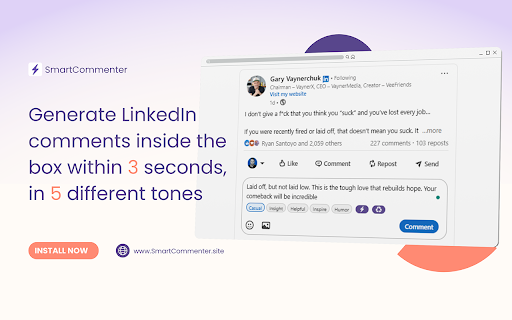


Write natural Linkedin comments faster using a simple comment generator extension built for creators and founders SmartCommenter is a LinkedIn comment generator extension that helps you write natural comments and replies faster, directly inside LinkedIn. It’s built for creators, founders, marketers, and professionals who want to stay visible in conversations without overthinking what to say or relying on generic replies. Commenting consistently is one of the most effective ways to increase reach on LinkedIn, but it often gets skipped because it takes time and mental effort. This LinkedIn comment generator extension removes that friction by helping you draft context-aware comments you can review, edit, and post yourself, so your engagement stays thoughtful and human. 👉 What SmartCommenter helps you do SmartCommenter assists you while you’re writing comments or replies on LinkedIn by generating short, relevant suggestions based on the context of the post or comment. You stay in control at all times. With SmartCommenter, you can: - Draft LinkedIn comments faster without starting from scratch - Reply to comments on your own posts with better context - Engage consistently without spending too much time thinking - Choose a tone that fits the conversation - Stay active on LinkedIn even on busy days This extension is designed to support real engagement, not replace it. SmartCommenter is not an automation bot and does not perform actions on your behalf. - Automatically post comments - Run background actions - Scrape LinkedIn profiles or data - Send messages or connection requests - Interact with LinkedIn without your input Every comment is generated only when you ask for it, and nothing is published unless you choose to post it yourself. 👉 Choose the right tone for every comment Not every LinkedIn conversation sounds the same. SmartCommenter lets you select a tone before generating a comment, such as: This helps your comments feel natural and appropriate instead of repetitive or templated. 👉 Built for real LinkedIn engagement Many people focus on posting content, but meaningful comments often drive more reach, profile visits, and conversations. 👉 It’s especially useful if you: - Want to engage daily but don’t know what to say - Overthink replies and comment late - Skip commenting because it feels time-consuming - Want visibility without posting every day - Works directly inside LinkedIn Once installed, SmartCommenter appears inside LinkedIn’s comment and reply boxes. - There’s no separate dashboard, no learning curve, and no external site required. - You stay on LinkedIn and work within the interface you already use. - You can start using the extension immediately after installation. Getting started with SmartCommenter takes less than a minute. - Install the SmartCommenter Chrome extension - Open LinkedIn in your browser - Click inside any comment or reply box - Choose a tone and generate a comment - Review, edit, and post when ready - No account connection is required. - No credit card required - No login required - No extra dashboard is required - Save time on everyday engagement: Instead of spending several minutes thinking about each reply, SmartCommenter helps you draft comments in seconds, making daily engagement easier. - Reduce mental fatigue: Having a starting point removes the pressure of writing from scratch and makes commenting feel lighter and more approachable. - Stay consistent without burnout: Consistency matters on LinkedIn. This LinkedIn comment generator extension helps you maintain visibility without turning engagement into a chore. - Keep your voice natural: You review and edit every comment before posting, so your voice stays authentic and personal. - Boost productivity during busy days: Even a few minutes on LinkedIn can be productive when you don’t have to overthink replies. 👉 Free and paid plans SmartCommenter offers a free plan so you can try the extension before upgrading. Free plan: Limited daily comment generations Pro plan: Higher daily limits for active users Business plan: Extended limits for heavy usage You can upgrade or downgrade at any time. 👉 Privacy and data usage SmartCommenter is built with privacy and transparency in mind. - Comments are generated only when requested - No unnecessary personal data is collected - No data is sold or shared with third parties - The extension runs only on pages you interact with For more details, please review the Privacy Policy on our website. 1. Is SmartCommenter allowed on LinkedIn? SmartCommenter is designed to support manual engagement. It does not auto-post comments, scrape data, or perform actions on your behalf. You remain in control of every comment you submit. 2. Does SmartCommenter post comments automatically? No. SmartCommenter only generates suggestions. Nothing is posted unless you choose to submit it yourself. 3. Will my comments sound generic? SmartCommenter generates context-aware suggestions and lets you choose a tone. You can also edit the comment before posting, which helps keep your replies natural and relevant. 4. Do I need to connect my LinkedIn account? No account connection is required. The extension works locally in your browser when you interact with LinkedIn pages. 5. Is my data stored or sold? SmartCommenter is built with privacy in mind. Comments are generated only when requested, and no unnecessary personal data is sold or shared. 6. Who should use SmartCommenter? SmartCommenter is helpful for LinkedIn creators, founders, marketers, and professionals who want to engage more often without spending excessive time writing comments. If you want a simple way to comment faster on LinkedIn without sounding generic or rushed, SmartCommenter can help. Install the extension and make LinkedIn engagement easier, one comment at a time.

LinkedIn Comment Assistant
Suggests human-like, relevant LinkedIn comments based on post text, tone, and length. 💬 Engage on LinkedIn in seconds — AI-powered, personalized comments with your tone, length, and style. ⚡ One-click comment generation right inside your LinkedIn feed 🎯 Custom tone, length, and optional key message for every reply 🤖 Powered by your own OpenAI GPT model, you control privacy & cost ✨ Natural, human-like responses with light emoji use for personality 🖱️ Separate generate button for each post with real-time loader 🌐 Unlike other extensions doesn't take away the control to auto post spammy comments 🔒 Fully client-side — keeps your LinkedIn data private LinkedIn Comment Assistant – AI-Powered, Personalized Comment Suggestions Make your LinkedIn engagement smarter, faster, and more impactful. This Chrome extension uses ChatGPT to instantly generate short, human-like, and context-relevant comments for any LinkedIn post — directly inside your feed. 🚀 What It Does The LinkedIn Comment Assistant adds a 💬 Generate Comment button to every post in your LinkedIn feed. Click the button, and the extension: Reads the post content (without storing or sharing it externally beyond your own API request). Sends it to OpenAI’s ChatGPT API using your own API key for privacy and control. Returns a natural, engaging, and emoji-enhanced comment tailored to: The tone you prefer (e.g., professional, casual, witty, inspiring). The maximum word limit you choose. An optional key message you want to convey (e.g., agreement, appreciation, a counterpoint). 🔑 Bring Your Own API Key: You control your data — enter your OpenAI API key securely in the extension options. Supports any GPT model you choose (e.g., gpt-4, gpt-4o, gpt-3.5-turbo, etc.). Tone Selector – Choose how your comment sounds: formal, friendly, witty, thought-provoking. Max Words – Keep your comments short and scannable. Emoji Enhancement – Adds relevant emojis naturally to make your comments more human-like (light usage, no spammy overkill). ⚡ Instant On-Page Experience Each post gets its own Generate Comment button. Comment appears right below the post in your feed. Buttons blend with LinkedIn’s design. Comments appear in a subtle card with clean typography. 💡 How to Use 1. Install the extension from the Chrome Web Store. 2. Open the Options page: 3. Paste your OpenAI API key. 4. Select your preferred GPT model. 5. Set tone, max words, and optionally a key message. 6. Save your settings. 7. Go to LinkedIn. 8. On any post, click 💬 Generate Comment. 9. Watch your personalized comment appear in seconds. 🔒 Privacy & Data Your LinkedIn post text is sent only to OpenAI via your own API key. No data is stored or sent to any third-party servers by this extension. You control the API usage and can monitor it directly in your OpenAI account. 🎯 Who Is This For? Busy professionals who want to engage on LinkedIn without spending hours crafting replies. Job seekers aiming to stay visible in their network with thoughtful engagement. 📌 Example Uses Professional Networking – Leave insightful comments to build authority in your field. Community Engagement – Show appreciation and support for your network’s posts. Light Humor – Add friendly, witty remarks with just the right emoji. ⚙️ Technical Highlights Works directly in your LinkedIn feed — no need to copy-paste text into a separate app. Built with: Manifest V3 (Chrome’s latest extension framework). Secure storage for API key & settings using Chrome sync storage. Dynamic prompts — comment generation respects your tone, length, and optional key message. 📥 Installation Notes This extension requires an OpenAI API key (get one from platform.openai.com). You’ll be charged by OpenAI for API usage at their standard rates. Works on Chrome, Brave, and other Chromium-based browsers. 💬 Example Comment Outputs (Generated by the extension, max 30 words, casual tone) Post: "Thrilled to announce our startup just closed Series A funding!" Comment: "Congrats! 🚀 This is just the beginning — can’t wait to see how you scale and shake up the market. 👏" Post: "New blog post: The future of AI in education" Comment: "Fascinating read! 📚 The intersection of AI and learning is where real transformation happens — eager to see how this evolves." ⚠️ Disclaimer This extension is not affiliated with or endorsed by LinkedIn or OpenAI. Use responsibly and respect LinkedIn’s community guidelines.

ReplyWise: AI Comment Generator
Maintain an authentic social presence using AI. Save time, boost your engagement, and stay genuinely you. ReplyWise helps you effortlessly write professional-social network comments that sound like you, even when you're short on time. With just one click, this free Chrome extension generates personalised and context-aware comments for any professional-social network post. Whether you're in sales, recruiting, building your personal brand, or job hunting, ReplyWise simplifies your daily interactions and boosts your engagement, without sacrificing authenticity. 1. Install the Chrome extension (it's completely free). 2. Browse your professional-social network as usual. 3. Click “Comment” under any post and hit the ReplyWise icon, or click the ReplyWise extension in your browser 4. Instantly receive an AI-generated comment tailored to the content. 5. Copy, paste, edit if needed, and post! ReplyWise understands context, matches your personal tone, and helps you engage naturally and consistently. No more staring at the screen wondering what to write. Just genuine, thoughtful comments ready in seconds! - Save custom tone profiles for yourself or your brand and switch personas instantly - Personalised comments reflecting your authentic voice - Multiple comment styles to match your professional personality Try ReplyWise today and start boosting your engagement the smart way.

Sparklin.ai - LinkedIn Comment Generator
Generate engaging, professional AI-powered comments for LinkedIn posts using Sparklin AI

inReply | LinkedIn Comment Assistant
10x your LinkedIn engagement with AI comment suggestions and tone options — right inside your LinkedIn feed. inReply helps you 10x your engagement on LinkedIn by generating smart, personalized AI comments directly within your feed. Whether you're networking, building your personal brand, or just staying active— inReply saves you time while making you sound great. ☑️ Suggests thoughtful, context-aware comments with one click ☑️ Lets you copy and paste AI replies instantly ☑️ Boosts engagement with quality comments in seconds ☑️ Helps you show up consistently and confidently ☑️ Saves time while keeping your voice authentic Perfect for content creators, job seekers, marketers, and professionals who want to grow fast on LinkedIn.
