
dmndghmhppfafffipjlhdmhaaaieoccn
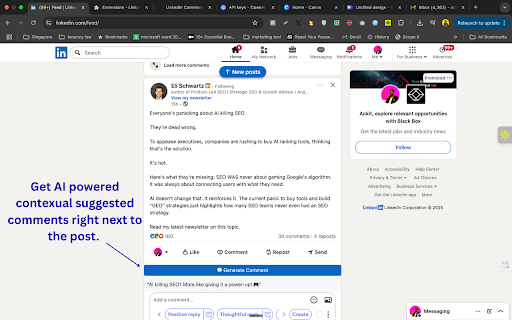


Suggests human-like, relevant LinkedIn comments based on post text, tone, and length. 💬 Engage on LinkedIn in seconds — AI-powered, personalized comments with your tone, length, and style. ⚡ One-click comment generation right inside your LinkedIn feed 🎯 Custom tone, length, and optional key message for every reply 🤖 Powered by your own OpenAI GPT model, you control privacy & cost ✨ Natural, human-like responses with light emoji use for personality 🖱️ Separate generate button for each post with real-time loader 🌐 Unlike other extensions doesn't take away the control to auto post spammy comments 🔒 Fully client-side — keeps your LinkedIn data private LinkedIn Comment Assistant – AI-Powered, Personalized Comment Suggestions Make your LinkedIn engagement smarter, faster, and more impactful. This Chrome extension uses ChatGPT to instantly generate short, human-like, and context-relevant comments for any LinkedIn post — directly inside your feed. 🚀 What It Does The LinkedIn Comment Assistant adds a 💬 Generate Comment button to every post in your LinkedIn feed. Click the button, and the extension: Reads the post content (without storing or sharing it externally beyond your own API request). Sends it to OpenAI’s ChatGPT API using your own API key for privacy and control. Returns a natural, engaging, and emoji-enhanced comment tailored to: The tone you prefer (e.g., professional, casual, witty, inspiring). The maximum word limit you choose. An optional key message you want to convey (e.g., agreement, appreciation, a counterpoint). 🔑 Bring Your Own API Key: You control your data — enter your OpenAI API key securely in the extension options. Supports any GPT model you choose (e.g., gpt-4, gpt-4o, gpt-3.5-turbo, etc.). Tone Selector – Choose how your comment sounds: formal, friendly, witty, thought-provoking. Max Words – Keep your comments short and scannable. Emoji Enhancement – Adds relevant emojis naturally to make your comments more human-like (light usage, no spammy overkill). ⚡ Instant On-Page Experience Each post gets its own Generate Comment button. Comment appears right below the post in your feed. Buttons blend with LinkedIn’s design. Comments appear in a subtle card with clean typography. 💡 How to Use 1. Install the extension from the Chrome Web Store. 2. Open the Options page: 3. Paste your OpenAI API key. 4. Select your preferred GPT model. 5. Set tone, max words, and optionally a key message. 6. Save your settings. 7. Go to LinkedIn. 8. On any post, click 💬 Generate Comment. 9. Watch your personalized comment appear in seconds. 🔒 Privacy & Data Your LinkedIn post text is sent only to OpenAI via your own API key. No data is stored or sent to any third-party servers by this extension. You control the API usage and can monitor it directly in your OpenAI account. 🎯 Who Is This For? Busy professionals who want to engage on LinkedIn without spending hours crafting replies. Job seekers aiming to stay visible in their network with thoughtful engagement. 📌 Example Uses Professional Networking – Leave insightful comments to build authority in your field. Community Engagement – Show appreciation and support for your network’s posts. Light Humor – Add friendly, witty remarks with just the right emoji. ⚙️ Technical Highlights Works directly in your LinkedIn feed — no need to copy-paste text into a separate app. Built with: Manifest V3 (Chrome’s latest extension framework). Secure storage for API key & settings using Chrome sync storage. Dynamic prompts — comment generation respects your tone, length, and optional key message. 📥 Installation Notes This extension requires an OpenAI API key (get one from platform.openai.com). You’ll be charged by OpenAI for API usage at their standard rates. Works on Chrome, Brave, and other Chromium-based browsers. 💬 Example Comment Outputs (Generated by the extension, max 30 words, casual tone) Post: "Thrilled to announce our startup just closed Series A funding!" Comment: "Congrats! 🚀 This is just the beginning — can’t wait to see how you scale and shake up the market. 👏" Post: "New blog post: The future of AI in education" Comment: "Fascinating read! 📚 The intersection of AI and learning is where real transformation happens — eager to see how this evolves." ⚠️ Disclaimer This extension is not affiliated with or endorsed by LinkedIn or OpenAI. Use responsibly and respect LinkedIn’s community guidelines.

LinkedIn Post Formatter
Format LinkedIn text with bold, italic, underline, bullet points, and emojis using a selection toolbar. Powerful formatter for font on websites with rich-text inputs like: Linkedin YouTube, etc. Apply bold letters, italic, underline, strikethrough, exotic fonts, glyphs instantly. Control text boldness, bolding letters, bolding words without breaking linkedin format. One-click clear all formatting to reset your text editor. Advanced linkedin formatter for daily creators 1️⃣ Built specifically for linkedin posts formatting, and headline optimization. 2️⃣ Work on other websites as well: YouTube, Notion, etc! 3️⃣ Works as font and publication generator combined. 4️⃣ Reliable linkedin formatting without broken boldtext or copy hacks. 5️⃣ Instant preview of your text on mobile/desktop Shortcuts built for speed 🔸 Use shortcut to bold text with bold keyboard support. 🔸 Built-in linked-in shortcut system for faster editing. 🔸 Optimized formater flow inside the editor for your posts. Live counters for clean structure ♦️ Track characters, words, emojis, tags, hashtags in real time. ♦️ Essential for post formatting. ♦️ Prevent cutoff issues before publishing. True linked-in post preview 🌐 See exactly where your content gets cut with “…more” after three lines. 🌐 Built-in hook preview to improve scroll-stopping openings. 🌐 Accurate post preview, not guesswork. Device-width awareness ◆ Toggle mobile and desktop widths instantly to optimize text format for every feed layout. ◆ Prevent broken headline on mobile. Headline-first writing tools ① Craft headline for linkedin with spacing and emphasis control. ② Improve headline readability using linkedin font options. ② Test multiple headline variants instantly. Posting, tagging, hashtag helpers 🔺 Learn content moderation directly in the editor. 🔺 Built-in guidance on tagging your connections properly. 🔺 Practical tips on effective platform usage while posting. Safe bolding and formatting 💠 Reliably make text bold without unicode corruption. 💠 Clean linkedin bold text that survives paste. 💠 Consistent bolding words across content. Designed for growth-focused creators 🔸 Ideal formatter for daily publishing faster than manual workflows. 🔸 Serious content formatting without spammy effects. 🧩 Complete content editor replacement layer ♦️ Acts as a seamless enhancement for formatting. ♦️ Simplifies formatting and structure control for you. ♦️ Removes friction from your daily publishing workflow. Precision control. Fine-tune format, capitalization, uppercase, lowercase, lists, numbered list. Maintain visual hierarchy in your content. Clear intent through controlled boldness of sentences. Built for consistency at scale. Works for solo creators, founders, recruiters, marketers. One formatter to standardize formatting. Predictable results across all content. ❓ How to make bold text? 🔹 Use shortcut or toolbar to bold text or bold keyboard instantly. 🔹 Works cleanly for any kind of characters in your content. ❓ Does it break linkedin format? 🔹 No, formatting stays compliant with platform formatting rules. 🔹 Safe for creating posts and linked in headline usage. ❓ What is the best linkedin font generator? 🔹 Built-in generator handles bold, italic, exotic fonts. 🔹 Designed specifically for platform limitations. ❓ Does it replace the linked in editor? 🔹 It enhances the editor without conflicts. 🔹 Acts as a smarter text formatter layer. ❓ How to bold/italicize/etc text? 🔹 Select content and apply bolding/etc words directly. 🔹 No copy-paste tricks, simle in-place formatting. ❓ How to post on linkedin correctly? 🔹 Preview, format, then paste with confidence. 🔹 Avoid broken formatting. ❓ How to tag someone on linkedin? 🔹 Use built-in tagging tips and counters. 🔹 Prevent broken mentions in your text. ❓ How to use # on linkedin? 🔹 Track hashtags live with counters. 🔹 Optimize reach without cluttering linkedin format. ❓ When is the best time to post on Linked-in? 🔹 Test different times using previewed hooks and engagement patterns. 🔹 Early mornings and weekdays usually outperform evenings and weekends. ❓ How to make a post engaging? 🔹 Focus on a strong opening line visible before the “…more” cutoff. 🔹 Use spacing, emphasis, and structure to guide reader attention. 🔧 If you need a formatter, or linkedin post generator This formatter is built to control text format, visibility, and performance-without hacks.

Replya - FREE LinkedIn Comment Generator & AI Assistant
Generate perfect LinkedIn comments instantly with AI. Free comment suggestions, personalized tone, and one-click apply. Generate perfect LinkedIn comments instantly with AI. Free comment suggestions, personalized tone, and one-click apply. 🚀 Free LinkedIn AI Comment Generator - Boost Your Professional Engagement Transform your LinkedIn networking with Replya, the intelligent comment assistant that helps professionals engage authentically and efficiently. Generate perfect, personalized comments in seconds! 🎯 Instant AI-Powered Suggestions * 5 unique comment variations per post * Context-aware responses that understand post content * Personalized to your professional background * One-click apply directly to LinkedIn 🎨 Full Customization Control * 4 Professional Tones: Professional, Enthusiastic, Friendly, Thoughtful * 3 Length Options: Short (5-15 words), Medium (20-35 words), Long (50-60 words) * Optional emojis and engaging questions * Real-time regeneration with updated filters 👤 Smart Personalization * Uses your job title, company, and expertise * References poster by name automatically * Builds on your existing draft comments * Maintains your authentic professional voice ⚡ Seamless LinkedIn Integration * Native UI that matches LinkedIn’s design * Replya logo "R" button appears right in comment box * Smart caching for instant re-access * Works on all LinkedIn posts Perfect For: ✓ Job seekers building their network ✓ Professionals growing their LinkedIn presence ✓ Sales & marketing teams engaging leads ✓ Content creators responding to audience ✓ Executives maintaining thought leadership ✓ Anyone who wants thoughtful comments faster How It Works: 1. Click the Replya logo "R" button in any LinkedIn comment box 2. AI analyzes the post and generates 5 tailored suggestions 3. Customize tone, length, and style preferences 4. Click “Apply” to insert into comment field 5. Edit if needed and post! Why Choose Replya? 🆓 Completely Free - No hidden costs or premium tiers 🚀 Saves Time - Comment 10x faster than writing from scratch 🎯 Increases Engagement - Professional comments get more responses 💼 Career Growth - Build your network and visibility 🤖 AI-Powered - Leverages latest language models ⚡ Lightning Fast - Generate suggestions in 2-3 seconds Start Engaging Smarter Today! Install Replya now and experience the easiest way to boost your LinkedIn presence. Join thousands of professionals who are commenting with confidence and building stronger professional networks.

Reply Wizard - Customizable AI Reply Generator for Twitter and LinkedIn
Reply Wizard listens to your prompt! Grow your socials with customisable, engaging replies. Works for X, LinkedIn and YouTube. Reply Wizard listens to your prompt! Grow your socials with customisable, engaging replies. Works for X, LinkedIn and YouTube. The first reply tool you can customise with your own prompts! It takes time to think of cool tweets and interesting replies, right? Well, not anymore! Press Reply Wizard's button and generate engaging replies based on a prompt provided by you. Edit to your liking and post! 🧩 Install Chrome Extension 📧 Verify Your Email ❓ Provide Your Prompt 𝕏 Go on Twitter or LinkedIn 💬 Start Replying! Sentence generator and reworder: 🔄 Have a reply in mind? Write it and Reply Wizard will reword it. ⚡ Generate punchy sentences based on your prompt 🆕 Need a new prompt? Provide it any time and click 'Save' 🫣 Controversial 👏 Applause 🤔 Disagreement 🤬 Angry 🫣 Provocative ✅ Any moood you can think of - just tell the wizard! Works for: Reply Wizard protects your data: ‣ No risk to be flagged for spam: Everything happens in your browser ‣ Security-first ‣ We'll never compromise your privacy ‣ No access to any sensitive browser data, like passwords or cookies ‣ Data we collect is exclusively used to improve Reply Wizard and bring better replies to you! Try it out with 30 replies for free! Do you like our extension? Please leave a review, it helps us a lot. Thank you and happy growing!

ConnectGenie - Linkedin AI Assistant
Linkedin AI assistant, assists in writing captivating posts, personalised comments and connect notes It's Your personal branding AI assistant for LinkedIn, BUT quite different. Different how you may ask? Well, what’s the biggest issue you face when using AI tools to create content? But with ConnectGenie, AI meets persona and your content gets written in YOUR unique writing style! - Intriguing hooks that compel your audience to click on the “See more” button. - Post preview ( To see how your post looks in different device settings before posting). - Thought provoking comments written in your unique conversation style. - Craft persona driven personalised connection request notes which can be either created: - By referring your prospect’s most recent posts or - By analysing your prospect’s unique profile details. - Discover relevant leads right within your LinkedIn feeds by highlighting posts with your niche specific keywords. This not only helps your find leads but also helps you focus your engagement efforts where they belong and enhances your content consumption on the platform. - Write customised job cover letters that highlight your skills and abilities exactly according to Job requirements. - Persona can include both company and individual types: so you can also create content from your company’s Linkedin profile. - Supports multiple leading AI models (including OpenAI GPTS and Claude Sonnet) to generate high-quality LinkedIn posts, comments, and connection request messages. - You can create content in 38 different languages. - A Referral Program lets you earn free connects, more over you can join our affiliate partner program to earn money with us. Note: Connect Genie offers free and premium plans, ensuring a flexible and tailored experience that suits you. Upgrade to unleash the full power of our AI-driven features. See, great opportunities await those who connect strategically. Let ConnectGenie support you in the world of networking and Personal Branding. Install ConnectGenie, today and let the magic begin!
