
gcjpefhffmcgplgklffgbebganmhffje


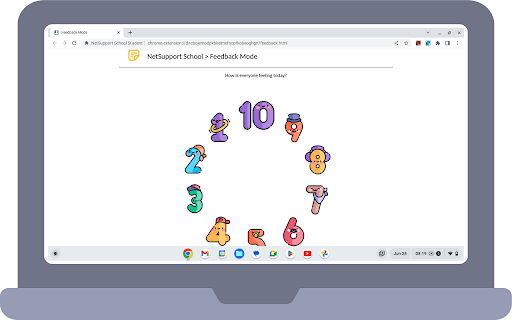


The #1 choice for IT educators worldwide, NetSupport School delivers the tools you need to help maximize the effectiveness of… The #1 choice for IT educators worldwide, NetSupport School delivers the tools you need to help maximize the effectiveness of computer-led teaching and now you can utilize the power of NetSupport School in a Google Chrome environment. For use in your existing NetSupport-managed classroom, the NetSupport School Student extension can be installed on each student machine running the Google Chrome OS. From the teacher's machine (Chrome OS or Windows) you can then connect to each system enabling you to monitor and interact with each student quickly and efficiently. KEY FEATURES: - View a crystal clear thumbnail of each student device in a single view and zoom in to view a larger thumbnail of any selected student Chromebook. - Open a separate view session to discreetly monitor a selected student’s screen and take a closer look at activity – perfect for ensuring students are on task with their learning activities. (The open Browser activity can be viewed in Thumbnail and View modes along with the option to view the full desktop if required.) - The teacher can set objectives and expected outcomes for the current lesson. - Ask students to register at the start of each lesson. - The teacher can show their desktop to students’ Chromebooks to help demonstrate a point or show students how to do a particular task. - Lock the student's mouse and keyboard when instructing. - The teacher can send an instant survey to students during or at the end of a session, helping to instantly capture students’ understanding of a topic. - The Feedback and Wellbeing feature can be used by teachers to gauge how students feel, their confidence with a topic and whether they need extra support. - The teacher can open a discussion session that all or selected students can join, enter their comments and share with the rest of the class. - Send an attention-grabbing message or instruction to each student machine. - Request Help facility - students can send a request for help to the teacher. - Block unauthorized websites. - Use approved websites only. - Block all Internet access. - Launch a website on the student Chromebook. - Block FTP Access. - See details of the website that students are currently viewing. CHROME INCOGNITO MODE: To ensure you retain full visibility of your students' internet use, it is recommended that you ‘disallow’ Incognito Mode in the Chrome OS User Settings via Google Apps for Education. INSTALLATION and PRE-REQUISITES: For a teacher to be able to monitor and interact with their students using Google Chromebooks, the NetSupport Name & Connectivity Server must be installed on a Windows Server; the NetSupport School Tutor app for Google Chrome must be installed on the teacher's Chrome OS machine or for mixed platform classrooms, the NetSupport School Windows Tutor application can also connect to student Chromebooks; and the NetSupport School Student extension installed onto each of the students' Chromebooks. An IT Admin can centrally manage the configuration and deployment of the Student extension within the Google Admin Console. The NetSupport School student for Chrome OS can be used with the existing NetSupport School licences you have already purchased (as long as you have sufficient unused licences). Please visit www.netsupportschool.com/chrome for more information and a simple step-by-step guide to managing your Chrome OS students in the classroom. - Performance and operability enhancements.

IP Address and Domain Information
The Ultimate online investigation tool! See detailed information about every IP Address, Domain Name and Provider. This extension displays detailed information about the current website. The information can be used for online investigation and SEO purposes. See IP info like (IPv4 and IPv6): location, DNS, whois data, routing, domain neighbors, blacklists and ASN information. Including a shortcut to Your public IP Address (myIP info). See domain info like: Alexa en Quantcast ranking, DMOZ info, social media activity, WOT ranking, whois data and PageRank of every domain. See provider info like: BGP, IPv4 subnets, IPv6 subnets, connected providers (peers), hosted nameservers, hosted domains, number of spam hosts, bogon subnets and whois data. ******************* This extension is also available for Firefox, Opera and Safari. https://addons.mozilla.org/en-US/firefox/addon/ip-address-and-domain-info/ https://addons.opera.com/extensions/details/ip-address-and-domain-information/ http://www.macupdate.com/app/mac/39018/ip-address-information

My IP address
Find your IP address! See ISP, location, and DNS. Get IP address change alert and see your history. This extension shows detailed information about your IP address, domain and ISP. For example the ISP name, location, ISP, DNS, whois, routing, hosting, domain neighbors, DNSBL, BGP and ASN information. Functions: -Summary of the network information like ISP, ASN, BGP, subnet, DNS servers and reverse DNS. -Checks to see if your IP address is listed on the most popular DNS based anti-spam databases. -Checks to see if your IP address is listed on the most popular blocklists. -See all official registration information related to your IP address. -Find other websites hosted on the same IP address (domain neighbors). -Shows the geographical location of your IP address. -Summary of the country where your IP address is located.

NetSupport DNA Agent
This DNA Agent extension for Chrome OS is for use with NetSupport DNA (version 4.50 and above), a single, low-cost solution delivering IT Asset Management, Classroom Instruction, Internet Safety and more – with dedicated versions available for schools and corporate enterprises. The extension supports NetSupport DNA’s core desktop management capabilities. When launched within a Chrome Browser, it will interrogate the Chrome OS device to gather key system inventory details and monitor online activity. The data collected is dynamically sent to your local NetSupport DNA Server and is then available for reporting within the NetSupport DNA Management Console. Real-time Monitoring - An Admin or Teacher via the Console can view a real-time summary of all Chrome OS devices. Selected devices can be viewed either in a detailed list view or via real-time thumbnails of each device screen. Internet Metering - A summary of Internet activity via the extension is recorded, including start and finish times for each URL visited and the active time spent on a page. Safeguarding Keyword Monitoring (Education version) – This tool helps schools protect students from being exposed to inappropriate online content. It alerts staff when students type or search for any terms that match with those in the DNA keyword database, providing safeguarding and internet safety indicators for self-harm, bullying, radicalisation, Child Sexual exploitation - and much more. Safeguarding Report a Concern (Education version) - Students can report concerns directly and discreetly to nominated school staff. Hardware Inventory - When the Chrome Browser is launched on a device, an inventory is dynamically sent to the NetSupport DNA Server. Activity - Console operators can see a chronological view of device activity for a selected time period, including triggered Safeguarding phrases. For more information on NetSupport DNA (or to download a full evaluation version of the entire solution) please visit our website. Installation of the NetSupport DNA Agent Extension should be centrally managed via the Google Admin Console. This allows the extension to be force-installed on Chrome OS devices and set to connect to the required DNA Server location. NetSupport is a leading producer of educational and corporate software solutions. With our easy-to-use IT management tools, we help our customers increase productivity and security, as well as save time and money. Updates and fixes in version 1.8.0.0 ----------------------------------------------------- Performance and operability enhancements

Certificate Enrollment for ChromeOS
Request a certificate for your device. Easily request a certificate for your managed Chromebook to access resources in a PKI environment. This extension provides an out-of-the-box certificate enrollment experience for Chromebooks in enterprises with a deployment of Microsoft Public Key Infrastructure based off of Active Directory Certificate Services (ADCS). Once installed on managed devices, this extension will allow users to generate hardware-backed keys and use them to request certificates from ADCS. You can find the deployment and usage manuals under our support pages. By installing this item, you agree to the Google Terms of Service and Privacy Policy at https://www.google.com/intl/en/policies/. Additionally, this extension utilizes open source libraries from third parties that come with their own licenses. Please see below for each library and associated license: Redistribution and use in source and binary forms, with or without modification, are permitted provided that the following conditions are met: * Redistributions of source code must retain the above copyright notice, this list of conditions and the following disclaimer. * Redistributions in binary form must reproduce the above copyright notice, this list of conditions and the following disclaimer in the documentation and/or other materials provided with the distribution. * Neither the name of the {organization} nor the names of its contributors may be used to endorse or promote products derived from this software without specific prior written permission. THIS SOFTWARE IS PROVIDED BY THE COPYRIGHT HOLDERS AND CONTRIBUTORS "AS IS" AND ANY EXPRESS OR IMPLIED WARRANTIES, INCLUDING, BUT NOT LIMITED TO, THE IMPLIED WARRANTIES OF MERCHANTABILITY AND FITNESS FOR A PARTICULAR PURPOSE ARE DISCLAIMED. IN NO EVENT SHALL THE COPYRIGHT HOLDER OR CONTRIBUTORS BE LIABLE FOR ANY DIRECT, INDIRECT, INCIDENTAL, SPECIAL, EXEMPLARY, OR CONSEQUENTIAL DAMAGES (INCLUDING, BUT NOT LIMITED TO, PROCUREMENT OF SUBSTITUTE GOODS OR SERVICES; LOSS OF USE, DATA, OR PROFITS; OR BUSINESS INTERRUPTION) HOWEVER CAUSED AND ON ANY THEORY OF LIABILITY, WHETHER IN CONTRACT, STRICT LIABILITY, OR TORT (INCLUDING NEGLIGENCE OR OTHERWISE) ARISING IN ANY WAY OUT OF THE USE OF THIS SOFTWARE, EVEN IF ADVISED OF THE POSSIBILITY OF SUCH DAMAGE. Redistribution and use in source and binary forms, with or without modification, are permitted provided that the following conditions are met: * Redistributions of source code must retain the above copyright notice, this list of conditions and the following disclaimer. * Redistributions in binary form must reproduce the above copyright notice, this list of conditions and the following disclaimer in the documentation and/or other materials provided with the distribution. * Neither the name of the copyright holder nor the names of its contributors may be used to endorse or promote products derived from this software without specific prior written permission. THIS SOFTWARE IS PROVIDED BY THE COPYRIGHT HOLDERS AND CONTRIBUTORS "AS IS" AND ANY EXPRESS OR IMPLIED WARRANTIES, INCLUDING, BUT NOT LIMITED TO, THE IMPLIED WARRANTIES OF MERCHANTABILITY AND FITNESS FOR A PARTICULAR PURPOSE ARE DISCLAIMED. IN NO EVENT SHALL THE COPYRIGHT HOLDER OR CONTRIBUTORS BE LIABLE FOR ANY DIRECT, INDIRECT, INCIDENTAL, SPECIAL, EXEMPLARY, OR CONSEQUENTIAL DAMAGES (INCLUDING, BUT NOT LIMITED TO, PROCUREMENT OF SUBSTITUTE GOODS OR SERVICES; LOSS OF USE, DATA, OR PROFITS; OR BUSINESS INTERRUPTION) HOWEVER CAUSED AND ON ANY THEORY OF LIABILITY, WHETHER IN CONTRACT, STRICT LIABILITY, OR TORT (INCLUDING NEGLIGENCE OR OTHERWISE) ARISING IN ANY WAY OUT OF THE USE OF THIS SOFTWARE, EVEN IF ADVISED OF THE POSSIBILITY OF SUCH DAMAGE.
