
gcickoimlignpaimgekhajcbogfmbpnc


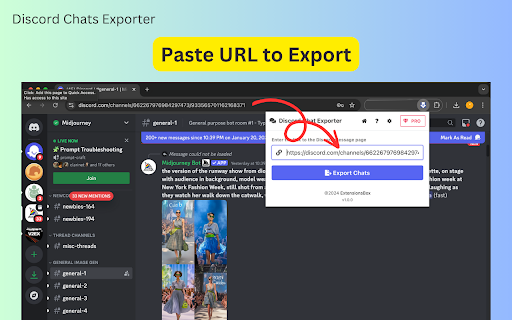

Export Discord chats effortlessly in CSV, JSON, or Excel. Capture messages, attachments, and threads with a friendly interface. Export Discord Chats Easily with Discord Chats Exporter Are you looking for a seamless way to export Discord messages or save your chat history? Discord Chats Exporter is a powerful browser extension designed to help you capture and download chat records from any Discord channel or thread. With just a few clicks, you can export Discord chats in formats like CSV, JSON, or Excel (XLSX). Whether you're archiving conversations, managing community data, or analyzing messages, this tool makes it quick and easy. - Export Discord Messages Automatically: Effortlessly extract all messages from any Discord channel, including sub-threads. Multiple Export Formats: You can save your chat data in CSV, JSON, or Excel (XLSX) formats to suit your needs. - Detailed Content and Attachments: The extension captures core message details, including the content of each message and any attachments such as images, videos, or files. For example, if the message author is "Midjourney Bot," the content could be the prompt, while the attachments would include the generated images. Customizable Settings: You can adjust sorting preferences and select your desired export format directly from the extension's settings menu. User-Friendly Interface: This interface is designed for both beginners and advanced users, and it has an intuitive layout for ease of use. Follow these simple steps to start exporting your Discord chat history: 1. Open any Discord channel or thread you want to export. For sub-threads, make sure to expand them. 2. Click the "Download Chats" button at the top of the page, or copy the channel's URL into the extension's input box. 3. The extension will begin capturing the chat history automatically. 4. Once the process is complete (or paused), click the "Export Discord Chats" button to download the data in your preferred format. 5. Visit the settings menu to customize your export preferences, including sorting options and file formats (CSV, JSON, or Excel). - Save Time: Automates the process of capturing and organizing Discord chat history. - Supports Multiple Formats: Export Discord messages to CSV for structured data, JSON for developers, or Excel for easy analysis. Capture Content and Attachments: This function extracts essential message details such as text content and attachments like images, videos, or files, ensuring no important data is missed. Works with All Conversations: It is compatible with channels and threads, making it easy to capture everything in one go. - Beginner-Friendly: Simple setup and easy-to-use interface for users of all skill levels. Who Is This Extension For? Discord Chats Exporter is perfect for anyone who needs to save Discord chats for personal, professional, or analytical purposes. Whether you're a community manager, researcher, or casual user, this tool ensures you have full access to your Discord data for archiving, sharing, or analysis. Start Exporting Your Discord Messages Today Take control of your Discord data with Discord Chats Exporter. Download the extension now and experience the easiest way to export Discord chat history, complete with message content and attachments for comprehensive data management. Data Privacy Your data stays on your device and is not stored or transmitted to our servers. We prioritize keeping your information secure and confidential. Disclaimer This extension is an independently developed product by ExtensionsBox and has no association with Discord.

Instant Data Scraper
Instant Data Scraper extracts data from web pages and exports it as Excel or CSV files Instant Data Scraper is an automated data extraction tool for any website. It uses AI to predict which data is most relevant on a HTML page and allows saving it to Excel or CSV file (XLS, XLSX, CSV). This tool does not require website specific scripts, instead it uses heuristic AI analysis of HTML structure to detect data for extraction. If the prediction is not satisfactory, it lets the user customize the selections for greater accuracy. This type of scraping technology is much more convenient, because it does not require large user created libraries of scraping scripts, which often become filled with outdated and redundant versions. This means that our scraping method works just as well with small and lesser known websites, as it does with global giants like Amazon. Also, our users do not need to have any coding, json or xml skills! Instant Data Scraper FEATURES: * Detecting data for extraction with AI. * Detecting when dynamic data has loaded. * Delay and maximum wait time customization for desired crawling speed * Support for pagination on websites. * Automatic navigation to next page via buttons or links. * Support for infinite scrolling. * Extracted data preview with copy and paste support. * Data export to Excel spreadsheet or CSV file. * Extracted data column renaming and filtering. This extension is completely FREE. Instant Data Scraper works well in unison with SEO tools, CRM recruiter systems, sales leads management tools or email marketing campaigns. Web scraping and data downloading is made easy with our tool. Furthermore, you have data security and privacy as the scraped data does not leave your browser. Instant Data Scraper USE CASES: * Lead generation for companies and freelancers. * Growth hackers looking for easy ways to collect data. * Recruiters looking for job candidates. * Crawl results from search engines. * Get product pricing data from e-commerce websites. * Amazon sellers, distributors and review analysts. * Get email and addresses and phone numbers from directories. * Get contact info from professional association websites. * Scrape reviews and ratings. * Analyze posts for likes, comments, connection and contacts. * Extract emails and ID from social media profiles. Developer promise: This extension does not contain any malware or spyware beyond standard Google Analytics.

Free WA Chat Export - Download WA Number to Excel/CSV/VCard - WAExport
Export WA chat with media to HTML, save group number & download contact to Excel. Local, Secure, Private. Zero data collected. 🔒We promise never to collect any user data, 100% privacy and security guaranteed. 🌟 Powerful WA Export Features 1. Advanced WA Group Number Export Batch Download WA Group Number from all or selected groups. Includes smart filtering to exclude Admins and exports rich data (Group Name, Public Display Name, Business Status). 2. Comprehensive Chat List Export Extract WA Number from your entire history. Use Country Filters to specific Download WA Number lists (e.g., +1, +86). Includes analytics like "Is Blocked", "Last Message Date", and "Unread Chats". 3. Flexible Contact Saving Efficiently Save WA Contact and Save WA Number. Keep your lists clean by filtering out existing contacts and focusing on new leads. 4. All Major File Formats Support WA Number to Excel (CRM ready), WA Contacts to CSV, and WA Contacts to VCard/VCF for easy import to iOS/Android. 【NEW!】 Ultimate WA Chat Export Tool Looking for the best way to export WA chat history? Our latest update brings a powerful and secure way to export your messages directly from your browser. Whether for business records, legal evidence, or personal archiving, we've got you covered. 🔥 Key Features: ● Export WA chat to Excel, HTML, or CSV: Choose the perfect format for your data. Excel and CSV are ideal for data analysis, while HTML provides a beautiful, readable offline interface. ● Export WA chat with media: Don't lose your valuable files! Seamlessly export images, videos, and documents attached to your conversations. ● Custom Date Range: Only need specific messages? Filter and export chats between specific dates to save time and storage. ● Safe & Fast Export Modes: Choose 'Safe Mode' to minimize account risks and ensure stable data extraction, or 'Fast Mode' for lightning-speed processing. ● Target Specific Chats: Easily select and export individual group or private conversations without exporting your entire inbox. 🎯 Who is this WA Export Tool for? ● Marketers: Download WA phone number lists for campaigns. ● Sales: Save WA Contact details to Excel for lead management. ● Analysts: Analyze activity with fields like "Last Message Date". ● Users: Easily Backup WA Number and save lists to PC. 💡 Why Choose This Extension? Native WA Web lacks a bulk WA Export function. Manually saving a WA Group Member or copying numbers is tedious and time-consuming. This tool bridges that gap. It is the most complete WA Contact Export utility that allows you to extract WA contact details with precision. Stop wasting time—automate your WA Group Number extraction and WA Number to Excel conversion today. We make WA Export simple, secure, and free. Whether for backup or marketing, use this tool to Download WA Group Number lists and extract WA contact details effortlessly. 📝Privacy Note: WAExport respects your privacy. We do not collect personal information or violate WhatsApp's terms of service. We do not request any authorization to user personal data. The extension works solely with the data already available on your device. 🔒 Disclaimer This extension is an independent project and is not affiliated with WhatsApp Inc. "WhatsApp" is a registered trademark of WhatsApp Inc. All WhatsApp Export and WhatsApp Number Export operations are processed locally on your device for 100% privacy and security.

WASendly – WhatsApp Contacts Extractor
Easily export WhatsApp contacts and group members to Excel, CSV, or vCard. WASendly – WhatsApp Contacts Extractor is a free Chrome extension that allows you to easily extract and export WhatsApp contacts and group members in popular formats such as Excel, CSV, and vCard. If you are looking for a reliable WhatsApp contacts extractor, WhatsApp group members extractor, or a simple way to export WhatsApp contacts, WASendly provides a fast and user-friendly solution directly in your browser. Easily extract WhatsApp contacts from your chats and export them to Excel, CSV, or vCard format. Perfect for organizing, backing up, or managing your contact list. Extract WhatsApp group members and export group participant lists to Excel, CSV, or vCard files with just a few clicks. WASendly supports the most commonly used formats: This makes it easy to reuse your WhatsApp contacts across different platforms and tools. WASendly is a completely free WhatsApp contacts extractor. No subscriptions, no hidden payments, and no premium restrictions. No technical knowledge required. Install the extension, open WhatsApp Web, and start exporting contacts and group members instantly. Lightweight and easy-to-use Chrome extension Whether you need a WhatsApp group extractor, a WhatsApp contact export tool, or a simple way to manage WhatsApp contacts, WASendly is designed to get the job done quickly and efficiently. WASendly works locally in your browser and does not store or share your personal data. Your WhatsApp contacts and group information remain under your control. 🎯 Ideal For Anyone looking for a free WhatsApp contacts extractor Install WASendly – WhatsApp Contacts Extractor today and easily export WhatsApp contacts

WA Contacts Extractor & Contact Saver - Wa2in
Export phone numbers from WhatsApp groups, chats, and labels. Download contacts to CSV, Excel, JSON, or VCard files—fast and easy. The easiest way to export WhatsApp contacts from groups, chats, and labels. Download phone numbers to CSV, Excel, JSON, or VCard files in seconds. ✅ GROUPS Export all members from any WhatsApp group you're part of. Perfect for extracting contacts from community groups, business networks, or customer support channels. • See member count before export • Option to include or exclude group admins • Search and filter groups by name ✅ CHATS Export contacts from your entire conversation list. Includes both saved contacts and unsaved numbers you've chatted with. • Export from all chats at once • Extract unsaved phone numbers • Quick access to frequently contacted people ✅ LABELS (WhatsApp Business) Filter and export contacts by your custom WhatsApp Business labels. Organize exports by "Customers," "Hot Leads," "New Orders," or any label you've created. • Perfect for business users • Export by specific labels • Maintain your contact organization ✅ COUNTRIES Export contacts filtered by country code. Target specific regions for localized campaigns or regional contact management. • 200+ countries supported • Filter by multiple countries • See contact count per country • CSV — Universal format for spreadsheets, CRM imports, and data analysis • Excel (.xlsx) — Ready for Microsoft Excel and Google Sheets • JSON — Structured format for developers and database imports • VCard (.vcf) — Import directly to phone contacts, Outlook, or any CRM | Field | Description | |-------|-------------| | Phone Number | Complete international format | | Country Code | +1, +44, +86, etc. | | Country Name | United States, United Kingdom, China | | Saved Name | Contact name you've saved | | WhatsApp Name | Display name set by contact | | Group Name | Source group (for group exports) | | Business Account | Whether it's a WhatsApp Business | | Labels | Assigned WhatsApp Business labels | | Last Message | Timestamp of recent interaction | 🔒 PRIVACY & SECURITY — YOUR DATA STAYS LOCAL ✓ 100% Local Processing — All extraction happens in YOUR browser ✓ No Data Upload — Contacts never leave your device ✓ No Server Storage — We don't see or store your data ✓ No Message Access — Only contact metadata, never message content ✓ No Account Required — Basic features work without registration STEP 1: INSTALL & OPEN Add the extension to Chrome or Edge. Open WhatsApp Web and log in. STEP 2: SELECT YOUR SOURCE Click the extension icon. Choose where to export from: → Groups → Chats → Labels → Countries STEP 3: DOWNLOAD Pick your format (CSV/Excel/JSON/VCard) and download instantly. 👥 WHO IS THIS FOR? 🏢 SALES & MARKETING • Build prospect lists from industry WhatsApp groups • Export leads for CRM import • Create targeted campaign lists 🌍 INTERNATIONAL TRADE • Export contacts from global supplier groups • Filter by country for regional targeting • Manage multi-country client lists 📱 BUSINESS OWNERS • Back up customer contact information • Organize contacts by WhatsApp Business labels • Export for team sharing 🎯 EVENT ORGANIZERS • Collect attendee info from event groups • Export participant lists after registration • Follow up with group members 💾 PERSONAL BACKUP • Keep a copy of your WhatsApp contacts • Export to VCard for new phone setup • Never lose important contacts English, Español, Français, Deutsch, Português, 中文, 日本語, 한국어, العربية, हिन्दी, and 42 more languages. • Wait for WhatsApp Web to fully load before exporting • Use search to quickly find specific groups or countries • VCard format works best for phone contact imports • Large groups may take a few seconds to process Download WhatsApp Contacts Extractor now and simplify your contact management! Part of the Wa2in WhatsApp productivity tools suite.
