
gcbnmkhkglonipggglncobhklaegphgn
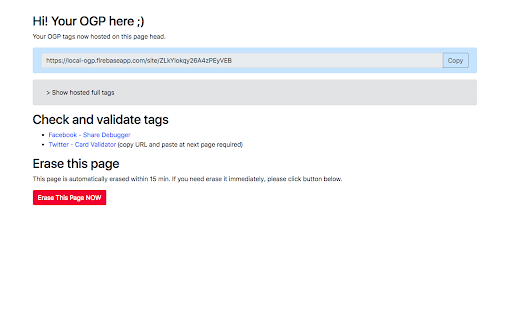
Localhost Open Graph extension allows you to quick, easy and temporary your Open Graph tags hosting. Checking your Open Graph tags on developing environment, it usually not reachable from the Internet, was always too much hassle work :( We need to some proxy services like ngrok or need to just release it to internet. This extension is maybe BEST alternative solution for these works. 1. Click button and extension copies your active tabs HTML tag for host it on temporary page. 2. Automatically open your temporary page, it is reachable from internet service like twitter card validator, facebook debugger. 3. Check how your Open Graph tags works. 4. Erase temporary page by clicking Erase button.

PerfectPixel by WellDoneCode (pixel perfect)
Drop your mockup on the live page for pixel-perfect comparison with your code. PerfectPixel adds a semi-transparent image overlay on top of any web page, letting you compare your frontend implementation against the original design mockup directly in the browser. Upload a design comp, adjust opacity, and immediately see where your code diverges from the spec — with pixel-perfect accuracy. No more switching between tabs or squinting at two screens side by side. How it works: install the extension, open any page, and drop in an image — drag and drop, paste a URL, paste from clipboard, or use the file picker. Position and scale the overlay, then adjust opacity to compare. - Overlay any PNG, JPG, or SVG on any web page - Adjustable opacity for real-time visual comparison - 4 blend modes (Difference, Invert, Multiply, Overlay) plus Normal — each useful for catching different types of mismatches - Lock the overlay to click through it and interact with page elements underneath - Per-domain persistence: your layers stay saved per site and restore automatically across browser sessions - Multiple layers per domain - Scaling, repositioning, and centering controls - Keyboard shortcuts for common actions - Unlimited simultaneous layers (free tier supports 2) - Folders to group layers - Layer rotation - Dark theme - Custom icon, accent color, and custom CSS Built for frontend developers, QA engineers, agencies, and development teams who need to verify that what they shipped matches what was designed. 350,000+ developers. 10+ years on the Chrome Web Store.

Localhost Open Graph Tester
Effortless Open Graph tags testing by hosting your meta tags. This Chrome extension puts you in control with a one-click solution that makes previewing your content on social networks a breeze. How to use : - Install the extension. - Go to your local site where og tags ready. - Click the extension icon , after a few seconds it will open a new tab with a link. - Local images won't share directly, upload the images in postimages or imgbb first. Use that url in the og image tags on your website. Then create a new sharer link using this extension again! Key Features 1️⃣ Effortless Testing: No need for ngrok tunnels or public URLs. Simply click the extension icon to instantly test your OG tags on localhost. 2️⃣ Instant Previews: See how your content will look on Facebook, Twitter, LinkedIn, and more, ensuring perfect previews every time. 3️⃣ Developer-Friendly: Designed with developers in mind, this extension seamlessly integrates into your workflow. How It Works : The extension will get all the meta tags from your site and host in a different url so you don't have to deploy and check everytime you make a change! Boom! Your OG tags are instantly tested and previewed on social networks. Take control of your social sharing experience and make sure your content shines on every platform. ✨

Lighthouse
Lighthouse is an open-source, automated tool for improving the performance, quality, and correctness of your web apps. Lighthouse is an open-source, automated tool for improving the performance, quality, and correctness of your web apps. When auditing a page, Lighthouse runs a barrage of tests against the page, and then generates a report on how well the page did. From here you can use the failing tests as indicators on what you can do to improve your app. * View and share reports online: https://googlechrome.github.io/lighthouse/viewer/ * Github source and details: https://github.com/GoogleChrome/lighthouse

TDK Meta Checker
閲覧中のタイトル・description・キーワードなどのメタ情報を確認しやすく表示します。 閲覧中のWebサイトで サイトタイトル(title タグ)や説明文(metaタグのdescription)などを確認するための仕事効率化の拡張機能です。 Facebookのシェアデバッカーのリンクや、 Twitter Cardのバリデーターリンクがあり確認しやすくしてあります。 重要な項目が未設定だったりすると警告メッセージを表示してくれます。
