
gbpjhipoimcbdgocmigniagbdbniikab
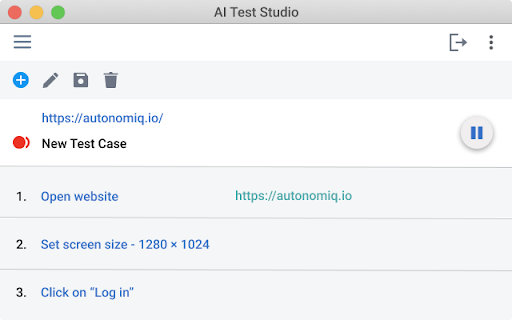
Selenium Test Generator for creating low-code tests in the SauceLabs Low Code Test Recorder. The AutonomIQ AI Studio Recorder is a user-friendly record and playback Chrome extension that empowers you to write, validate, and execute test automation in minutes. As an alternative to Selenium IDE, the AutonomIQ AI Studio Recorder helps you record browser interactions, and create multiple e2e test cases that can be saved for the future. This will speed up your development cycle and help you deliver digital confidence with every release. - Record clicks, input events, etc. - Pause the recording when navigating. - Identify elements from the overlay. - Monitor recorded events. - Export to Selenium code. - Tweak the contents of the generated code. 1. Click Add to Chrome. 2. In the Add “AutonomIQ AI Studio Recorder”? Window, click Add extension. 3. To launch the Recorder, in Google Chrome, click the Extensions icon and then click AutonomIQ AI Studio Recorder.

Basecamp: Sprint, Task Management
Sync daily tasks or work between Basecamp & Moon HRM. Use filters & enhanced features for seamless collaboration. From organizing tasks and tracking sprint progress to viewing work through smart cards and flexible filters, every element is built to simplify how your teams plan, execute, and stay aligned. View ongoing, completed, and on-hold tasks, manage workflows, and stay on top of your project deadlines. Get instant access to pinned projects, real-time activity tracking, and quick updates. Always know what’s happening and what truly needs your attention. It makes sure no information remains scattered. Project managers and team leaders can track the progress of the Basecamp sprints and todos using our extension. They can check and take necessary steps to meet the project timeline. Here’s why you should choose our extension for your Basecamp project management and time tracking over other traditional software. Centralized dashboard: Get a complete overview of your workspace from a unified dashboard. Direct access to key project details and everything that matters. Hey section: Never miss a beat with “Hey section,” which provides updates from across the team. For uninterrupted visibility, you can also enable it as a sidebar on your left, so that nothing slips through the cracks. Latest activity: Keep a close eye on recent activities across different projects. See updates, changes, and contributions, helping you stay aware of how work is progressing in real time. Sprint progress and status: Observe how your sprint is advancing with a clear view of task status and upcoming stages. Understand the current status at a glance and assure everything is progressing as planned. Task filters: Smart filters to refine your task view and concentrate on what matters most. Sort tasks based on whatever criteria you want and quickly access relevant work without distractions. Project list: Zoom into all your projects in an organized list that makes navigation pretty much easier. Switch between projects and keep track of ongoing and completed work without confusion. Smart card view: Users can visualize tasks in a structured card layout that highlights details at a glance. Such a format makes it very easy to oversee and act on tasks with better clarity. Work Summary: Review a comprehensive summary of work done across tasks and projects by different team members. Take a closer look at whether efforts are being utilized in the right way. Connect with Moon HRM: Directly link an advanced HRM software, Moon HRM, with Basecamp in order to align project activities with employee management. Organize tasks, teams, and monitor performance without any extra effort. Download Basecamp: Sprint, Task Manager Extension & follow these steps. 1. Open Basecamp and log in to your Basecamp account 2. In the top right corner of the screen, click on the sign-up button 3. Choose Moon HRM while signing up 4. Complete the sign-up process by filling in the required details. 5. Start adding projects and managing workflow with time log reports Why integrate with Moon HRM? Basecamp: Sprint, Task Manager integration using Moon HRM is best for managing the workflow of your team members. It helps track each sprint’s card or to-do status management and the time to complete the assigned tasks. Once integrated with Moon HRM, it automatically syncs the time log for each employee as per the tasks completed or the time dedicated to each task. Using Moon HRM integration, the project manager can closely monitor each sprint’s progress, thereby checking the performance and status of each employee’s tasks.

TestCase Studio - Selenium IDE
TestCase Studio record the user actions performed on a web application in English Sentences. Best alternative for Selenium IDE TestCase Studio is a platform to record and replay the user actions performed on a web application in English Sentences. This recorder plugin also records screenshots. It will also generate the XPath and Automation Code for every user action. User can save or copy these recorded steps as a Test case. Watch this video tutorial to make the best use of TestCase Studio. https://www.youtube.com/watch?v=Gcofn71bJdo New Features: Screen Recording, Customise Command, Record TestCase in any Language and BDD Format Support. Very simple steps to use the tool- 1. Click on the TestCase Studio logo in the tool bar. 2. It will open the TestCase Studio window. 3. Now keep performing your steps, it will automatically write english sentence for every user action. 4. You can download the written steps by clicking on download button. Upgrade to Pro version for more advanced features. Compare the Pro version features here- https://selectorshub.com/testcase-studio-pro/plans/

testRigor’s Test Case Recorder
Capture test cases in plain English by recording your interactions with the application. Capture test cases in plain English by recording your interactions with the application. With testRigor, tests are generated in plain English, eliminating reliance on XPath and guaranteeing ultra-stability. Additionally, enjoy a suite of tools provided by testRigor to maintain test cases effortlessly. Elevate your company's testing standards with testRigor - it's easy, fast, and enjoyable.

SnapTest
Selenium IDE substitute. Create, maintain, and auto-generate hand-crafted QA automation code in a variety of frameworks. Taking Selenium out of the stone age. SnapTest, A Selenium IDE like tool, helps you create, run, debug, maintain, and generate beautiful QA test code in a variety of frameworks. Run your tests directly in the browser with near Selenium-like behavior for fast debugging and maintenance. With tools to scale, SnapTEST allows you to maintain a library of tests that are composable, scalable, and professional.
