
gbnnlkbgnpcphebpbbfdabipmccjfama
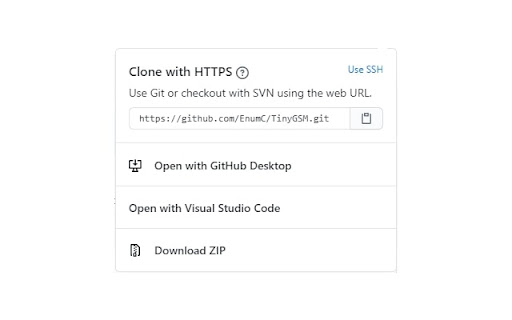
Overrides Open in Visual Studio button on GitHub with Open in Visual Studio Code This extension overrides the "Open in Visual Studio" button on GitHub with Open in Visual Studio Code.

Gloc
Gives approximate LOC from repo page (private and public)

Octotree - GitHub code tree
Browser extension that enhances GitHub code review and exploration. Features * Fast IDE-like code tree * Quick search in tree format * Bookmark repos, issues, PRs, files * Support GitHub themes * Support private repositories * High performance, working with repositories of any size NO BS POLICY: Octotree doesn't track you or share/care about your data at all. GitHub tokens are only needed when you want to access private repositories or exceed GitHub API rate limit. Octotree stores tokens in your browser storage and only uses them to authenticate with GitHub.

GitHub Code Folding
Code folding - the ability to selectively hide and display sections of a code - is an invaluable feature in many text editors and IDEs. Now, developers can utilize that same style code-folding while poring over source code on the web in GitHub. Works for any type of indentation, spaces or tabs. v0.1.0 - remove jQuery dependency - use event page instead of permanent background

GitHub DeepWiki Button (Unofficial)
This browser extension adds a convenient "DeepWiki" button to GitHub repository pages, allowing you to quickly access the repository's documentation on DeepWiki. 🛠️ Features: - Seamlessly integrates with GitHub's interface - One-click access to DeepWiki for any GitHub repository - Clean and minimal design following GitHub's UI patterns - Works on all GitHub repository pages 🚀 How to Use: 1. Install the extension 2. Navigate to any GitHub repository 3. Click the "Open in DeepWiki" button in the repository header 4. You'll be redirected to the corresponding DeepWiki page ⚠️ Note: This is an unofficial extension and is not affiliated with GitHub or DeepWiki. It simply provides a convenient way to navigate between GitHub repositories and their corresponding DeepWiki pages. 🔒 Privacy: - No data collection - No tracking - No authentication required - Only requires access to github.com to add the button 💻 The source code is also available, and you can build and install it yourself. For more details, please visit: https://github.com/yamadashy/github-deepwiki
