
gbkgialchigfapopdbliekaekaanhpen


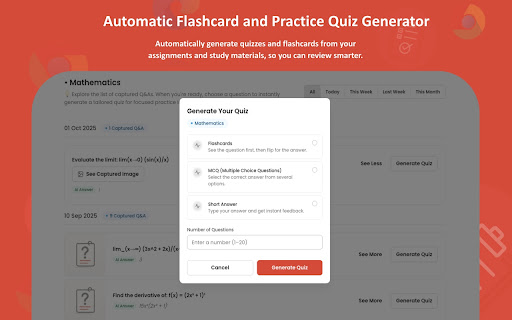


Get support on questions quickly and confidently with AI. CampusAI or Canvas AI – AI Homework Solver for Canvas, Blackboard, and All LMS Platforms CampusAI (also known as Campus AI, CanvasAI, or Canvas AI) is the all-in-one AI homework solver designed specifically for students. Whether you’re using Canvas, Blackboard, Moodle, D2L, or another LMS, CampusAI helps you screenshot and solve homework instantly, organize your solutions by subject, and even quiz yourself with AI flashcards and AI-generated multiple-choice questions based on your own assignments. Screenshot and Solve Any Homework Question Instantly solve math, science, writing, or any subject by taking a screenshot. CampusAI uses advanced AI homework solver technology to give you clear, step-by-step answers. Canvas AI Homework Solver & Blackboard AI Homework Solver Works seamlessly with Canvas LMS and Blackboard LMS, giving you the Canvas AI homework solver and Blackboard AI homework solver experience students actually need. Organized Study Dashboard Every screenshot is automatically saved and categorized by subject (Math, Science, History, English, etc.). Your Campus AI / Canvas AI dashboard stores all solved homework problems so you can revisit them anytime. Quiz Yourself on Your Assignments Go beyond answers: CampusAI converts your real homework from Canvas, Blackboard, and other LMS platforms into personalized study tools: AI-generated flashcards for quick review Practice quizzes based on your own assignments Tab Switching Between Canvas & Blackboard Designed for the way students really work, CampusAI makes it simple to switch between your Canvas homework tab, Blackboard assignments, and AI solver results without losing track.

Ask Gene - AI Assistant
Your Ultimate Web AI Assistant. Answers tough questions. Solves problems. Searches smartly. Use it anywhere. 🆕👉 Try out the new Notes feature! You may save your AI searches now to Gene Notes! Create new notes and save AI responses to a particular note - that way you can always go back to it as a reference! 🚀 Gene is your all-in-one AI assistant powered by GPT-5.5, Claude Opus 4.8, and DeepSeek-V3. Hit Ctrl + Q, and you’re ready to go! Gene helps you search, read, write, translate, and much more—all in one place. Key Features: 💬 AI Chat ✨ Chat with the latest ChatGPT model seamlessly across any webpage. 🧵 Doesn't matter the length of that document—just ask away! 🌐 Real-Time Data Access 📡 Get up-to-date information from the web including news, markets, sports, and trending topics in real time. Chat & Summarize 📚 Webpage Summaries: Type "/webpage" to reference page and get concise summaries of long articles without having to read everything. 🖍️ Highlight & Learn: Select any text on a webpage, and Gene will answer your questions right away. 📄 PDF Search: Freely open any PDF—whether online or from your computer—use "/webpage" or "/pdf" to reference the whole doc, or highlight any text, right-click, and ask Gene! (Note: Make sure "Allow access to file URLs" is turned on before use) 📑 Google Docs Search: Freely open any Google Docs and use highlight or "/webpage" or "/docs" feature! ▶️ Youtube Video Search: Freely open any Youtube video and use "/webpage" or "/video" feature and ask anything on that video! [◉°] Screenshot: Click the screenshot button, highlight anything on a webpage, and ask questions on it. This is useful for a picture or chart! It is also great for data analysis! Smart Search 🧠 Search Agent: Ask a question, and Gene will intelligently search the web, review the results, and deliver an accurate answer using multiple keywords. Write with AI 📝 Write Agent: Share a topic, and Gene will create structured outlines with detailed content and references. ✏️ Content Assistant: Provide a prompt, and we’ll turn it into polished, well-written content for you. Problem Solve ➕ Math & Code Solutions: Get step-by-step explanations for math problems and solve coding challenges instantly. 💻 How to Use: 🔹 Add Gene to Chrome and pin it to your toolbar. 🔹 Press Ctrl+Q to wake up Gene. 🔹 Start leveraging the power of AI instantly! 🗣️ Do I need a ChatGPT/OpenAI account? Nope! You don’t need an OpenAI account to use Gene. Get ready to supercharge your productivity with Gene! ⚡

Study AI - Instant Homework Help & AI Tutor
Use Study AI - Advanced AI homework helper and math solver to get your homework help done instantly with use of screenshot solver! Solve Homework Instantly with Study AI – Your Personal AI Tutor Stuck on homework? Study AI is the ultimate AI powered homework solver, tutor, and study companion. Instantly get clear answers, detailed step-by-step explanations, and personalized support on homework, quizzes, tests, and assignments across all subjects. 📸 Screenshot to Solve Capture a screenshot of any question—math, science, history, or literature—and receive instant, accurate solutions. Complex equations and diagrams are no match for our powerful AI. 🖍️ Highlight to Get Answers Prefer reading on-screen? Highlight text directly in your browser and let Study AI break down each problem with step-by-step clarity. 🧠 Curriculum-Aligned Guidance Receive context-aware answers tailored to your grade level, ensuring each response aligns perfectly with your academic curriculum. 🔍 Focus Mode Hide answers at first to challenge yourself, then reveal detailed explanations to verify your work and boost critical thinking. 📚 Universal Subject Coverage From algebra to biology, literature to physics—Study AI works as an all-in-one tutor for all subjects and grade levels. 🤝 Summarizing and translation Study AI can summarize or translate any text. Translations for over 50 languages! This allows students to not be hindered with any language barriers. ✅ Instant Homework Answers: Simply screenshot, highlight, or type your question to instantly receive accurate AI-powered solutions. ✅ Step-by-Step Explanations: Study AI doesn’t just give answers—it helps you understand your homework by providing detailed step-by-step explanations tailored to your curriculum. ✅ All Subjects Covered: Get help with Math (Algebra, Calculus, Geometry, Statistics), Science (Biology, Chemistry, Physics), History, Literature, Foreign Languages, and more. Perfect for any homework or assignment. ✅ AI Writing Assistant: Quickly draft essays, summarize texts, fix grammar, and elevate your writing skills effortlessly. ✅ Quiz & Test Prep: Ace your quizzes and exams confidently with accurate explanations and practice problems available anytime, anywhere. ✅ Language Translation & ESL Support: Easily understand and complete foreign-language homework with built-in translations in 100+ languages. ✅ Safe & Private: Your data stays private and secure. No invasive permissions, no account needed—just install and start solving. ✅ Distraction-Free Focus Mode: Use our unique Focus Mode to eliminate distractions, concentrate better, and finish assignments faster. 🎯 Improves grades & academic performance ⏰ Saves hours of study time 💡 Helps students understand difficult concepts deeply 🌎 Trusted by students worldwide—from high school to Ivy League universities 🎓 Who Should Use Study AI? High school and college students, homeschool learners, ESL learners, educators, parents helping their children, and anyone needing quick, reliable study assistance. 🌟 Install Study AI for free today and start acing your homework with confidence! 🌟

Quietly AI - Study Assistant
Get intelligent hints, step-by-step explanations, and learning support for Canvas quizzes. Quietly AI sees your screen and helps you learn in real time. No copying. No switching tabs. Just instant clarity on whatever’s in front of you. What Quietly Does • Auto-detects quizzes on Canvas & McGrawHill the moment they load • Works on text, images, charts, and more • Breaks down tough questions with clear, step-by-step reasoning • Gives guided hints when you want direction without the full explanation • Opens a quick “Ask Quietly” button whenever you highlight text Why Students Use It • Faster understanding with less frustration • Clean, distraction-free help directly on the page • Strong support across math, science, business, stats, and technical subjects • A more efficient way to review material and learn the logic behind problems Key Features • Real-Time Screen Recognition • Deep Explanations & Hints • Image-Based Assistance • Highlight-to-Ask Mode • Adaptive learning support across multiple subjects • Privacy-first design Quietly AI gives you the clarity you need to learn faster and study with confidence.

Quizard AI - Homework Tutor
Study smarter with Quizard! Instant AI answers and explanations for your all your questions to help you learn and succeed! ✨ Homework & AI Answers Solver Are you struggling to understand your homework and study materials? Don’t worry, Quizard is here to help! Take screenshots 📸 and get instant answers, explanations, and related resources for any question. 💁♀️ 🪄 【 Instant and Accurate Solutions 】 ✅ Instant answers: in just seconds receive answers, explanations, and related resources to your question ✅ The #1 AI in accuracy: we are 20% more accurate than ChatGPT and deliver the highest quality, most accurate answers with speed ✅ 24/7 support: use Quizard anytime, anywhere, we’re always there to help you ✅ Math: Quizard can accurately recognize and solve even the most complex math problems that have symbols which can’t be copy and pasted 🔥 【 Take A Screenshot, Get An Answer 】 ✅ Screenshot feature: allows effortless question-asking by capturing a screenshot ✅ Highlight text: simply highlight and solve any question found online ✅ Type In Your Question: you can directly type your question into the text box to receive an instant answer ✅ Universal compatibility: use it on websites like Canvas, Blackboard, Moodle, Google Classroom, and more 🎓 【 Any Subject, Any Level 】 ✅ Any type of question: we can solve multiple choice, short and long answer questions, and provide step by step solutions to your word problems ✅ Help on any subject: from math, history, chemistry, biology you name it we got you covered ✅ Every grade level: whether you’re a college student, high school student, or even an adult looking to brush up on your knowledge, Quizard is the perfect tool to help you succeed. 🗣 【 Clarify Your Understanding 】 ✅ Ask follow-up questions: interact with Quizard to explore complex topics effortlessly ✅ Related resources: we generate you related resources from the web based on the question to confirm the solution we’ve provided and see how others have solved it 💻【 How To Use 】 🟪 Click the “Add to Chrome” button and pin it to the toolbar. 🟪 Log in to your account. 🟪 Press Cmd/Ctrl+Shift+K to wake up Quizard 🟪 Start working with AI! 🗣️【FAQ】 📌 Is it free to use? -Yes, we offer limited use for free. For unlimited access, you can choose the Quizard Pro Subscription. 📌 Is my Quizard Pro Subscription active on both the mobile and Quizard Chrome Extension version? -Yes! If you are a Quizard Pro subscriber link your device in-app or through the Chrome Extension 📌 How can I link my Quizard profile to the extension or from the extension to the app? -From the extension, go to your settings and click “Link Device.” You will then receive further instructions for linking with your mobile device! 📌 ChatGPT is banned in my country. Does it work in my country? -Yes. Our chrome extension works in all countries. 📌 Can I use your service on my phone? -Yes. Quizard is available on all devices (Chrome Extension, iOS, Android). Search up “Quizard AI” in the App Store/Google Play Store
