
opmlbifgjdfgenkcejhdboookegdijcg


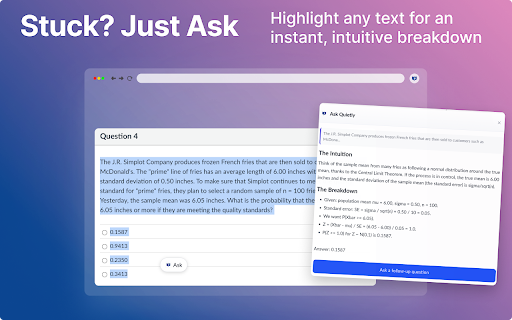
Get intelligent hints, step-by-step explanations, and learning support for Canvas quizzes. Quietly AI sees your screen and helps you learn in real time. No copying. No switching tabs. Just instant clarity on whatever’s in front of you. What Quietly Does • Auto-detects quizzes on Canvas & McGrawHill the moment they load • Works on text, images, charts, and more • Breaks down tough questions with clear, step-by-step reasoning • Gives guided hints when you want direction without the full explanation • Opens a quick “Ask Quietly” button whenever you highlight text Why Students Use It • Faster understanding with less frustration • Clean, distraction-free help directly on the page • Strong support across math, science, business, stats, and technical subjects • A more efficient way to review material and learn the logic behind problems Key Features • Real-Time Screen Recognition • Deep Explanations & Hints • Image-Based Assistance • Highlight-to-Ask Mode • Adaptive learning support across multiple subjects • Privacy-first design Quietly AI gives you the clarity you need to learn faster and study with confidence.

Study Buddy
Invisible AI for Proctored Exams CheatMate gives you instant answers for proctored exams, all without tipping off the proctor. All you need to do is • Wait 10 seconds • Double click each question CheatMate does the rest! Off by Default: CheatMate only activates when you press our keyboard shortcut. That means total privacy, and total security. Undetectable & Secure: • CheatMate bypasses all cheating monitors including tab-switch monitors and AI-based cheating detectors. • All traffic routes through secure proxies, that means no suspicious network activity. CheatMate supports every question type: • Multi Choice • Multi Select • Fill in the Blank • Matching • Short Answer • Essay Questions • Many More! CheatMate works on every quiz provider currently used: • Canvas • Blackboard • Moodle • D2L Brightspace • Schoology • And many more! If we don't support your provider, just let us know at contact@cheatmate.io!

SolvelyAI - AI Homework Tutor & Study Helper
SolvelyAI is your AI Homework Helper—instant screenshot solving, step-by-step AI Answers, AI Summary, and Study Helper tools. Capture, Solve, Summarize, and Learn Anytime, Anywhere 🚀 Solvely.ai is the AI learning assistant for solving problems and understanding content faster. Our revolutionary One-Click Solve now gets you answers to an entire page of questions at once. 💬 👉 Your AI Homework Solver Stuck on a tough assignment? Whether it's one question or a whole page, get instant clarity. 🆕 One-Click Solve All : Solve all problems on your screen at once with one click. Press the magic button for instant answers, no screenshots required. ✔️ Take a Screenshot to Get Instant Answers: Quickly capture your homework questions and receive immediate solutions from AI. ✔️ Step-by-Step Solutions: Understand complex problems with detailed, step-by-step explanations that guide you to mastery. ✔️ Save Problems for Later Review: Keep a record of your questions and solutions for future reference and revision. ✔️ Solutions in Various Formats and Languages: Access solutions in different formats and languages to suit your learning preferences. 👉Your AI Content Summarizer Overwhelmed by long videos and articles? Get the key ideas in seconds. ✔️ Real-Time YouTube Summaries: Get AI-generated summaries, key points, and time-stamped chapters while you watch. Instantly grasp the core concepts of any video and jump directly to the most important parts. ✔️ Summarize Any Webpage in Seconds: Instantly distill any article, academic paper, or online report into a concise summary and key talking points. Absorb complex information at a glance and accelerate your research. 📌Pro tip: Use our quick capture shortcuts for faster question solving: 👉Learn Smarter, Not Harder Get the Solvely.ai extension now and embark on an extraordinary journey of knowledge and success. Unlock the power of AI and make every study session count! 💪📚🌟

AI Homework Helper - Apex Vision AI
Fast, accurate homework help in-page on any site, save time, stress, and boost grades. ⚡ Real-Time Help, Right on the Page • One-click pop-up activation • Floating toolbar for instant access • Side panel workspace for essays, math, and more • Image & graph solver — upload or snap photos for instant solutions 🌐 Works on All Platforms Canvas, Blackboard, Moodle, Top Hat, Apex Learning — or any website you study on 🎓 All Subjects Supported Math, Science, English, History, and more 🤖 Accurate & Intelligent • Powered by advanced AI models optimized for Apex Vision AI • Auto-fill for multiple-choice, short answers, and quizzes 🧠 Learn While You Solve • Clear explanations and personalized study help 🔒 Private & Discreet • Clean in-page design that blends into your workflow • No unnecessary data collection ⏱ Save Time. Study Smarter. • Finish assignments faster and stay focused

Classology AI – Homework & Quiz Helper
Study smarter with Classology! Instant AI answers and explanations for all your questions to help you learn and succeed! ✨ Homework & AI Answers Solver Struggling with your homework or study materials? Classology has your back! With just one click, capture your question 📸 and let our AI solve your complex questions in subjects like math, chemistry, history, physics, economics, business and many more! 🖥️ Smooth User Interface Designed for students, by students—our sleek interface ensures instant access to answers and explanations without disrupting your workflow. 🔍 Instant and Accurate Solutions With just one click, access accurate answers and detailed explanations instantly. Classology offers AI-powered insights from across the web, making your research process easier. 💡 AI Sidebar Ask follow-up questions in real time with AI Sidebar. It stays on your screen no matter what website you’re on. Get instant, accurate responses for homeworks, quizzes, or general study questions. 🎓 Cross-Platform Functionality Classology directly integrates with leading LMS platforms including Blackboard, Canvas, Brightspace, McGraw Hill, Pearson, and more. 🌍 Universal Compatibility Bring your study companion anywhere you go across the web. Whether you’re researching, browsing articles, or exploring new ideas. Classology provides accurate information and support on any webpage. 💡 Enhanced Learning Strengthen your knowledge with thorough, step-by-step explanations. Ask follow-up questions to deepen your understanding and master concepts, opening the door to limitless learning opportunities. 🤖 Advanced Artificial Intelligence Classology employs a powerful AI Engine and sophisticated search algorithms to provide accurate and reliable academic support. We're 30% more accurate than ChatGPT, delivering high-quality answers swiftly. 💻 How To Use Classology: 1️⃣ Install the extension: Click the "Add to Chrome" button and pin it to the toolbar. 2️⃣ Log In: Sign in or create a subscription to access Classology’s features. 3️⃣ Ways to Search: 🖱️ Highlight & Solve: Highlight any text and press the "Solve" button. 📸 Snapshot: Press Cmd/Ctrl+Shift+1, then click and drag to initiate a search. 💬 AI Sidebar: Ask questions and get real-time responses without switching tabs. 🧠 Join over 100,000+ students and leverage the power of AI Answers, Instant Solutions, and Study Materials with our revolutionary homework solver. With 15M+ questions solved, it’s your ultimate tool for achieving academic goals and mastering any subject! 📞 Need Help? Visit our website to learn more and contact us with any questions you may have. 📧 24/7 Support - support@classology.ai 📤 Help Center - https://classology.ai/help-center 📖 Terms & Conditions - https://classology.ai/terms-and-conditions
