
gbjmhgjhhdefffefpkolhofnnielikcp
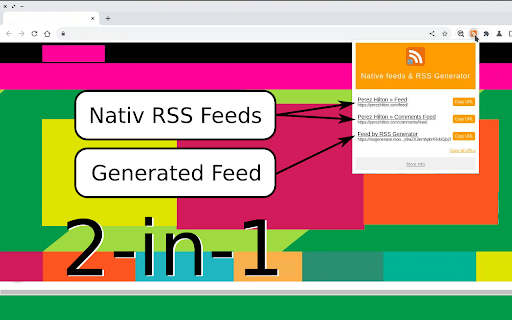
Your favorite site don't have RSS? It's not problem — Create RSS feed for any site in one click! Your favorite site don't have RSS? It's not problem — Create RSS feed for any site in one click! RSS Generator app can generate RSS feed for any site and also help you to retreive existings RSS feeds URLs from web sites. RSS Generator for any site working in one click. After click you can see all feeds of this site and even new feed generated by robot. Every time when you click to 'RSS Generator' icon you will see all RSS feeds of active site and one RSS feed generate by our robot. If you will subscribe to robot-feed, our robot will check selected site every 4 hours and looking to the new links. If robot find link it will be added to the feed. 🕸 Meet 'RSS Generator' your premier Chrome Extension for RSS monitoring. Immerse in an effortless RSS reading experience in one click, only hit your extension button and get all necessary functions! 💡 Key Features of 'RSS Generator for any site' extension: 1 All available function in one click. Find out all feeds and generated feed in one click. 2 Get native feeds for all sites with RSS function. 3 And get generated feed for all other sites. 3 Availabel for any site. 🚀 Kickstart Your Journey with 'RSS Generator' extension: 1 Add the 'RSS Feed Generator' extension to your Chrome. 2 Tap the RSS icon and get all necessary feeds for current web site. 🎤 Reasons to pick 'RSS Generator' extension: - User-Centric Design: our extension boasts a very simple and intuitive interface for a breezy experience. - Full Details: Full feed data for any sites. - Multipurpose: Perfect for read news, education purpose and subscribing to entertaining sites. - Privacy First: Your data are your own. We do not store your data at our servers. - Save your time: Save your time every time when you read generated feed. You no longer need to visit websites to stay updated. 🔧 Instructions for Using 'RSS Feed Generator' extension: 1 Tap the Add to Chrome button to install the extension. 2 Tap on the RSS icon and get information about availabel feeds. 3 Copy and Paste feed url to your favorite feeds reader. ❓ Frequently Asked Questions: 🔹 Is 'RSS Generator' free? Absolutely, with RSS Feed Generator you can generate any number of feeds completely free. 🔹 How does 'RSS Feed Generator' extension manage my data? We prioritize your privacy. We doesn't collect your personal data. Try RSS Feed Generator for any site now and redefine your RSS fetching experiences!

RSS Reader - Swipe my feed now
Discover the RSS feeds available on the current page with just a click on the toolbar and read live articles as swipe and flip cards. How it works? Swipe my feed NOW © will check if the current page itself is an RSS feed and open the swipe reader in that case, otherwise it will start a bot to lookup for RSS on the current website and bring a list. Once the list of RSS feed links is returned, you can open the swipe reader of the feed of your choice. Why is Swipe my feed NOW © different from other RSS feed readers? -SWING WITH SWIPE AND FLIP Forget old interfaces and swipe items into cards with your finger or you mouse. Instantly throw away what you don't like. Tap or click the card to flip it over and read the details and then access the author's website only if you like it. -REAL TIME READING Don’t let other decide what’s good to read for you. While traditional RSS readers notify upon arrival of a new item, Swipe my feed NOW © rely on "agility". The reader get you read faster thanks to the swipe so you can read more frequently. It's You who make the news! -A REAL "FREE" There are a plethora of RSS readers that pretend to be "Free". But you often register or install an extension to discover that interesting features are actually paid! The Swipe my feed NOW © RSS feed reader is completely free. -NO ADVERTISING Some RSS readers do not hesitate to blackmail: either you pay or you have advertising! The Swipe my feed NOW © RSS feed reader is ad-free. Note: the reading of the complete articles is done on the authors' website; the latter can impose advertising on their site. -NO REGISTRATION, NO SPYING Access to RSS feeds is anonymous and immediate, it does not require any registration. Note: the reading of the complete articles is done on the authors' website and depending upon their Terms and Conditions, they can impose a registration and paid services. Note: Swipe my feed NOW © uses an external website as a viewer: News on the Web © (https://news-on-the-web.com), by the same author, another RSS reader without ads, free and without spying (anonymous). -OPTIMIZED FOR TOUCH SCREEN DEVICES The News on the Web © RSS feed reader works fine on a desktop computer with a mouse but is optimized to provide the best user experience on touch screen devices. -BONUS Share your favorite feeds! Share on social networks or mail, or with yourself to read your favorite feed on your phone. If you have any feedback, bugs or issues, please use the QUASTER SASU contact page: https://quaster.fr/#contact . Do not hesitate to share if a RSS feed is not recognize as such, this may happen sometime. This extension was developed and is maintained with ♥.

RSS Feed Finder
Instantly discover and copy RSS and Atom feeds from any webpage. Discover RSS Feeds on the web page with the click of a button. For many people the open-web still revolves around syndicated feeds—whether they track industry news, monitor competitors, or curate content for newsletters. Yet discovering a site’s RSS or Atom feed in 2025 is surprisingly tricky. Face-lifted templates bury it, social widgets hide it, and some publishers omit the link tag entirely. RSS Feed Finder eliminates that friction with a single toolbar click. 1. Instant, standards-compliant feed discovery When you press the orange icon the extension injects a lightweight content script that combs the DOM for the official markers browsers and readers have recognised for two decades— and its Atom equivalent. Because discovery is performed inside the page, no external requests or APIs are required. Results return in well under a second, so the popup updates before you finish moving your mouse. Benefit: you no longer need to “view source” or guess a feed URL by adding “/feed” to the address—every formally linked feed appears automatically. 2. Heuristic fallback for non-standard sites Plenty of sites forget to add tags, but still expose a feed under predictable paths such as /feed, /rss, or /atom. RSS Feed Finder unobtrusively fires HEAD requests (same-origin only) to those locations and inspects the Content-Type. If the response is XML or a recognised MIME type it is promoted into the list and clearly labelled as a “Guess.” Benefit: you capture feeds you would otherwise miss, retaining one-click convenience while avoiding blind network scans that might violate CORS or privacy expectations. 3. Clean, practical popup UI The popup opens with a “Scanning…” hint that flips to a tidy vertically spaced list. Each row shows: a vector-sharp orange RSS logo for visual scanning; the feed title or URL as a clickable link; a Copy button that writes the feed URL to your clipboard and flashes “Copied!” for 800 ms. Zero feeds? You see a friendly grey message—no blank white boxes, no developer error text. Benefit: whether you are saving dozens of feeds for later or just grabbing one link for your reader, the UI stays friction-free, readable, and self-explanatory. 4. Badge counters for at-a-glance insight Immediately after discovery the background service-worker sets a numeric badge on the extension icon. Five feeds discovered? You see a solid orange “5.” None? The badge clears. Hovering does not require opening the popup. Benefit: you gain situational awareness of a page’s syndication options while browsing at speed. Many power users open dozens of tabs; the badge lets them quickly return to the richest sources.

RSS Generator
Detect RSS feeds or generate custom ones for any website RSS Generator - Never Miss Updates from Your Favorite Websites Discover RSS feeds instantly or create custom feeds for any website with AI-powered content extraction. RSS Generator makes it effortless to follow updates from blogs, news sites, and web pages that don't offer native RSS feeds. ✓ Automatic RSS Feed Detection Instantly detect and display all available RSS feeds on any website. No more hunting through page source or searching for hidden feed links. ✓ Custom RSS Feed Generation Generate custom RSS feeds for websites that don't offer native feeds using advanced AI-powered content extraction technology. ✓ One-Click Feed Access Copy feed URLs to clipboard with a single click. Seamlessly integrate with your favorite RSS reader (Feedly, Inoreader, The Old Reader, FeedLake, etc.). ✓ Feed Preview Preview feed content directly in the extension before subscribing. See titles, descriptions, and publication dates at a glance. ✓ Universal Compatibility Works on any website - blogs, news sites, forums, social media pages, and more. If it has content, we can create a feed for it. ✓ Clean, Modern Interface Beautiful, intuitive design that matches your browser. Fast and lightweight with minimal resource usage. 1. Click the RSS Generator icon while browsing any website 2. View automatically detected RSS feeds or generate a custom feed 3. Copy the feed URL with one click 4. Add to your favorite RSS reader and stay updated 🎯 PERFECT FOR • Content creators tracking competitors and industry trends • Researchers monitoring multiple sources for updates • News enthusiasts following blogs without RSS feeds • Social media managers aggregating content • Anyone who wants to declutter their inbox and centralize content consumption • No data collection or tracking • All processing happens locally in your browser • Open source and transparent • No account required for basic feed detection • Minimal memory footprint • Instant feed detection • No performance impact on browsing • Works offline for cached feeds • Follow blogs and personal websites • Track news sites and publications • Monitor e-commerce sites for product updates • Stay updated on forum discussions • Aggregate content from multiple sources • Create feeds from social media profiles • Track GitHub repositories and releases RSS feeds give you control over your content consumption. No algorithms deciding what you see, no endless scrolling, no distractions. Just the content you want, delivered efficiently. • Detects standard RSS 2.0, Atom, and JSON feeds • Supports dynamic content and single-page applications (SPA) • AI-powered content extraction for custom feeds • Integration with FeedLake API for enhanced features • Compatible with all major RSS readers

Jiant.ing Monitor & RSS Feed Generator
Monitor web page, generate RSS feed & notifications on change detection. On server or cloud service, it is too complicated to configure if you monitor websites that need login. Jiant.ing runs in browser extension, monitors ANY page easily and WYSIWYG in browser tabs. * Unlimited monitoring tasks and RSS feed generation for FREE. * Automatically generate and host RSS feed & notifications for monitoring tasks. * Free and easy to build task with various examples and templates that cover hot websites. * Powerful and flexible to customize everything with your own script. * Push instant notifications to Jiant.ing telegram bot for new updates. * Translation automatic and free. * Keywords inclusion/exclusion filter. * Support custom AI integrations. * Support custom proxies and user-agents for monitoring. * Support tasks backup export & import. * Support OPML export for RSS Reader. * Support custom remote scripts for monitoring tasks. * Reprocess existing RSS feed to new one with custom filters or translation. * Merge multiple existing RSS feeds to new one with custom filter and translation. 1. Search example and template on extension index. 2. Click "Build your own" then parse and save task. 3. Click "Start" on extension navigation bar to keep all tasks monitoring. 4. Get RSS feed link for your RSS reader. 5. Connect & Enable Telegram bot notifications if you need it.
