
gbhpdgodkjichnmknlkeeemanikneopa

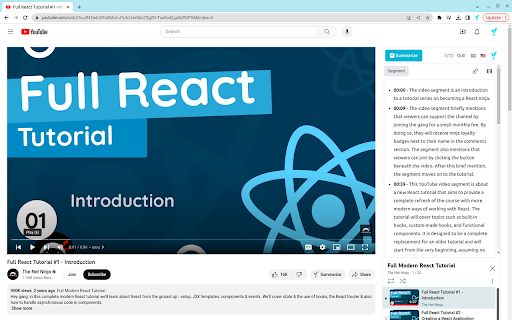
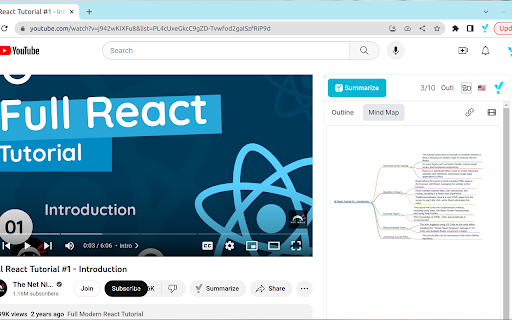
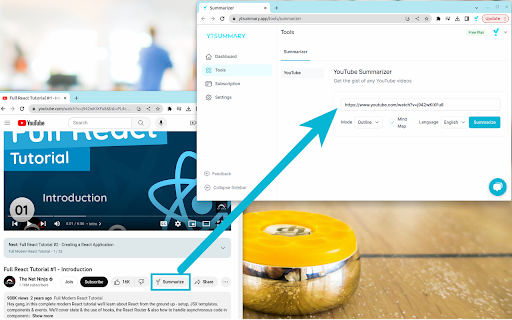
YouTube Video Summarizer with GhatGPT. Get concise YouTube summaries with ChatGPT instantly. Save time and learn quickly. ☑️ Don't waste time on videos that are not relevant to your goals or interests. --- Features --- - 🤖 AI-powered Summarization: Generate video summaries and highlights by ChatGPT - 🌐 Multi-Language Support: Summarize videos in your preferred language - ⏲️ Long Video Summary: Summarize YouTube videos that are up to 4 hours long - 📤 Summary Export: Export the summary to various formats making it easy to share and use - 📜 Summary History: Keep track of your summaries and easily access them in the future - 📨 Summary Share: Easily share the summary to collaborate and communicate with others. - ⚙️ Three Summarize Mode Support: 1. Outline Mode Summarize: Quickly get the gist of a YouTube video with a brief summary along with key highlights and detailed summaries 2. Mind Map Mode Summarize: Visualize the key points of a YouTube video and see how they are connected in a hierarchical view 3. Segment Mode: Get a detailed understanding of a YouTube video based on chapters, key moments or fixed interval segments --- Usecases --- - 📚 Learning new skills - 📰 Staying informed about industry news and trends - 🔍 Conducting research on a topic - 📝 Preparing for exams - 🚀 Enhancing productivity --- How to use YTSummary --- - 🔳 Method 1: Summarize YouTube video using the YTSummary extension 1. While watching a YouTube video, you will find the YTSummary extension on the right side of the screen. 2. Log in to our YouTube video summary app through the YTSummary extension. 3. Select your desired options and click the "Summarize" button within the YTSummary extension. - 🌐 Method 2: Summarize YouTube video using YTSummary website. 1. Login to our YouTube video summary app via the website YTSummary.app. 2. While watching a YouTube video, simply click the "Summarize" button located below the video. 3. While browsing the YouTube web page, click the three dots button to the right of the video title to access the "Summarize" button.

Ask The Video
AI-powered Chrome extension that summarizes YouTube videos, saving time & boosting productivity. Get key points in a click! Ask The Video is a powerful and user-friendly extension designed to enhance your YouTube experience by providing concise summaries of videos, allowing you to quickly grasp the key takeaways and main points without watching the entire content. 1. News Summary: Get concise breakdowns of news videos, helping you stay informed without watching lengthy content. 2. Question & Answer: Enter your query, and the extension finds the relevant information within the video, saving time. 3. Write tweet: Automatically generate and share engaging tweets based on the video's highlights.

Youtube Summarizer - Syllaby
Use ChatGPT to summarize YouTube videos with syllaby Use ChatGPT to summarize YouTube videos with Syllaby Introducing Syllaby's Chrome Extension – a revolutionary tool catering to content creators, students, and professionals immersed in YouTube video consumption for research, learning, or scriptwriting. This game-changing extension redefines your interaction with YouTube content, significantly reducing the time spent on video watching. Say goodbye to lengthy viewing sessions and embrace a more efficient and streamlined approach with Syllaby Features -- Transcript: Fetch the video transcript instantly. -- Timestamp Navigation: Seamlessly navigate through video segments. -- Swift Summaries: Get a quick video summary in a new window. -- Clear Bullet Points: Concise, easy-to-read bullet points distill the essence of the video. -- Key Insights: Uncover essential takeaways, ensuring you grasp the core message at a glance. What is ChatGPT? ChatGPT is an AI chatbot developed by OpenAI, leveraging the Generative Pre-trained Transformer (GPT) architecture. It excels in engaging conversations, responding to queries, and performing diverse language-related tasks. It's a sophisticated tool designed for natural language understanding and generation. Do I need to create a ChatGPT/OpenAI account to use this extension? No, Simply click the AI button, and the extension will seamlessly generate the summary and key takeaways for you. Enjoy a hassle-free experience without the need for a ChatGPT or OpenAI account. How can I access Key Insights with Syllaby? In the summary in bullet point and key takeaway prompt, you can uncover essential takeaways, ensuring you quickly grasp the core message of the video at a glance.

Youtube Video Summary
Get youtube summaries by chatgpt injected automatically if the video has a transcript! 6/12/23 - Auto summarize longer transcripts 6/3/23 - Now supports more language options for summary.

Youtube VideoSynth: summarize Youtube videos
YouTube VideoSynth is a practical tool designed to simplify your YouTube experience! It summarizes YouTube videos in any language, offering a straightforward and efficient way to navigate YouTube content. It uses LLMs models like GPT and Claude, all for free—simply create a free account for GPT and Claude. Perfect for those seeking a quick understanding of video content and quick answers to clickbait titles. - Simple UI - Summaries organized in chapters and bullet points - Move video cursor by clicking on the bullet points - Keyboard shortcuts to open/close side panel - Choose summary language - Choose summary length - Compatible with GPT3.5 and Claude (additional models will be added over time) - Completely free! Donations are welcomed and they will all be used to fund charity work.
