
ebfclgdnkobkhicjjocfhokjejfcgiph

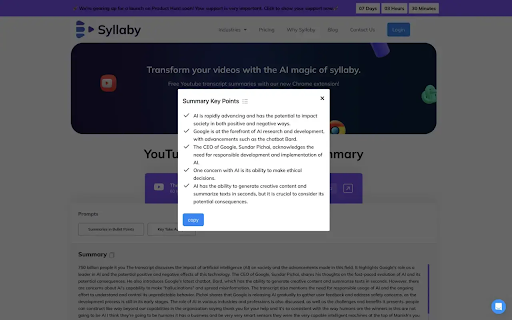
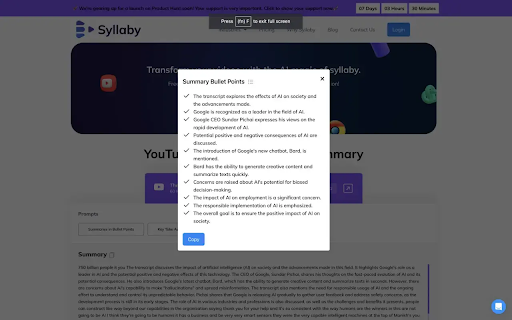
Use ChatGPT to summarize YouTube videos with syllaby Use ChatGPT to summarize YouTube videos with Syllaby Introducing Syllaby's Chrome Extension – a revolutionary tool catering to content creators, students, and professionals immersed in YouTube video consumption for research, learning, or scriptwriting. This game-changing extension redefines your interaction with YouTube content, significantly reducing the time spent on video watching. Say goodbye to lengthy viewing sessions and embrace a more efficient and streamlined approach with Syllaby Features -- Transcript: Fetch the video transcript instantly. -- Timestamp Navigation: Seamlessly navigate through video segments. -- Swift Summaries: Get a quick video summary in a new window. -- Clear Bullet Points: Concise, easy-to-read bullet points distill the essence of the video. -- Key Insights: Uncover essential takeaways, ensuring you grasp the core message at a glance. What is ChatGPT? ChatGPT is an AI chatbot developed by OpenAI, leveraging the Generative Pre-trained Transformer (GPT) architecture. It excels in engaging conversations, responding to queries, and performing diverse language-related tasks. It's a sophisticated tool designed for natural language understanding and generation. Do I need to create a ChatGPT/OpenAI account to use this extension? No, Simply click the AI button, and the extension will seamlessly generate the summary and key takeaways for you. Enjoy a hassle-free experience without the need for a ChatGPT or OpenAI account. How can I access Key Insights with Syllaby? In the summary in bullet point and key takeaway prompt, you can uncover essential takeaways, ensuring you quickly grasp the core message of the video at a glance.

Summary Webpage - Summarize Youtube videos | AI - Assistant
Summarize any webpage or Youtube video using AI and save time. Get the summary. Summary Webpage is a free Chrome Extension that lets you quickly access the summary of the YouTube videos you are watching or any articles. Use this extension to save time and learn quicker. The ultimate tool for easy and efficient web page summarization! With just a few clicks, you can now summarize any web page or Youtube video. What is special about the extension? • Summarizes any website with AI. • Summarizes the transcript of any Youtube Video. • Uses templates to modify the result for study, science or journalistic purposes. • Copy button - for quickly copying and pasting text Extension works by extracting readable content from the webpage and sending it to AI with the prompt to produce a summary that highlights the key information. Also, you can quickly view and access the summary of the video by clicking the summary buttons on the video thumbnail while browsing videos on YouTube. With the Summary, you'll save time, stay informed, and never have to wade through lengthy content again. Try it out today and see just how much more efficient your reading and research can be! Save your time. Learn more in less time!

YouTube Video AI Summary - AI by ChatGPT, Claude & Gemini (Unlimited)
Summarize YouTube Videos Unlimited with ChatGPT, Claude & Gemini. 📺 UNLIMITED YOUTUBE VIDEO AI SUMMARIZER WITH ChatGPT, CLAUDE & GEMINI. Save hours watching YouTube videos! This free Chrome Extension uses ChatGPT, Claude, and Google Gemini to instantly summarize any YouTube video. Perfect for students, professionals, and lifelong learners. ⚡ PERFECT FOR: - Research & Studying - Content Analysis - Quick Knowledge Extraction - Time Management - Educational Purposes - International Users 💡 HOW IT WORKS: 1. Open any YouTube video 2. Click the summary button in YouTube video player 3. Get instant AI-powered summary in new tab 4. Ask more questions if required 🌟 UNIQUE BENEFITS: - Save time on long videos - Increase productivity - Improve learning efficiency - Access video transcripts instantly - Customize summary detail level - Support for multiple languages - Jump to specific video sections using timestamps Join other productive users saving time with AI summaries! 🔍 Note: Works with all YouTube videos with captions/subtitles available.

YouTube Transcript & Summary Generator with ChatGPT & Gemini
Generate accurate transcripts and concise summaries for any YouTube video with ChatGPT & Gemini. Instant YouTube video transcripts you can view, copy, or download. YouTube Transcript & Summary Generator gives you clean, accurate transcripts powered by ChatGPT and Gemini directly inside YouTube. Once installed, no sign-up needed, the transcript panel appears automatically whenever you watch a supported video - no extra steps. Whether you're studying, reviewing tutorials, extracting scripts, or analyzing long videos, this tool saves time and removes the need for manual note-taking. ⭐ Key Features ✅ In-page YouTube Operation: Generate transcripts while watching videos, no tab switching required. ✅ AI-Powered Accuracy: Leverage ChatGPT and Gemini for reliable, error-reduced transcript results. ✅ Multi-Language Support: Works with various video languages to meet global user needs. ✅ One-Click Copy: Copy transcripts instantly to your clipboard for quick use. ✅ Flexible Exports: Download transcripts as SRT or TXT files, suitable for subtitles or documentation. ✅ Fast Generation: Get full video transcripts in seconds, saving your time and effort. 🎯 Perfect For ● Content Creators: Edit video subtitles, create blog posts from video content, or repurpose footage easily. ● Students & Learners: Make study notes from educational videos or foreign language learning materials. ● Researchers: Extract key information from academic or industry-related YouTube videos efficiently. ● Professionals: Extract key insights from industry-specific YouTube videos for work reports, project proposals, or cross-departmental communication. ● Multilingual Users: Understand and transcribe videos in non-native languages with accurate results. 🚀 How to Use 1. Install the plugin in your browser and enable it (no registration required). 2. Open any YouTube video you want to transcribe. 3. The transcript content will automatically display in the sidebar, with no extra operations needed. 4. Optional: Enable the summary feature to generate key points of the video. 5. One-click copy or download the transcript and summary results directly. 💡FAQ Q1: Does the plugin work with all YouTube videos? 💬 It works with most public YouTube videos. Restricted or private videos may not be supported due to platform limitations. Q2: How many languages does the plugin support? 💬 It supports over 50 common languages, including English, Spanish, French, German, Chinese, Japanese, and more. Q3: Is the transcript generation free? 💬 Yes, all features of the plugin are completely free to use, including transcript generation, one-click copy, and SRT/TXT export with no hidden costs. Q4: Do I need to register to use the plugin? 💬 No registration is required at all. You can use all features of the plugin directly after installation without any sign-up steps. Q5: Will the plugin slow down my browser? 💬 No, it’s lightweight and optimized for performance. It won’t affect your browser speed or video playback quality. 📬 Contact Us Have questions or need support? Feel free to reach out to us through the following channels: Email: videotranscriberai@gmail.com Learn More: https://videotranscriber.ai/ We aim to respond to all inquiries within 24 business hours.

DeepSum | YouTube AI Summary
Use YouTube AI Summary to transcribe youtube video to text and apply a powerful AI assistant as a video summarizer. 🤖Enhance your productivity with YouTube AI Summary, the premier Google Chrome extension for ai youtube summary and converting video content to text. Leverage ChatGPT to generate insightful summaries, making it perfect for students, professionals, and content creators. Simplify information extraction with the ai assistant, and effortlessly convert YouTube video to text for seamless content management. 🚀Quick Start Tips 1. Install the Youtube Summary AI extension by clicking the "Add to Chrome" button. 2. Open any YouTube video. 3. Click the "Summarize video" button to get comprehensive summary of a video 4. Click the "Transcript" button to get the full transcript of video subtitles 5. Use the "Settings" button to customize the extension setting Optionally, you can click the 'Summarize with ChatGPT' button to view a summary on the external ChatGPT page, or click 'Telegram bot' to get a link to the YouTube AI Summary Telegram bot and try the extension's core features on your mobile device. 🌐Perfect for exploring and analyzing a wide range of content: • AI, Science, and Tech videos • Business, Investing, and Trading • Health, Wellness, and Personal Growth • Podcasts and interviews • News, Politics, and Trends ✨Why to use the YouTube AI Summary extension? ✅ Apply cutting-edge AI models like ChatGPT to summarize YouTube video, delivering precise and comprehensive overviews. ✅ Using video summarizer of YouTube, you can easily explore and search through text to swiftly locate the information you need while. ✅ Experience a user-friendly interface that integrates with your website, ensuring while using youtube summary ai tool. ✅ The AI YouTube summary extension allows you to transcribe videos in different languages, including captions and auto-subtitles. 🏆Key Features ➤ Generate concise summaries of YouTube videos with advanced AI models like ChatGPT. Save time by quickly grasping main points, making YouTube summarization effortless. ➤ Edit summary styles, adjust summary lengths, manage custom prompts to fit different needs, providing a tailored experience across various content types. ➤ Get high-quality transcriptions beyond YouTube subtitles and quickly navigate timestamps to focus on key moments. ➤ Multilingual Support: Summarization and translations in 50+ languages. 📅 Everyday applications: 👌The YouTube video summary generator AI condenses long videos into quick summaries, keeping you informed efficiently. 👍The YouTube video summarizer highlights key points, helping you grasp essential information quickly. 🤟With ChatGPT YouTube integration, you access insightful summaries that reinforce learning and retention. 💼Professional Benefits: • The extension turns lengthy content into concise reviews, helping professionals focus on critical information for faster decision-making and productivity. • YouTube to summary AI highlights key points, ensuring better understanding and retention of essential details from complex materials. • The ChatGPT summarizer allows professionals to efficiently sift through extensive video data, aiding in research, presentations, and strategic planning. 🎓Educational Benefits: ▪ AI summary provides concise synopses of educational videos, allowing students to quickly grasp the main ideas without watching the entire video. ▪ YouTube summary with ChatGPT improves comprehension and retention by summarizing key concepts from lectures. ▪ Language learners can enhance their listening and reading skills using the extension. 💬 Frequently Asked Questions ❓How do I install the extension? 💡Find it on the Chrome Web Store and click "Add to Chrome". ❓How to use the extension? 💡Select Transcript & Summary to view the video transcript. Click the View AI Summary button to send the transcript to ChatGPT or another AI assistant. ❓What does the extension do? 💡The YouTube AI Summary extension transcribes and summarizes YouTube content, providing concise overviews and easy access to key content. ❓Can the extension handle transcript in languages other than English? 💡Absolutely, YouTube AI Summary can summarize videos in multiple languages, making it highly valuable for international users. ❓How to customize the youtube summarization? 💡Click on the extension settings to customize AI models, prompt for summary, and select strategies for longer videos. 👆🏻Click "Add to Chrome" for effortless YouTube video summaries, enhancing your understanding of video content.
