
gbapalelnfadklmbjpdobphnkaepkkpe

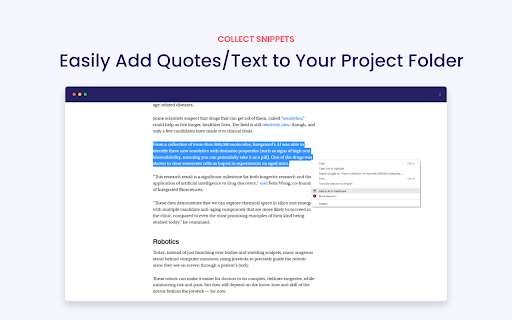
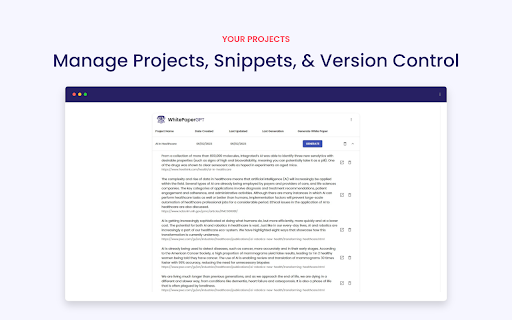

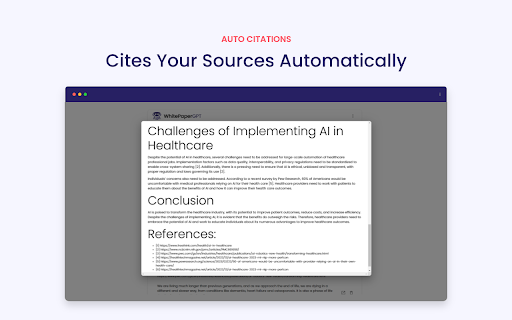
WhitePaperGPT is a chrome extension that uses GPT-3 to generate white papers for any topic. The WhitePaperGPT Chrome extension revolutionizes the way users gather and utilize information from the internet by offering a seamless and efficient solution for creating white papers. With the extension installed, users can effortlessly collect relevant sources from various online platforms, such as websites, articles, and research papers. By simply clicking a button, the extension saves these sources and allows users to organize them into individual projects for easy management and retrieval. The project management feature of WhitePaperGPT empowers users to stay organized throughout their research process. Users can create multiple projects, each tailored to a specific topic or subject area. Within each project, they can add, edit, and categorize their collected sources, making it simple to locate and reference information later. The extension's intuitive interface enables users to seamlessly navigate between projects and effortlessly switch between different sources, ensuring a streamlined experience for efficient white paper creation. Once users have gathered and organized their sources within a project, WhitePaperGPT takes the automation process one step further by transforming these sources into professionally formatted white papers. By simply submitting their collection of sources, the extension utilizes advanced natural language processing and machine learning algorithms to analyze and synthesize the information, generating a cohesive and well-structured white paper. This saves users valuable time and effort that would otherwise be spent on manually crafting and formatting the document. With WhitePaperGPT, users can focus on the content and let the extension handle the arduous task of creating a polished white paper from their collected sources. Getting started: - Create an account by click "view projects" - Create a new project - Right-click on any content on any site and add to project - When you're ready click on "Generate" to generate a white paper using the saved content. With PRO, regenerate as many times as you'd like all version will be saved Visit https://www.whitepapergpt.com/ to sign up for updates.

ChatGPT AutoContinuer
ChatGPT AutoContinuer automates your conversation by clicking "Continue generating" button for you. ChatGPT AutoContinuer automates your conversation by clicking "Continue generating" button for you. The "Continue generating" button function of ChatGPT is useful, but it becomes even more convenient when even that click is automated.

ChatGPT Recall Prompts
"ChatGPT Recall Prompts" is an extension that allows you to quickly recall your previous inputs in the textbox by pressing the "up" keyboard button without copying and pasting. It saves you time and effort when composing messages. Try it out to experience fast text input recall with just a button press! Tip 1: If nothing shows in the textbox, try to press F5 key or send your first prompt to reload prompts. Tip 2: If you don't see the full text when recalling prompts, try to type any text or press space key to show full text in the textbox. Tip 3: If pressing "Enter" doesn't send your message, try editing the text box first. Simply type or delete something to enable the "Enter" key functionality. "No data is saved or used by any third party, all prompts are removed every time the page is reloaded."

GPT+ (GPT Plus)
Uses the power of OpenAI gpt-turbo-3.5 to generate queries from you, without hassle and leaving your website. THIS EXTENSION REQUIRES OPENAI KEY! OPENAI CAN AND PROB. WILL CHARGE YOU FOR USAGE AFTER FREE TRIAL IS USED - BEFORE USING PLEASE CHECK OPENAI'S gpt3,5-turbo PRICING The GPT+ extension is a powerful tool that allows users to harness the power of ChatGPT directly from their browser. With just a few simple clicks, users can select any text and have the extension automatically process it through OpenAI's powerful algorithms. Additionally, users have the ability to input their own custom extensions to further personalize their experience. PLEASE NOTE THAT AN OPENAI KEY IS REQUIRED TO USE THIS EXTENSION. Users must obtain their own OpenAI API key and enter it into the extension before being able to utilize its full potential. Furthermore, users should be aware that they are responsible for any charges incurred from using OpenAI's services. For those interested in learning more about the GPT+ extension and how to use it, there is a helpful video overview available on YouTube. This video provides an in-depth look at the extension's features and functionality, making it an excellent resource for both new and experienced users alike. If you want to see it in action, check out this video: https://www.youtube.com/watch?v=qVOMSnMDrqc If you find the GPT+ extension to be useful, we highly recommend leaving a positive review and sharing it with others. Not only does this help support the developer and encourage future updates, but it also helps spread awareness of this powerful tool to others who may benefit from it.

YouTube Chatbot extension by Audio2Doc
A chatbot for YouTube videos by Audio2Doc.com This extension is a chatbot that allows you to ask questions about videos on YouTube. Updates: - (05/16/2023) Added ability to save chat history to database. Also, a small bug fix. - (05/15/2023) Fixed a bug. Also, users don't need to refresh a page after signing in. - (05/12/2023) Added login functionality, no need to generate API secret key anymore.
