
fpgnigcfehflnaffhbcakjadhpcjiapn
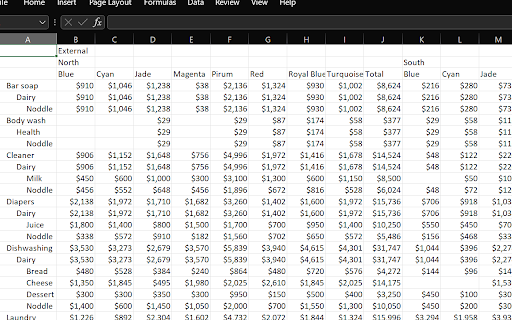
export the report Export PBI Matrix in the current format by clicking "ExportReport" button.

BI Table Exporter
Export Power BI tables and matrices to Excel, CSV, JSON, HTML, and PDF in one click. Tired of Power BI's 30,000 row CSV limit? Need to export embedded reports that have no download button? BI Table Exporter detects tables automatically — even inside iframes — and exports them instantly. All processing happens in your browser: your data never leaves your device. 🚀 KEY FEATURES: • Works with Power BI Service, Power BI Embedded, and Power BI Report Server • Detects tables inside iframes and cross-domain embeds • No 30,000 or 150,000 row limits — export unlimited rows with Pro 📊 FREE VERSION: • Export up to 500 rows per table • CSV and JSON formats (free) • Excel, HTML, PDF included with Pro • No registration, no data collection, no external servers 🔒 PRIVACY & SECURITY: • All data processed locally in your browser • No data sent to external servers • No personal information collection • Open source transparency 🔍 PERFECT FOR: • Power BI analysts needing Excel exports from embedded reports • Teams working with Power BI Service and Power BI Embedded • Users who hit the 30,000 or 150,000 row limit with native export • Anyone who needs Power BI data in CSV, JSON, HTML, or PDF format 📈 WHY USERS CHOOSE BI TABLE EXPORTER: • Native Power BI export limits you to 30K rows (CSV) or 150K rows (Excel) • Embedded reports often have NO export option at all • BI Table Exporter detects tables automatically — even in iframes • All processing is local: your data never leaves your browser

Table as CSV - Table Capture
ACTIVATE Extension: Purchase Subscribtion Hot To Use: 1.Go to website when you want to export or copy table 2.Click ctrl + right mouse click when you want select table then ctrl +c 3. If you want select random cells click alt + right mouse click then ctrl +c 4.To export table to csv, pdf, google sheets, image, jpeg, microsoft word, doc, clipboard. Table as CSV - Table Capture is a powerful and versatile chrome extension that empowers you to interact with HTML tables on websites like never before. With this extension Table as CSV - Table Capture, you can effortlessly copy, select, and export HTML tables to various formats, including Microsoft Excel, CSV, Google Sheets, PDF, images, and more. Whether you need to analyze data with Table as CSV, share it with colleagues, or keep a local backup, this extension Table as CSV provides a seamless and user-friendly experience. -Copy HTML tables with ease and efficiency -Export tables as CSV to work with data in spreadsheet applications -Capture tables as images (PNG, JPEG) or PDF for documentation and sharing -Download tables directly as Excel spreadsheets or CSV files -Save tables to your clipboard as Markdown for versatile use -Export tables to Office 365 for further collaboration and integration -Supports multi-page tables and dynamically loading tables -Extract tables from PDF files, both local and from the web

Web Table Extractor
Effortlessly extract table data from websites and export it to Excel files. Transform the way you handle online data with the Web Table Extractor, the ultimate tool for efficiently extracting and managing table data from any website. This powerful extension allows you to quickly select, download, and manipulate table data straight from your browser, making it indispensable for professionals and students alike who deal with vast amounts of web-based information. Easy Extraction: Instantly extract tables from any webpage with just a click. Whether it’s a simple HTML table or a complex data grid, Web Table Extractor handles it seamlessly. Versatile Export Options: Export the captured data directly into Excel format (.xlsx), ensuring compatibility and ease of use with spreadsheet applications. Customizable Viewing: Toggle view options allow you to either display all rows or focus on specific segments of the data for clarity and ease of analysis. Clipboard Support: Copy the data directly to your clipboard, making it simple to paste into other applications or documents. Real-time Feedback: Instantly know if a page contains extractable table data with our dynamic content script that communicates directly with the popup interface. Streamlined Interface: A user-friendly popup interface equipped with clear, actionable buttons and minimalistic design ensures a smooth user experience. Lightweight and Fast: Built to be both lightweight and efficient, ensuring that your browsing speed remains fast and unaffected. Whether you're a data analyst needing to transfer data to a spreadsheet, a student gathering information for a research project, or just someone who regularly works with online tables, Web Table Extractor is designed to enhance your productivity and save you time. Embrace the simplicity of extracting and managing web table data with Web Table Extractor – your tool for smarter data handling!

AnyPicker - A.I. powered No Code Web Scraper
AnyPicker is a free web data scraper. Powered by A.I. pattern recognition engine, You can scrape any website with just a few clicks. AnyPicker is a free and easy-to-use web data scraper. With a powerful A.I.-powered pattern recognition engine, You can extract any website data easily with just a few clicks. ↘️ Works With Any Web Site, Even Behind Logins ↘️ Export XLS Excel and CSV format ↘️ Scrape and Download Images ↘️ Full Support for Pagination and Infinite Scroll ↘️ Save Recipes For Repeat Scraping ↘️ Crawl Multiple Pages At the Same Time • Public business lead scraping, email collector, or public phone scraping • Scrape real estate data from Zillow, RedFin estate agent, or broker websites • Amazon, Shopify, BigCommerce, or any eCommerce platform data scraper for price monitoring, detailed description extraction; • Extract Amazon, Walmart, Etsy, Lazada, AliExpress product reviews, and work with any eCommerce website. • eBay listing scraper to track competition on eBay for SME owners and home businesses; • Scraping data on Yelp, Yellow Pages to optimize your eCommerce shops; • Contact scraping and data scraper for data extraction freelancers on Fiverr and Upwork; • Use AnyPicker for Data entry, automation form filling, and data extraction assistant for working from home or home business; • Scrape Website data scraping for SEO and content extraction tools; • Monitoring new job posting on Indeed or Monster, or any employer websites for job seekers; • Scrape Lead information from LinkedIn or Indeed and enter into Salesforce for potential sales opportunities and or recruiter job candidate database; • Gather data from any website for data mining purposes AnyPicker is perfect for • Salesperson for lead info gathering • Data Analyst for data mining • Amazon Sellers for review collecting • eBay Retailers for competition monitoring • Recruiters for job candidates collecting • Job Seekers monitoring job postings • Marketer Social media monitoring • Small business owners trying to monitor reviews and ratings • Rapportive LinkedIn Sales Navigator users AnyPicker is a simple data scraping tool to scrape web data or files. AnyPicker is also an image scraper or file scraper to extract image URLs and download images or files directly. AnyPicker can scrape images in URLs and then download them in batches. What are the alternatives if AnyPicker doesn't work in your case? Grepsr works excellent with some websites for web extraction; Instant Data Scraper can help you to detect data automatically and start to scrape on the same page easily; NoCoding Data Scraper (NDS) is good for workflow automation; SimpleScraper makes very intuitive previews and is easy to use; Distill helps you to monitor web elements and notify you when any changes; If you know to program, the following products will work out great for your needs: Octoparse, Axiom, and UI.Vision Please let us know if you have any feedback or feature requests:
