
fommpldicogfgegfpcoibmhkbbdpodjg
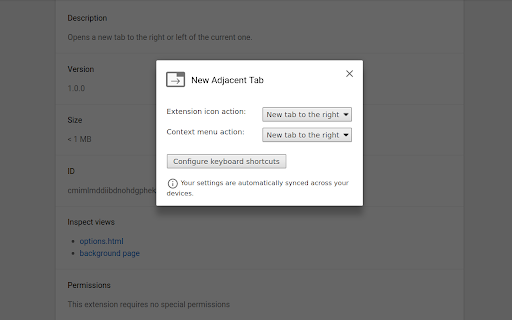


Opens a new tab to the right or left of the current one. New Adjacent Tab allows you to open tabs to the right/left through keyboard shortcuts, the context menu, and the extension's icon. It does not change or override Chrome's default behavior for opening new tabs. The default keyboard shortcuts are: - Alt+T to open a new tab to the right of the current one. - Alt+H to open a new tab to the left of the current one. All settings are configurable and are automatically synced across your devices if you're signed in to Google Chrome. Developed exclusively for Chrome. This extension is not guaranteed to work with other Chromium-based browsers like Edge, Brave, Opera, etc... Please don't report issues or down-vote this extension in the Chrome Web Store if you're using a non-Chrome browser.

Activate New Tab
Activate new tab and move it to beside of opener tab. Activate new tab opened from link (context menu 'Open link in new tab' or click middle mouse button on link) and move to right beside of opener tab. Simple and lightweight extension. No permissions required.

Always Right
Always open new tabs immediately to the right of the active tab. New tabs should always open to the immediate right of the current tab. And now they will. Usually when I open new tabs, it's not because a lightning bolt struck, and I must switch from my current activity to a new and different one. Most of the time the new tab is directly related to what I'm currently doing, so when Firefox (or a Chromium-based browser) opens tabs at the end of 50 tabs, they're almost guaranteed to be far from the tabs I was working with. I then find myself hunting around for the tabs I was just at, sometimes trying long and RSI-inducing drag-and-drop operations to regroup things. Sure, if I wanted to strictly manage things, I could always have separate tab groups in this tab set, but often my workflow is more organic than that, and I end up in this place, and I should be able to continue working with the software in the way that my mind expects it to work. So maybe this isn't for you, but I'm Always Right.

Open Tab Next Right to Current
This extension affects the behavior of opening new tabs. The following behaviors are affected: + New tab created from current tab open next right to current tab. + Second and subsequent new tab also open next right to current tab. + New tab created from pinned tab open next right to last pinned tab. The following behaviors are controlled so that they are not affected: + New tab created from Window open to right edge the window. + New tab created from Shortcut open to right edge the window. + New tab created from Bookmark open to right edge the window. + New tab created from Tab Contextmenu open next right to current tab. + Restore closed tab/window to original state. *This does not apply if it interferes with other extensions or settings.

Rearrange Tabs
Rearrange Tabs is a tiny Google Chrome Extension that allows users to rearrange the position of the tabs in a window by moving them around using keyboard shortcuts. 🚨 IMPORTANT NOTE 🚨 Please reconfigure your keyboard shortcuts if your previously set combinations are wiped out after upgrading to 3.0.0! Customize your keyboard shortcut by following these steps: 1. Go to `chrome://extensions/shortcuts` 2. Scroll down to locate `Rearrange Tabs`. 3. Click in the greyed out fields for `Not set`. 4. Press the desired key combination to create a new shortcut. To move selected tab(s) to the front (leftmost position) Mac: Ctrl+CMD+Up Windows: Shift+Alt+Up To move selected tab(s) to the end (rightmost position) Mac: Ctrl+CMD+Down Windows: Shift+Alt+Down - Move regular tabs around in a window - Move pinned tabs around in a window - Move multiple highlighted tabs around in a window - Move selected tabs to the leftmost or the rightmost positions * Complete rewrite! * Fixes bugs and performance issues * Changes default key combo for Mac users to avoid conflict * update commands in script to reflect the new namespace * namespace the shortcuts with the "rt-" prefix. This fixes the bug that caused the shortcuts to reset after installing of 2.1.2. This only affected users who were upgrading from an existing version of rearrange tabs extension. New installs are not affected. * Add feature to move tabs to the front or the end of the tab bar (Issue #3) * removing permission block from manifest since it is not needed to rearrange tabs (Issue #19) * Create CODE_OF_CONDUCT.md * update license * include lifehacker and changelog links - Add support for moving several tabs at once - Fixed an issue where tab move did not cycle when tab is the rightmost tab and is moved to the right * Add support for pinned tabs * prioritize mac over windows * update key on Mac to Ctrl+Shift+ to avoid conflict with the shortcut to highlight a single word * Initial release * Add support for rearranging tabs using keyboard shortcuts
