
folmheinbclmhjefmfoanamdmanhedjc
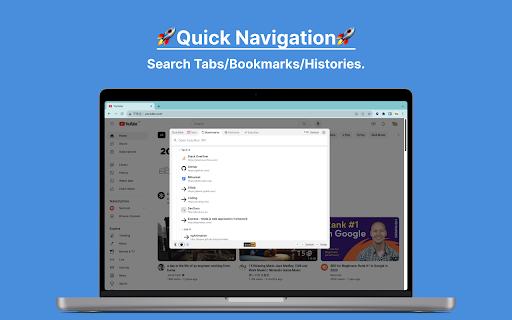


A quick searchbar, can search websites in tabs, bookmarks, histories, Raindrop and EasyNav, also can search TOC in web page. ❖ Features 1. Search websites in tabs/bookmarks/histories/Raindrop/EasyNav in one place, in the same way. 2. Search TOC(table of contents) in any page. ❖ Usage 1. Install the extension. 2. Click the extension icon to open search bar(It's recommended to right click the extension icon and pin it if you use it in this way). 3. Search and Navigate, it's recommended to use keyboard to select and enter. ❖ Shortcuts It's highly recommended to set shortcut for quick open search bar in the browser. To set shortcut, go to: chrome://extensions/shortcuts ❖ Integrations For now, it integrates Raindrop(raindrop.io) and EasyNav(easy-nav.cc).

Selection Menu
Pop-up menu after selection with copying and searching for selected text in Google (or other search engines) Select the text and click on one of the buttons in the pop-up menu (copy or search in Google (or other search engines)). See extension preferences to choose your own search engine.

Bookmark Manager per Domain and Page
A Bookmark Manager to list all bookmarks for the domain or page of the current URL as hyperlinks. This Bookmark Manager is special, it displays only bookmarks belonging to the current domain. ie. https://gist.github.com or https://docs.github.com/en will be displayed if you have it as a bookmark and navigate to https://www.github.com Open any URLs from Domains that you have saved within *.domain.com* We will show you only the ones from that domain. The extension does not work across domains from the same brand, such as pinterest.de or pinterest.at, etc. we might add this functionality in a near future update if there is demand. So if you are looking for that best next app to open pages in a new tab, while simply organizing your url in this awesome quick software, with our bookmark manager you will not need more bookmarking apps on your sidebar, forget all the other addons. Save webpages that you find popular, then navigate there with speed, have a look at your bookmarklet and use our free extension to view your custom starred urls, search through them with ease. Updates / Change log: 22.06.2024 / V 1.0.7 - Responsive pop-up added, Extension Icons added, fixed folder view, deleting and editing the URL 25.05.2024 / V 1.0.6 - Updated Manifest to v3 19.07.2021 / V 1.0.5 - Removed "Storage" permission, not needed. 22.12.2020 / V 1.0.4 - Added FOLDER view buttons 14.12.2020 / V 1.0.3 - We added DELETE and EDIT buttons

Chrome Command Bar
Navigate your browser like a pro with just a few clicks. Chrome Command Bar is designed to enhance your productivity and streamline your browsing experience. With just a few keystrokes (Ctrl+K or Cmd+K on Mac), you can access a wide range of browser functions and popular websites. Navigate through the command list and hit Enter to execute your chosen action, all without touching your mouse. Whether you need to open a new tab or incognito window, access browser settings or developer tools, or visit your favourite websites like GitHub, ChatGPT, Claude, Perplexity, or YouTube, everything is just a Cmd+K away. a. Install the Chrome Command Bar extension. b. Press Ctrl+K (or Cmd+K on Mac) to open the command palette. c. Start typing to filter the command list. d. Use the arrow keys to navigate and Enter to execute a command.

Raindrop Bear
One job, done cute: sync your Raindrop.io collections and bookmarks into your browser’s bookmarks — across devices. Your cozy little helper for syncing Raindrop.io bookmarks right into your browser. No fuss, just pure bookmark magic! Rawr! 🌩️ One-Way Sync: Mirrors your cloud bookmarks to a local folder. Your Raindrop account stays tidy! 🗂️ Perfect Structure: Mirrors your Raindrop groups and collections into folders and subfolders. ⏰ Always Fresh: Auto-syncs every 10 minutes, or sync manually from the popup anytime. 🏡 Your Spot: Choose exactly where you want your 'Raindrop' folder to live. 💾 Save Any Tab: Save tabs to your 'Unsorted' list from popup page or context menu. 📁 Cuddly Projects: Save a group of tabs as a project and bring them back later. ✏️ Tab Makeover: Give your tabs a cute, custom name that sticks around. Super Simple Setup: 1. Open the extension’s Options. 2. Paste in your Raindrop API token. 3. That's it! Your bookmarks will start to appear. Your Privacy Matters: Your API token never leaves your device. No tracking, no analytics. Just happy syncing!
