
folafhnmabfodamicdpnobbneikljpdc

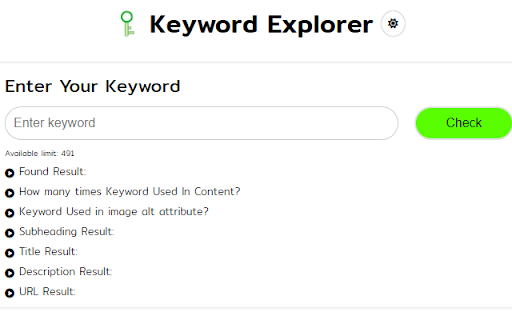
Uncover valuable keywords & optimize content for SEO! Use Keyword Explorer, the powerful Chrome extension Uncover valuable keywords & optimize content for SEO! Use Keyword Explorer, the powerful Chrome extension designed to revolutionize your website's search engine optimization efforts. Features: 1. Keyword Analysis: Analyze keywords within your webpage content to identify valuable keywords for SEO optimization. 2. Meta Tag Analysis: Evaluate meta tags, including title tags and descriptions, to ensure they are optimized for search engines. 3. Image Optimization: Assess images on your website, including image titles and alt attributes, to improve accessibility and search engine indexing. 4. Link Analysis: Identify all links on your webpage and determine if they are nofollow or follow links for effective link building strategies. 5. Keyword Frequency Analysis: Explore how frequently keywords are used within your content to optimize keyword density. 6. SEO Suggestions: Receive personalized suggestions and recommendations to enhance your website's SEO performance. 7. Title Tag Optimization: Optimize title tags to improve search engine visibility and click-through rates. 8. Alt Attribute Enhancement: Ensure all images have descriptive alt attributes to enhance accessibility and SEO. 9. Comprehensive SEO Toolkit: Benefit from a comprehensive set of tools to analyze, optimize, and improve your website's SEO performance. 10. Keyword Search: Input a keyword and find out if it's used on a webpage, how many times it's used in content, if it's in image alt attributes, subheadings, titles, descriptions, and URLs. 11. Dark/Light Mode: Customize the extension's appearance based on your preference for a comfortable viewing experience. 12. Robots.txt Analysis: Check if a robots.txt file is set up for the webpage. 13. Web Page Size Display: View the size of the webpage to optimize load times. 14. Page Network Status: Check the status code (200, 404, etc.) of the webpage. 15. Indexability Check: Determine if the webpage is indexable by search engines. 16. Meta Tags Analysis: Check if the webpage is open for indexing in robots meta tags and X-Robots tags. 17. Noindex Tag Detection: Detect if there's content in noindex tags, preventing indexing by search engines. Unlock the full potential of your website's SEO with Keyword Explorer. Seamlessly analyze keywords, meta tags, images, and more to enhance your website's search engine visibility and boost your ranking. Elevate your SEO game with Keyword Explorer today!

Ahrefs SEO Toolbar
Save hours with a complete toolkit in one SEO extension. Insights for on-page, keyword research, and link analysis on any webpage. Ahrefs toolbar is free and gives you detailed SEO insights without leaving your browser. 🌍 Global SEO research (No VPN needed) Switch regions, Google domains, languages, and get new keyword ideas directly in search results. 📃 On-page SEO data in 1 click Check titles, meta descriptions, headers, and technical SEO factors like canonical tags and indexation directives in one click. 🔗 Link analysis made easy Highlight links on the page, trace redirects, filter outgoing links, spot broken links, and export all the data to CSV. 🛠 Detailed SEO research tools Save URLs from open tabs or a SERP, switch user agents to see pages like Googlebot, read HTTP headers, and get performance data for page speed insights. ✨ Paid Ahrefs users unlock Ahrefs metrics: See domain and page-level metrics like keyword counts, traffic estimates, referring domains, and more - directly on every site or result. 📌 Note: Ahrefs subscription is required for access to Ahrefs metrics. The core tools of this SEO extension remain completely free.

SEO Review Tools for Chrome!
This extension will help you to analyze an URL using SEO Review Tools SEO Review Tools for Chrome is a free extension which allows you to quickly check the URL your visiting with one of my 68 free SEO Tools. And in addition I’ve added my 6 favorite Google Tools. An overview of all the tools you can access using this Chrome extension: - AI Brand Visibility Tool - ChatGPT Visibility Tool - Perplexity Visibility Tool - Backlink Checker - Fresh Backlink checker - Broken link checker - Rank Checker - Domain rank tracker - Link Building Tool - Bulk Domain Rating checker - SEO Competitor Research - Full SEO Scan - Website Authority Checker - Domain Authority & Page Authority Checker - Paid Search Competitor Checker ★ SEO Content Tools - AI Content Optimization tool - Content coverage checker - SEO Content Editor - AI Writer - Content Re-writer - Content Brief Generator - Headline Generator - Content Outline Generator - Keyword Cluster Tool - FAQ Schema Generator - Keyword Research Tool - Keyword Difficulty Checker - SEO Content Score Checker - Keyword Sourcer [NEW] - eBay Keyword Tool - Featured Snippet Tool - Trending topics - Free Keyword Search Volume Checker - Keyword Density Checker - SEO Keyword suggestion Tool - Duplicate content checker - Readability Checker - Keyword Extractor - Bulk Web page Word Count checker - Bulk Title tag checker - Title Tag generator [NEW] - Bulk meta description checker - Meta Description Generator [NEW] - HTML Headings Checker - Website SEO Checker - Page Experience Checker - Core Web Vitals Test - PWA Testing Tool - Website Security Checker - Google PageSpeed checker - AMP Checker / Testing tool - Internal Link Analyzer - SEO Redirect checker - Canonical URL / Location Checker - Paid Search Competitor Checker - Domain Age Checker - Email Finder - Website Accessibility Checker [NEW] - Social page authority checker - Bulk Pinterest Pins checker - Facebook Comments box count checker - Bulk Facebook share count checker

Conductor for Chrome - SEO Extension
Experience faster, better, smarter SEO insights in one click. The most advanced SEO extension is now free for all marketers. Conductor for Chrome is designed to make the day-to-day lives of marketing teams easier. 🔎 Discover insights around page performance and new topic opportunities 📈 Easily uncover website optimizations to improve visibility and performance 👍 Take action and collaborate more efficiently across teams Make impactful changes to your website by leveraging the best of Conductor right in your browser. Conductor for Chrome is available to anyone with a Conductor or Google account. Perform keyword research and better understand how your content is optimized for Search. Experience faster, better, and smarter SEO with the most advanced Organic Marketing browser extension ever created! == v4.10.11 == - Infinite loading and styles fixes. == v4.10.6 == - Minor bug fixes and performance improvements. == v4.10.4 == - Minor bug fixes and performance improvements. == v4.10.2 == - Minor bug fixes and performance improvements. == v4.10.0 == - Minor bug fixes and performance improvements. == v4.9.4 == - Minor bug fixes and performance improvements. == v4.9.2 == - Minor bug fixes and performance improvements. == v4.7.0 == - Minor bug fixes and performance improvements. == v4.6.0 == - Minor bug fixes and performance improvements. == v4.4.2 == - Minor bug fixes and performance improvements. == v4.4.0 == - Upgraded to Manifest V3 - Minor bug fixes and performance improvements. == v4.3.7 == - Fixed an issue where some users received an error when integrating Actions with Asana. - Minor bug fixes and performance improvements. == v4.3.5 == - Minor bug fixes and performance improvements. == v4.3.4 == - Minor bug fixes and performance improvements. == v4.3.3 == - Fixed issues related to correctly identifying and parsing sitemaps. - Fixed an issue where some users were unable to make edits using Conductor Live. - Fixed issue with reporting incorrect status code in Redirects widget. - Other minor fixes and performance improvements. == v4.3.2 == - Fixed and issue where related keywords would not load for certain pages. - The Live Editor Reset button didn't do anything before, now it does! == v4.3.0 == - NEW: Live Editor can now be used to make edits to page headings and image alt descriptions! A Conductor account is required. - Overview tab has been updated to bring live editor functionality to your fingertips. - Social Preview widget has been moved to the Social Tab. - Other bug fixes and improvements. ==V4.2.3 == Thank you for your continued use of Conductor for Chrome. In order to make sure the Chrome Extension is as secure as possible, unnecessary permissions were removed. ==v4.2.2== Minor Live Editor bug fixes and improvements. ==v4.2.1== - Minor bug fixes and performance improvements. == v4.2.0 == - NEW: Actions in Conductor for Chrome! Conductor customers can take action and seamlessly manage their SEO workflows by creating Content Briefs, To-do's, and Keyword Lists directly from the extension. Share them to your productivity tool of choice such as Jira, Asana and more or download them for easy team collaboration without leaving the page. - Fixed an issue when logged in using a Google account, it was then not always possible to login using a Conductor account. - Other bug fixes and performance improvements. == v4.1.1 == - Fixed an issue with Conductor Live that prevented publishing changes for some users. - Other bug fixes and performance improvements. == v4.1.0 == - Fixed an issue where the chrome extension would open sporadically on it own. Now it will only open when you want it to! - Other bug fixes and performance improvements. == v4.0.0 == - Now users who do not have a Conductor account can use the extension with their Google account. - Perform keyword research and navigate the extension with a new redesigned layout.

Mutable - Customizable Content Filtering
Improve your browsing experience by muting keywords across the web! Now open source! Take control of the websites you browse every day and eliminate the content you don't want to see! Mutable helps you mute unwanted content across multiple sites at once. Just pick the keywords you want to hide and Mutable will blur, hide, or replace any posts it finds containing those terms! - Control what you see (and what you don't) across multiple social media sites at once! - Create keyword mute lists that work across Twitter/X, Facebook, Reddit, and more! - Choose between blurring out posts, blurring with a preview, or hiding them altogether - You can even replace posts with cute images of kittens, puppies, or hedgehogs for that additional serotonin! Mutable is still being developed and I would love to hear from you. For questions, comments, or concerns, feel free to reach out!
