
focjonfjfbmcjfnepjngmjdlliilkofb
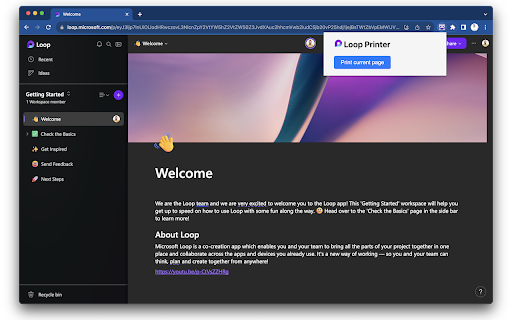
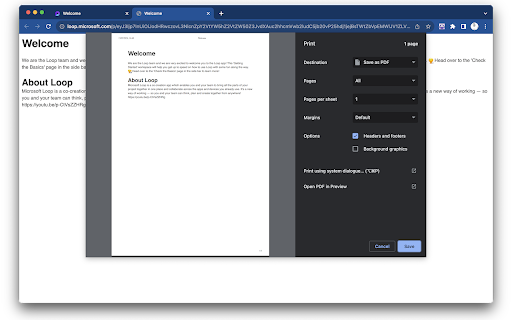
THIS EXTENSION IS FOR BETA TESTING - Print a Microsoft Loop page! Using Microsoft Loop and want to print out your pages? This extension gives you the ability to print or save as PDF current page from Loop. Empower Your Productivity: Whether you're a project manager needing to archive milestones, a student compiling research, or a team member sharing resources, Loop Printer streamlines your workflow, making information management more efficient and elegant than ever. Ready to Elevate Your Loop Experience? Add Loop Printer to Chrome now and transform how you save and share your digital workspace!

Unloop - Makes you Stop Scrolling
Unloop stops endless scrolling by closing distracting tabs and showing motivational quotes to refocus your day. Reclaim: Unloop!! Tired of endless scrolling and wasted hours online? Unloop is your ultimate productivity companion designed to help you reclaim your time and stay focused. With Unloop, you can effortlessly block distracting websites, get motivated by inspiring quotes, and even customize your motivational banner! • Smart Monitoring & Dual Modes Unloop constantly tracks your browsing activity. When you visit a website on your distraction list, it starts a timer based on your chosen mode: -Micro Mode for highly distracting content like social media reels and short videos ⏱️ -Macro Mode for less urgent distractions like news feeds and professional sites 📰 • Motivational Banner When your timer expires, a vibrant banner appears with a powerful motivational quote and image—hand-picked from an inspiring collection of anime heroes, leaders, and great personalities. 💪✨ • Customizable Experience Personalize your banner! Upload a custom image from your computer or enter a URL, and add your own custom message. If you don’t provide one, Unloop will randomly select a preset image and quote for you. 🖼️📝 • Automatic Tab Closure If you ignore the prompt, Unloop will automatically close the distracting tab after a brief countdown, ensuring you get back to what truly matters. 🚪❌ • Privacy First All settings are stored locally on your device—no personal data is collected or transmitted. 🔒 1. Setup Add distracting websites via the user-friendly options page. Unloop lets you specify which URLs to block and select a mode for each. 2. Customization Choose between Micro and Macro modes to set your distraction threshold. Personalize your motivational banner with your custom image and message—or let Unloop surprise you with one from its curated collection. 3. Distraction Control Once you land on a blocked site, Unloop starts a timer. When time’s up, a dynamic banner appears, urging you to refocus. Dismiss the banner to reset the timer, or ignore it to have the tab automatically closed. 4. Stay Focused Unloop’s intelligent matching algorithm ensures that if you add both a general URL and a specific section (e.g., “https://www.youtube.com/” in Macro Mode and “https://www.youtube.com/shorts” in Micro Mode), the most specific entry is used. This means a page like “https://www.youtube.com/shorts/XYZ” will trigger the faster Micro Mode reminder. 🔍 Take control of your digital life with Unloop—boost your productivity, overcome procrastination, and stay motivated every day. Install now and reclaim your time! ⏳🔥

Markdown Converter
Converts current web page to markdown Simply save webpages as Markdown for AI or offline reading. Note: It's free for now, as I test demand using my own funds. I'll try to maintain low costs. Transform webpages into clean Markdown with one click. This extension helps quickly convert web content to Markdown while preserving structure and formatting. Features: • One-Click Conversion • Smart Content Processing • Automatic Clipboard Copy (optional) • Progress Tracking • Large Page Support • Clean Output • Dark Mode Compatible Ideal for: • Content writers • Developers • Students • Anyone needing quick web-to-Markdown conversion Uses AI for high-quality conversions while maintaining content integrity. Lightweight, fast, and privacy-respecting. Compatible with: • GitHub/GitLab • Notion • Obsidian • Most Markdown-supporting platforms Quick installation with sensible defaults and customization options.

Mentus - Chat with Obsidian Notes and Google Docs
AI-powered chat for your Obsidian vault and Google Docs. Mentus - Chat with Obsidian Notes and Google Docs Mentus is a Chrome extension that brings your Obsidian vault and Google Docs to life, allowing you to chat with your notes and documents directly in your browser. This powerful tool integrates seamlessly with your personal knowledge base, enabling you to explore, edit, and interact with your content in innovative ways. Key Features: Chat with Your Knowledge Base: Engage in dynamic conversations with your Obsidian notes and Google Docs. Ask questions, get summaries, and receive insights from your personal content using advanced AI models like GPT-4 and Claude 3 Opus. Access and edit your Obsidian vault and Google Docs directly within Chrome. Switch effortlessly between viewing, editing, and chatting about your documents. Visualize connections between your notes and ideas with a node-based graph view. Discover new relationships and insights within your knowledge base. Edit your notes and docs using a feature-rich markdown editor. Enjoy syntax highlighting, dark mode, and other productivity-enhancing features. Receive contextual explanations and insights related to your current document or notes. Enhance your understanding and expand your knowledge with intelligent, adaptive support. Configure API keys and settings to tailor your interaction with Obsidian, Google Docs, and AI models. Incorporate images into your notes and chat sessions for rich, multimodal interactions. Mentus transforms your Chrome browser into an intelligent interface for your personal knowledge management system. By enabling direct chat interactions with your Obsidian notes and Google Docs, it offers a unique way to explore, question, and expand your knowledge base. Whether you're a student diving deep into course materials, a researcher organizing complex ideas, or a professional managing extensive documentation, Mentus provides an intuitive environment for knowledge exploration, creation, and learning. Unlock the full potential of your notes and documents - start chatting with your knowledge today with Mentus!

QuickBar
A quick searchbar, can search websites in tabs, bookmarks, histories, Raindrop and EasyNav, also can search TOC in web page. ❖ Features 1. Search websites in tabs/bookmarks/histories/Raindrop/EasyNav in one place, in the same way. 2. Search TOC(table of contents) in any page. ❖ Usage 1. Install the extension. 2. Click the extension icon to open search bar(It's recommended to right click the extension icon and pin it if you use it in this way). 3. Search and Navigate, it's recommended to use keyboard to select and enter. ❖ Shortcuts It's highly recommended to set shortcut for quick open search bar in the browser. To set shortcut, go to: chrome://extensions/shortcuts ❖ Integrations For now, it integrates Raindrop(raindrop.io) and EasyNav(easy-nav.cc).
