
fneahceogligokfcllminogbilaamgbd
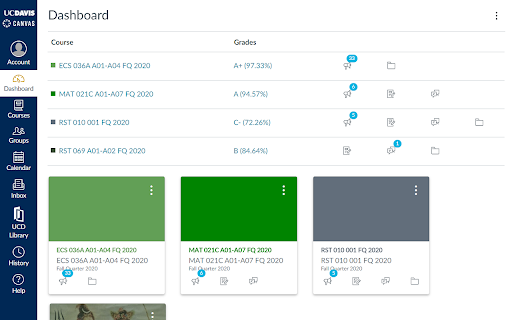
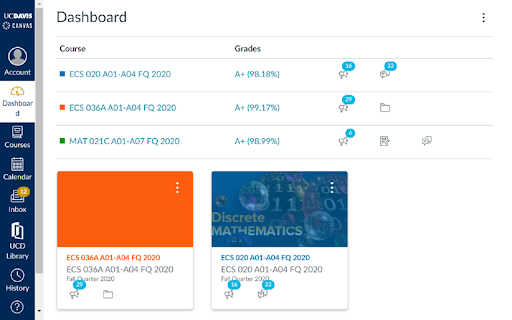
An Extension to view all your Grades on the Courses Pages! The purpose of this Chrome Extension is to give an easy to use, organized view of students' grades, as well as links to those grades and other important files from all classes on the dashboard, which is the default page that the student goes to when they sign in to Canvas. Note that for the extension to function properly, the user must be using Card View on their Canvas Dashboard and must be a student at UC Davis - the extension may or may not work for other universities/schools.

Canvas Page Folders
Please see https://youtu.be/aziV_vbLRsE for instruction video This extension allows you to create folders and sub-folders in which to organise Canvas Pages. Folders can be renamed, moved or deleted. The extension checks for updates to the pages such as renaming, creation or deletion, on a regular and customisable basis. As of version 1.1, there is also support for viewing pages in the folder-organised manner when adding them to modules on the Modules page (learn more about this and other new features here: https://youtu.be/xWlwutOzttU In an experimental feature, folder structures can also be shared between users who have the extension installed, in which case a designated page will serve as storage for the structure information and with which the users' folder info can be synced. Please note: Presently, only Canvas spaces hosted by domains of the type *.instructure.com/* can use the extension, with the addition of the following: canvas.gu.se/* canvas.qub.ac.uk/* canvas.wisc.edu/* canvas.wu.ac.at/* canvas.brown.edu/* If you wish to have another host URL incorporated in the list of supported hosts, please write a request to oldpikesoftware@gmail.com.

CanvasGradesPro
Enhance your Canvas experience with features designed to simplify grade tracking and improve your academic performance - Add GPA card to the dashboard cards list - Displays your cumulative GPA and term GPA - Stores grade to GPA mapping - Allows you to find minimum GPA for current term to get a X cumulative GPA - Adds grades to the dashboard cards - Bypass instructor hiding course grades - Allows user to add/disable weighting for assignment groups - Allows users to configure drop rules for assignment groups - Allows users to set custom grading standard/scale - Adds class grade statistics - Fixes "What-If Scores" button - Popup for customizing grade overlay and course grades page - Calculator for finding the minimum grade required on an assignment so that you're grade is a X% or a specified letter grade - Custom font support for the grade overlays via Google Fonts

Canvas Dark Mode
Dark Mode for Canvas. Dark mode for Canvas. Staying up late doing homework? Reduce your eye strain and keep your circadian rhythm with this Dark mode for canvas! Canvas dark mode should work for your school, if it does not, contact me and I can update the plugin to include your school's URL! Currently, dark mode for canvas works on any "instructure.com/*" domain. This is an open source project, if you would like to contribute, visit the repository.

Canvas Modules Organiser
• Compression:Based on the indentation level formatting of individual Module items on the Canvas LMS Modules page, this extension allows for collapsing more indented items "below" those of less indented items in a hierarchical fashion. This facilitates better and more concise overview of the Module contents. Collapsing can be done at item, module or page level using different controls. Modules can also be "tagged" with a short text defined and styled by the user. • As of version 1.0, module items as well as entire modules can be tagged, and tags can be stored for re-use. • As of version 1.0, contextual menus can be used as an alternative to hovering over extension icons to bring forward the extension menus. • The extension can also group modules in "boxes" or "tabs" (in v 0.9 +)for even better overview, and users can add their own text tags to modules • As of v 0.6 custom indentation is supported. Please visit https://www.youtube.com/playlist?list=PLP3asN9BirNAnaGPVgQGSviop-G_L-GhN for instructive videos on this extension. NOTE that Canvas Modules Organiser only works with Canvas platforms hosted on domains with the names or name types listed below. Requests for inclusion of other domains can be made to oldpikesoftware@gmail.com .
