
fnahmopebdcdngkmejdodljgccofeigl
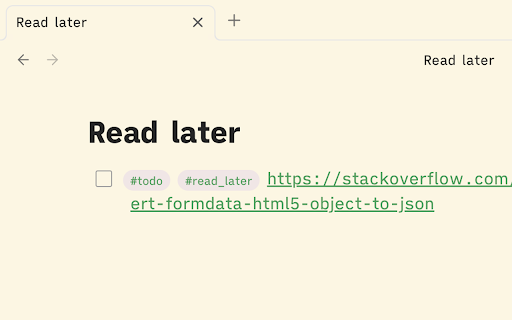
Save URLs to your Obsidian vault with a click of a button to read them later! Save URLs to your Obsidian vault with a click of a button to read them later! Installation: 1. Install and enable Obsidian Local REST API extension. 2. Enable non-encrypted HTTP server for Obsidian Local REST API. 3. Copy the API key 4,. When you first try to save any link, the extension is going to open its settings. Insert the API key there and click "Save". 5. Enjoy!

Obsidian ChatGPT Notes
Adds a button near every ChatGPT assistant message that will create a new Obsidian note with asistant's text inside. This plugin creates a button on ChatGPT website that will save the answer in a dedicated note that you can later open with Obsidian. ChatGPT markdown syntax is preserved Experimental features: - Select a part of assistant's message with your mouse and press "Save to Obsidian" button. If you find any bugs, report them in my GitHub repository

Mentus - Chat with Obsidian Notes and Google Docs
AI-powered chat for your Obsidian vault and Google Docs. Mentus - Chat with Obsidian Notes and Google Docs Mentus is a Chrome extension that brings your Obsidian vault and Google Docs to life, allowing you to chat with your notes and documents directly in your browser. This powerful tool integrates seamlessly with your personal knowledge base, enabling you to explore, edit, and interact with your content in innovative ways. Key Features: Chat with Your Knowledge Base: Engage in dynamic conversations with your Obsidian notes and Google Docs. Ask questions, get summaries, and receive insights from your personal content using advanced AI models like GPT-4 and Claude 3 Opus. Access and edit your Obsidian vault and Google Docs directly within Chrome. Switch effortlessly between viewing, editing, and chatting about your documents. Visualize connections between your notes and ideas with a node-based graph view. Discover new relationships and insights within your knowledge base. Edit your notes and docs using a feature-rich markdown editor. Enjoy syntax highlighting, dark mode, and other productivity-enhancing features. Receive contextual explanations and insights related to your current document or notes. Enhance your understanding and expand your knowledge with intelligent, adaptive support. Configure API keys and settings to tailor your interaction with Obsidian, Google Docs, and AI models. Incorporate images into your notes and chat sessions for rich, multimodal interactions. Mentus transforms your Chrome browser into an intelligent interface for your personal knowledge management system. By enabling direct chat interactions with your Obsidian notes and Google Docs, it offers a unique way to explore, question, and expand your knowledge base. Whether you're a student diving deep into course materials, a researcher organizing complex ideas, or a professional managing extensive documentation, Mentus provides an intuitive environment for knowledge exploration, creation, and learning. Unlock the full potential of your notes and documents - start chatting with your knowledge today with Mentus!

LinkStowr
Save links and sync it to your Obsidian vault. LinkStowr is a free, open source and privacy-friendly set of tools designed to make it extremely easy to capture and store your valuable online resources in a structured and meaningful way. You can think of it like using Obsidian as your bookmark manager for all your web links. To get started: - Create an account at https://linkstowr.com/ and generate an Access Token. - Download this Chrome Extension and input your Access Token. - Start saving links using the Chrome Extension. - Install the LinkStowr Obsidian plugin and sync your saved links. Once the links have been synced to your Obsidian vault they will be deleted from the LinkStowr database ensuring your vault is the only long term home for your links.

Markdown Copier
Copy selected text and page URL in Markdown format Markdown Copier is a Chrome extension designed to help you copy selected text and page URLs in markdown format for use with note-taking and knowledge management apps like Obsidian and Logseq. Key Features Two Modes of Operation: The extension has two modes: Text is selected: Copies the selected text and the page URL in markdown format; No text selected: Copies only the page URL in markdown format. Current Tab Only: The extension works exclusively for the current tab, ensuring that you have control over the content you want to copy. Customisable Output Format: Tailor the output format to your preferences. The default format is "> [selected text] | [src]([current page URL])", but you can modify it to suit your needs. Keyboard Shortcut Support: Assign a custom keyboard shortcut to activate the extension without clicking the icon. To set up a shortcut, visit `chrome://extensions/shortcuts` in your browser and configure a key combination. 'Cmd + M' is a suggested one. Seamless Integration with Obsidian and Logseq: Effortlessly copy and paste markdown-formatted links into Obsidian and Logseq, enhancing your research and note-taking experience. Secure and Lightweight: The extension is developed with security in mind, ensuring no unnecessary permissions or security vulnerabilities are present.
