
flnkogfheemakepeokbheholhfhgcbae

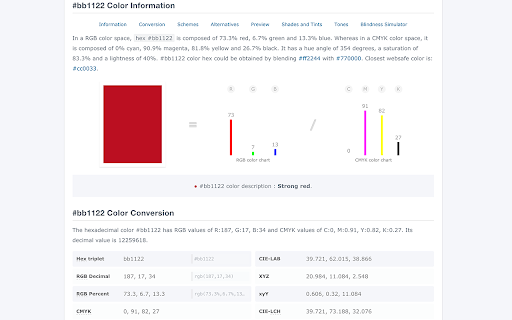


Full information about any color (schemes, shades, conversion in rgb, hsl, etc.). Eyedropper, Color Picker and Gradient Generator. How to use ColorHexa: - Just enter your color value in any format (e.g. hexadecimal, rgb, cmyk, hsl, lab, lch, luv, xyz, xyY, hunter lab, binary, wavelength). - Or simply use the colorpicker or the eyedropper (left to the search input field) ColorHexa will provide detailed description, color shades, color schemes (complementary, split complementary, analogous, triadic, tetradic and monochromatic), Html & Css codes, and automatically convert the color to rgb, cmyk, hsl, lab, etc. Color conversion: - For example, to convert or get any information about "red", you could directly type: - "red" or "ff0000" (with or without "#"), - "rgb(255,0,0)" - "rgb % 100 0 0" - "c:0, m:100, y:100, k:0" - "hsl 0, 100, 50" And so on... (with or without commas, brackets, colons or semi-colons, that doesn't matter). Color Mixer & Color Subtraction : - Colorhexa also offers the ability to merge / subtract colors together by simply separating them with a "+" or "-" in your query (e.g. : "blue + hsl 30 20 10", "red 200 green 30 blue 10 - orange"). Color Gradient Generator: - You can also create a gradient by separating the colors with the word "to" (e.g. "ff0000 to rgb 0 100 30").

ColorZilla
Advanced Eyedropper, Color Picker, Gradient Generator and other colorful goodies ColorZilla is the most user friendly, full-featured, secure and reliable color picker and color related suite of tools. It is one of the most popular Chrome and Firefox developer extensions with over 10 million downloads worldwide. With ColorZilla you can get a color reading from any point in your browser, quickly adjust this color and paste it into another program. And it can do so much more... ✓ Eyedropper - get the color of any pixel on the page ✓ Advanced Color Picker (similar to Photoshop's) ✓ Ultimate CSS Gradient Generator ✓ Webpage Color Analyzer - get a color palette for any site ✓ Palette Viewer with 7 pre-installed palettes ✓ Color History of recently picked colors ✓ Various sampling sizes - 1x1, 3x3, 5x5, 11x11 and 25x25 pixels ✓ Sample average color of any selected area ✓ Displays element information like tag name, class, id, size etc. ✓ Auto copy picked colors to clipboard ✓ Keyboard shortcuts ✓ Manipulate colors by their Hue/Saturations/Value components ✓ Get colors of dynamic hover elements ✓ Single-click to start color picking (currently only on Windows) ✓ Pick colors at any zoom level ✓ All features here: https://colorzilla.com/chrome/features.html This permission is needed by ColorZilla for its basic functionality of picking colors from websites. ColorZilla **DOES NOT** collect any of your data or your browsing activity on any websites. We are pretty fanatical about privacy ourselves, and your privacy is extremely important to us. Please visit this page for more info - https://colorzilla.com/chrome/privacy.html == Feedback and bug reports == If you're having issues or found a bug, please don't post you bug report here, contact us directly so we can fix it: https://colorzilla.com/contact/ If you like ColorZilla, please help spread the word by giving it a 5 star rating here ;) If you're not fully satisfied, please contact us https://colorzilla.com/contact/ and we'll make sure to help. Additional info, help and more is here: https://colorzilla.com/chrome/ For new feature announcements or just to say hello, please follow ColorZilla on Twitter https://twitter.com/colorzilla

Color Picker Online - Eyedropper Tool
Find color code on any pages, HEX, RGB Color picker and eyedropper tool. Gradient generator, color palette and color history. Color Picker is the ultimate tool for people working on world web design! It gives you the ability to choose accurate colors for your work, and give you the exact color number you can use in any design software that allows you to use it. Pick colors from websites, save colors & gradients, get matching shades and tints and create beautiful gradients. Site Pallete allows you to get all the colors of a page instantly. We quickly screenshot each section and allow you to add any of the colors you like, directly to your saved colors. With our gradient builder, every gradient is beautifully composed and generated. Add as many stops as you want, use your saved colors to make something beautiful, choose whether linear or radial and most importantly, save them so you can use them whenever you want. Gradient comes with a generated palette. Whether you are creating your own gradients, choose one of our gradients, color palettes help you find the perfect blend-able color. Copy the colors just by clicking and start using them in your designs. We hope you find our tool useful! We are waiting for your feedback and ratings! If you’re experiencing problems or isn't working on, please contact us.

Color Picker - Eyedropper Tool
Pick colors from web pages with Eyedropper. Picker, gradient generator, palette. Quickly grab HEX, RGB. Color Picker and Eyedropper Tool is a must-have browser extension for web developers, designers, and anyone who needs to choose colors from a webpage or extract a website's palette. Whether you're creating a website, designing graphics, or working on a digital project, extension will make the process of color selection easier and faster. Features: - Employ zoom technology to select and store multiple from any - Archive your preferred gradients; a single click on any stores its HEX value in your clipboard; - The site palette feature retrieves all the colors present on any webpage; - Personalize the type for automatic copying. Great for any designer, Chrome extension that easily allows you to identify the Hex colour code of any UI element you hover your mouse over. It's great for quick access to colours you gain inspiration from when browsing online. This extension stores the last six selected and represents the color in HEX, RGBA, HSVA, HSLA, and CMYK formats. Free open-source Color Picker extension. Source on GitHub. No ads, no tracking. Try using our software to find the color codes for any pixel today.

Web Color Picker - online color grabber
Grab colors from web pages. Color picker, color history. Live smart color picker tool in HEX, RGBA. Eyedropper colorpick for free Web Color Picker revolution tool for designers. Now you can easily pick any from any website with our new extension. Eyedropper tool will get color palette from any webpage you need. It`s pretty useful tool for web developers or web designers. This extension is pretty simple to use and it has simple and user-friendly interface. We provide you and amazing and useful eyedropper tool so you can get RGB colors from any webpage. Extract palette from web pages while you're browsing the web. There are three color formats available: RGB, CSS, and HSL. It`s also pretty simple to use – just click on extension icon in the upper right and star working. - Identifying the RGB HEX CMYK - Saving pallets - Editing them into beautiful palette combinations is a quick and simple job. Color Picker features are: * Different formats: HEX, RGB, HSV * Detect most used color on the page * Color list of recently picked colors * Red-Green-Blue (RGB) wheel to adjust selected and lot of others
