
flnghakciblliogbnkcnadhagckieiff

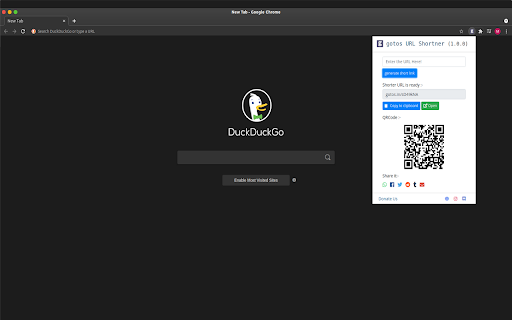
Want to quickly shorten your URL in one click? Then this extension is for you. Just click on the extension enter any long URL press generate short URL that's it. =============================================================== ★ Features of gotos URL Shortener: ✔ Easily shorten any link with gotos URL Shortener service. ✔ Get Detailed Analytics of a URL. ✔ Generate Unlimited Custom URLs. ✔ Short URL with only one click. ✔ Short Unlimited URLs. ✔ Share short gotos URL on social media like Whatsapp, Twitter, Facebook etc. ✔ Also get QR code of short link. ✔ Download QR code of generated link. ✔ Search gotos links on directly on gotos search link ===============================================================

Bulk URL Opener
Browser addon to open multiple urls with one click. With many more tools to help you manage urls. A simple and easy to use extension which allows the user to open a list of URL's in one click. Or alternatively you can create and store lists of links that you use and then load them from the drop down menu in the extension to open large amounts of links quickly and easily. Key Features:- -Allows a user to open a list of links quickly and easily -Ability to save, load and edit lists of links to provide an easier way to store and use a large amount of links -Tab Creation Delay: A user requested feature that allows the user to set a specified delay (in seconds) between each tab being created when a large number of links are opened -Custom themes: Change the look of the extension by using a different theme This extension collects no user data, for more info here is our privacy policy: https://euan.link/bulkurlopener-privacy-policy PERMISSIONS REQUIRED:- "Read your browsing history": This permission allows the extension to create tabs for you. It also allows the extension to get the URL's from currently open tabs when the 'Get list of currently open tabs' button is clicked Changelog:- 1.12.1 - Improved browser detection to fix broken buttons on Chromium. 1.12.0 - Migrated app to work with Manifest V3 - Temporally disabled context menus, as the way services workers work makes the context menu click event handlers work very poorly. Leading to context menus often not working correctly. - Added a list of tabs that are still to be created on the openingtabs page. This allows the user to easily see what (and how many) tabs are still to be created. - Fixed URL extraction (Thanks @allanlaal) 1.11.2: - Limited snapshots to 4 - Added option to disable snapshots & to delete snapshots - Added more context menu items for tools, settings help. - Added better error handling for localstorage writes, to prevent unhandled errors if users localstorage is full. 1.11.1: - Limited snapshots to 50 1.11.0: - Redesigned settings page: - New card based layout. - Settings now auto save. - Added automatic snapshotting: - Local storage is automatically snapshotted when a destructive action is taken, so user has option to restore to previous versions - Bug Fixes - List saving bug 1.10.0: - Added context menus. Currently, only context menus are for opening lists that the user has saved. - Added setting to open lists in reverse order. - Added new option for the 'Default list to display' setting: - 'Previous urls': whatever you previous had in the 'URLs' text box will be displayed the next time you open the app / popup. - Improved the REGEX for extracting urls from strings. - Redesigned help page - Added 'Tools' page, currently only includes a url extractor tool 1.9.0: - Added ability for the user to pause and resume the opening of tabs when using tab creation delay. - User can now specify the tab creation delay to decimal points, rather than just whole numbers as previously. - Added a hotkey to open the popup (Ctrl + Shift + U). 1.8.3: - Fixed wording on buttons on extension popup to make them clearer and less confusing. 1.8.2: - Fixed bug where if "Delay tab loading until tab is selected" setting was enabled, the url would be truncated after the first parameter in the query string. 1.8.1: - Firefox bug fix when deleting lists. 1.8.0: - Added option to launch a list when the browser starts. - Added feature to delay tab loading until the user focuses the tab (Selects the tab in their browser) - Added basic command line flags for election version of app, -v or --version, -h or --help 1.7.2: - Added a options file to the app manifest, so the settings page can be launched from the browsers addon / extension management page. - Continued refactor of old sections of code, as well as working to completely remove dependence on Jquery in preparation of Bootstrap 5 1.7.1: - Prevented electron version from having a tab creation delay of

URL Shortener by Rebrandly
Free and easy URL shortener to create short links in one click! Create short links easily with our convenient and user-friendly URL shortener! With the Rebrandly Chrome extension, you can shorten URLs just seconds, all for free. The process is simple, as you can shorten URLs directly from the page you’re on. If you want to create custom branded links, sign up for a paid plan. - Feature Highlights: - Shorten any link in one click - Generate QR codes - Manage UTM parameters - Track link clicks - Customize short URLs with your domain name - Customize short URLs with keywords - Share directly to social media platforms Visit Rebrandly.com for more details about our URL shortener.

URL Shortener Plus
One Click URL Shortener. Create links with Bitly, TinyUrl, is.gd, to.ly or goo.gl. QR Code, fast copy paste for Google Chrome. ★★★★★ The best way to create a short urls 📌 using Bitly, Rebrandly, TinyUrl, is.gd and to.ly, and more 🚨 Want to quickly shorten a url in one click? Then this is the extension for you 👑 Just click the extension to shorten the current page URL or by right clicking on any link 😍 Shorten the page/selected URL (TinyURL) 🔎 Shortern URL using tinyurl.com services 💣 FEATURES ★ Easily shorten any link ⚡ ★ Automatically copies url to clipboard 🚀 ★ Right click to shorten url and copy to clipboard 🚧 ✔ Limited permissions 🤓 ✔ Generate QR code 📷 ✔ HTTPS for maximum security 🔑 No share of credentials to third party 🔓 💎 Building Apps and Extensions for Google Chrome and Android 🔥📣 📔 Available on the product page: https://jitt.wwevents.fun/project/url-shortener-plus/#changelog By installing this product you agree to our privacy policy & terms of service: https://jitt.wwevents.fun/privacy-policy/ You may consult the list of permissions and the reason why they are required on the product page: https://jitt.wwevents.fun/project/url-shortener-plus/#permissions “notifications” – Used to send desktop notification. For example when a new message arrive or App is updated. “contextMenus” – Allow to add more settings when right click in the App icon in the browser toolbar and browser context menu. “storage” – Used to save settings on your local computer. “system.display” – Used to detect the display size and position the Extension window. “unlimitedStorage” – Storage is limited to 5MB of data that may not be enough to store all configs. “host_permissions” – Permission to access to some hosts/domains that we must modify in order to provide the desired functionality detailed in the functionality. It also allows that you can share content (links or text) from other pages directly to inside the App and send it as a SMS/Android message to a friend for example. Also used to allow intercommunication with other WWEvents Apps (i.e. Emojis). “activeTab” – Permission to access the window that the extension is running and is show to the user. “tabs” - Used when the App is not in Popup mode to read the page URL in order to shorten it. “all_urls” – We cannot predict ahead of time witch hosts/domains the user want to shorten. The extension is capable to shorten any link/url/domain. This information is also available inside the App: Options -> About

URL Shortener & Automatic copy
Generate a shortened URL from the URL of the current page with just one click. - Shorten a long URL with a single click. - Shortened URLs are automatically copied. - Access analysis function is provided. - No membership registration is required.
