
flmcglmalcnabfaalkomeaohklknbbhg
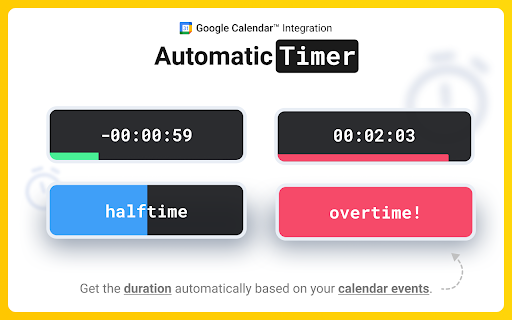


Google Meet Timer with Calendar Sync and a shareable SubTimer for tasks, speaking time, and agenda items. Meeting Timer is a lightweight timer for Google Meet with Google Calendar Sync, a Mini SubTimer for agenda items, and a shareable timer that stays visible when you present. • Automatic countdown from your Calendar – join a Meet, and the Google Meet countdown timer starts with the correct duration. • Mini SubTimer (new) – time tasks, speaking turns, or agenda points without touching the main timer. • Share across tabs – show the timer on every tab so it appears on your shared screen. • Stay on track – halftime/overtime color cues, optional sound alerts, and overlap warnings. • Drag & drop – place the timer where you want; we remember the position. • Quick access to upcoming events – open the extension popup to see and join your next meetings. • Automatic: Connect Google Calendar once. The timer counts down for any Meet that matches your event. • Manual: Set a duration yourself. Great when there’s no calendar event, or an event couldn't be matched. • 🕒 Automatic Timer (Calendar matched) • ⏰ Manual Timer (Calendar event not matched) (set duration, see progress/halftime/overtime) •➕ Mini SubTimer for topics, Q&A, exercises • 🤝 Shareable timer (visible while screen sharing) • 🎛️ Drag & drop + saved position • 🌈 Progress, halftime & overtime color states • 🚨 Overlap alerts for back-to-back meetings • 🔊 Sound alerts (optional; configurable volume) • 📍 Favicon badge before a meeting starts • 📅 See all upcoming meetings from your Google Calendar in the popup 1. Install the extension. 2. (Optional) Connect Google Calendar. 3. Join a Google Meet. The meeting timer overlay appears automatically. 4. Click the SubTimer icon to add a mini countdown for agenda items or controlling speaking time. 5. Click Share to mirror timers across tabs so they appear on your shared screen. • Open settings from the gear icon on the timer. We don’t store data on our servers. Your settings and meeting data stay in your browser. Google Meet Meeting Timer's use and transfer of information received from Google APIs to any other app will adhere to Google API Services User Data Policy, including the Limited Use requirements.

Visual Timer
A visual timer to help you focus on your current task. This timer is designed to help you be more productive by keeping your fingers on the keyboard. Click the extension icon from your browser to pop a new timer (or bring the existing one into the foreground). Then just type the number of minutes you want the timer to run for and hit Enter. The timer will start as a countdown, filling up as the timer runs so you'll know roughly how much time you have left without breaking your concentration. Once the timer completes, it begins flashing so you know it's complete. If you need to pause the timer, just select the timer popup and hit Space. Space again to resume. If you want to reset the timer (for the previously selected duration) just select the timer popup and hit "R" and it will start over. Cheatsheet for keyboard shortcuts: - 1-999 : Start a timer for that many minutes - R : Reset the timer - Space : Pause/resume the timer - ? : Toggle config mode (where you can set the background color, toggle the "ding") - T : Toggle task mode where you can list your tasks and start a timer for each - > (right angle bracket) : Mark current task done (delete it) and begin next task New in this version (1.5.0): * Removed default timer controls that show on hover (you can still toggle these back on) * Improved styling on settings and tasks view New in version 1.4.0 (Sep 12, 2025): * Gamification! Under settings you can opt in to setting a target number of minutes working on tasks (timers must be started from the tasks list) and track your streak. Feel the productivity points as you make a daily habit for spending at least an hour working on tasks. * More icons for those that aren't used to keyboard shortcuts: start/pause toggle icon, restart icon, task list icon Thanks to everyone who has commented on the Youtube instructional video to provide feedback and request new features!

Snack Time - Online Timer
A timer that appears on websites to help with timekeeping for meetings and tasks A versatile floating timer that enhances your online meetings and break management. Perfect for timeboxing, meeting facilitation, and quick breaks - all with a sleek, customizable interface. - Quick preset timers (1, 3, 5, and 10 minutes) - **End time-based timer** - Set timer by target time (e.g., "until 3:30 PM") - Floating timer window that moves anywhere on your webpage - 5 beautiful color themes (Light, Dark, Lemon, Rose, Mint) - Customizable alarm sounds with volume control - Timer history tracking with recently used timers - Full-screen mode for better visibility - Clean, intuitive interface with real-time theme preview - Stays on top while browsing - No complex settings or configurations needed ### Perfect For 1. Click the SnackTime icon 2. Select a preset time OR enter a custom duration/target time 3. Customize your theme and sound preferences 4. Drag the timer wherever you want on the page 5. Start/Stop with a single click 6. Toggle full-screen mode when needed - Ultra-lightweight and responsive - Highly customizable with live preview - No unnecessary permissions - Zero learning curve - Enhanced compatibility with Shadow DOM isolation - Professional timer with both duration and target time options Keep your meetings on track and breaks well-timed. SnackTime - professional time management made simple.

Timer app
Use Timer app as simple and offline countdown tool. This Chrome extension offers 5 minute timer, 1 hour, and other options. Ready to conquer world in one tick? Introducing our Timer app, where seconds matter, and hours give superpowers without cape! 1. Whether you need 5 minute timer to brew that perfect coffee. 2. You might even forget about task until it politely reminds. 3. Snooze function is provided! Desire a moment for strategic planning, our solution has your back. 🌟 Use Time Like a Pro Ever wish you could navigate moments like a pro? - Our countdown timer does precisely that. Take life slow. - Our delightful array ensures you'll never lose track! - Engaging visuals paired with an intuitive interface mean that setting up a alarm feels like a breeze. ⏱️ More Than Just a Reminder This app is more than an online timer. 1️⃣ Whether you need alarm for those sprints or a software for focused sessions, you've come to the right place. 2️⃣ No more waving at your clock timer and hoping it waves back sympathetically. 3️⃣ Instead, set stopwatch, knowing our clever tech has your back. Meet the kitchen timer extraordinaire! 1) With a robust countdown that handles a 10 minute timer flawlessly, you can perfect that soufflé or bake cookies like a champ. 2) Imagine Julia giving you a thumbs up. 3) No bubbling sauce casualties today, not on our watch! 🏫 Teaching with Precision In charge of a classroom? ❗ You can harness the prowess of our classroom timer, never missing the critical transition between subjects. ❗ Set a lively reminder for debates or utilize a smooth alarm for group projects. ❗️ Everyone will think you secretly control time with your magical powers! ⏳ Mindful Moments Meditation timer to the rescue! 🔸 Delve deep into tranquility with our solution, set perfectly with the calming sounds of nature—or robot byte sounds if you're feeling techy. 🔸If your zen flies faster than a alarm, don't sweat it! 🔸Customize your peace exactly how you need it. 📽️ Movie Has Nothing on You Ever thought about creating a movie? 🔺 With the extension, setting scenes or intervals is an worthy feat. 🔺 Keep track of film edits like a pro director casting the winning shot. 🔺 With a meticulous tool, your work of art will captivate the audience! 🏋️♂️ Fitness tactics, rejoice! Whether interval training or high-intensity workouts, our Timer App is your cheerleader minus the pom-poms. Set a alarm for quick bursts or a hardy interval for endurance. Who needs a gym buddy when your program tracks like a fit and fab virtual coach? 🕓 Extension Alternative You read that right. Finally, an alternative to the typical timer! When you glance at the tool, know someone, someplace, is proud of your promptness. Say goodbye to standard waiting times and hello to customized reminders. 😄 Tickled by Humor And if you just want a giggle, set a interval, sit back, and ponder why solution isn't actually longer than its math permits. Irony will befriend you as you await the tick of each second with lighthearted anticipation. Don't forget, a laugh a day keeps the stress at bay. 🧘 Pomodoro Potential Our program isn’t just static—it’s full of dynamic potential. Use our pomodoro timer to work in efficient bursts. No more just 5 minutes more shenanigans; with this tool, productive procrastination turns purposeful with easy setup and cheerful execution.

Slides Timer
Create timers using placeholders. ie >, >, >, >, >, > Slides Timer is a powerful extension that automatically brings your Google Slides to life with dynamic timers and clocks. Whether you're running a classroom activity, a business presentation, or a workshop, Slides Timer provides a seamless and beautiful way to keep your audience engaged and on track. Simply place your timer configuration between > and let the extension do the rest! 🚀 KEY FEATURES (FREE) Countdown & Count-up: Use - to count down or + to count up (e.g., >). 🕰️ Live Clock & Date: Display the current time or date with > or >. ♾️ Continuous Timers: Use ~ to keep your timer running across different slides. ⏭️ Slide Triggers: Automatically advance slides (-+) or go back (--) when a timer hits zero. 🔔 Audio/Video Alarms: Trigger your inserted audio (@) or video (!) files at specific times. 💎 PREMIUM FEATURES (PRO) Unlock powerful tools to customize your experience: 🎨 Custom Formatting: Full control over time/date displays using common indicators (e.g., >). 🍅 Pomodoro Cycles: Infinite work/break chaining for ultimate productivity (e.g., >). ⏱️ Analog Clock Faces: Beautifully rendered analog clocks using |analog. 📊 Dynamic Progress Bars: Visual progress bars that fill or empty as your timer runs (|bar). 💯 Scoreboards: Track points between slides with shared IDs and custom increments. 🏷️ Custom Tags: Personalize your starting and ending markers (default >). 🖌️ Custom Clock Interfaces: Get access to exclusive, advanced clock visual interfaces. ⏰ Advanced Alarm Scheduling: Take deeper control over when and how your alarms trigger. 🔄 Data Synchronization: Keep your custom settings and tags synced across your devices. ⭐ Priority Support: Dedicated and faster assistance when you need help. ⌨️ KEYBOARD CONTROLS (PRO) Enhance your presentation flow with premium quick hotkeys: Pause/Start: Press y to pause or resume the active timer. Reset: Press r to reset the timer to its starting value. 🛑 Manual Start: Use $ in your tag (e.g., >) to start the timer in a paused state. ⚙️ Custom Hotkeys: Personalize all of your keyboard shortcuts directly in the extension popup. 📖 COMMON EXAMPLES > : 5-minute countdown. ⏱️ > : 10-minute count-up. 🍅 > : A cycle of 25m work and 5m break. 📊 > : A 30-second progress bar. 🕰️ > : Current time without seconds or AM/PM. 📅 > : Countdown to a specific date! 💯 > : Scoreboard starting at 0, press [ for +1 and ] for +5. 🛠️ FORMATTING REFERENCE Customize your > and > tags with these indicators: 🕛 hh : 12-hour format (double digit) 🕒 HH : 24-hour format (double digit) mm : Minutes ⏱️ ss : Seconds 📆 dddd : Day of the week (long) 🗓️ MMMM : Month (long) 📅 yyyy : Year (4 digits) 💳 SUBSCRIPTION & MANAGEMENT Manage your PRO subscription directly through the extension popup. Click "Manage Subscription" to view invoices or update payment methods via our secure portal at https://slidestimer.web.app 🔒 PRIVACY This extension does not collect or handle personal user data beyond your Chrome Profile ID for subscription verification. 💡 Tip: Be sure to refresh your Google Slides tab after installation for the timer to activate!
