
flkebkiofojicogddingbdmcmkpbplcd
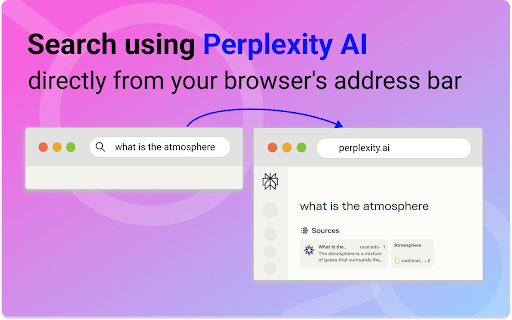
Use the Search for perplexity ai Chrome extension to find information and switch to another search engine whenever you need. 🙂 Happy to see you here at the page of our extension Search for perplexity ai ► Extension helps you to use extension in your lovely browser and do it with really ► You just type into the browser tab what you need and after press enter button the Search for perplexity ai website will be open automatically with your question already put inside the search tab and also with result of your desired search. ► If you need to search with the help of another search engine, google or bing, it’s totally easy. Just switch between search engines and at your search bar will work another one. ⟡ perplexity ai is a cutting-edge search engine and chatbot that leverages technologies like machine learning and natural language processing NLP to deliver precise and extensive responses to user inquiries. ⟡ perplexity ai is engineered to perform real-time web searches and provide the most current information on a variety of subjects. ⟡ also this is a robust tool with a user-friendly interface, capable of assisting users in finding data on a broad spectrum of topics. ⟡ shortly talking what is perplexity ai this is your helper in day-to-day search of information 📌 asking how does perplexity ai work we found out that Perplexity.ai distinguishes itself in the field of AI-driven search engines. 📌 perplexity ai utilizing GPT technology and provides an easy-to-use platform for obtaining detailed responses to a wide range of questions. 📌 the main distinguish of extension is an opportunity to give links to the information it was given. So the user can not only find answer but also check it in various sources. 📌 what sets perplexity ai apart is its ability to conduct real-time web searches, guaranteeing users access to the most up-to-date information. 1. perplexity ai vs chatgpt — both artificial intelligence based search engines, but they function differently and offer unique capabilities. 2. perplexity ai uses a wide variety of online sources, such as academic databases, YouTube, Reddit, news outlets, and the Wolfram Alpha physics and mathematics knowledge base. This allows it to provide users with extensive information, including the most recent academic papers and references on specific subjects. 3. on the other hand, ChatGPT uses a large text and code dataset to produce responses. 4. chatGPT creates responses that mimic human conversation, making it a useful tool for content creators, writers, and general users who need help with things like recipes, resumes, and education. Perplexity.ai vs ChatGPTt offers summaries that include source citations, allowing users to verify the information and explore the topic further. 5. when it comes to answering subjective or ambiguous questions, perplexity.ai vs chatgpt may fall short as it relies on objective facts and data. However, ChatGPT can handle such questions, making it more suitable for creative writing and general use. 6. in terms of response accuracy, perplexity ai ensures this through personalized user experiences, transparency about sources, advanced algorithms, and real source citations. ChatGPT, however, may not always provide accurate or reliable answers, depending on the quality of its sources. 🔥 How does search for perplexity ai chrome extension work: 1️⃣ the process begins with the user initiating the download process of search for perplexity.ai chrome extension by clicking on the designated 'download' button on the page. This action triggers the download process, which, once completed, allows the user to utilize the search functionality in the browser search bar. 2️⃣ the unique feature of this process is that the search is conducted via Perplexity.ai, an artificial intelligence platform. This means that any search queries entered into the browser's search bar will be processed and analyzed by this platform, providing the user with search results that are more relevant and accurate. 3️⃣ should the user wish to modify search engine or change to smth else, they can do so by locating the pp icon on their extension panel. This icon serves as a shortcut to the search for perplexity ai chrome extension’s settings and options. By clicking on this icon, the user can access a menu of search choices and select the desired search engine. 4️⃣ this process of search for perplexity.ai chrome extension is designed to be user-friendly and intuitive, making it easy for users to navigate and use the platform's functionalities effectively. By integrating the platform with the browser's search function, it allows users to enjoy a seamless and efficient search experience. 💸 Search for perplexity AI pricing 🚀 search for perplexity ai chrome extension offers a unique experience that is completely free for users. 🚀 this tool is designed to provide users with a seamless and efficient experience, enhancing their browsing capabilities. 🚀 despite being a free from search for perplexity ai pricing, the perplexity ai chrome extension does not compromise on quality or performance. 🚀 it is a cost-effective solution for users who want to leverage the power of artificial intelligence without incurring additional expenses. 👏 search for perplexity ai app - perplexity ai has developed its own perplexity ai app. However, there's no need to download the app if you're already using the extension. It serves the same purpose and offers the same functionality. 📌 Is search for perplexity ai free? Certainly, you don't have to worry about any expenses. It's completely free of charge. 📌 What is the relationship between search for perplexity ai chrome extension and Perplexity? this extension was developed to enhance our comfort and efficiency in utilizing our favorite tool. Currently, we have not established any official correspondence with Perplexity. 📌 Are there IOS, Windows, and Mac versions? perplexity ai has created its own dedicated application. Nonetheless, if you're already utilizing the extension, there's no necessity to download the app. 📌 Does this extension facilitate switching between different search engines? Yes, this extension not only enables you to utilize search for Perplexity AI but also facilitates seamless transitions between various search engines, such as Google or Bing. This functionality proves beneficial when incorporating multiple search engines into your professional or daily routine. 📧 Reach out to us If you need to ask anything, propose ideas or request additional features, don't hesitate to let us know via the Feedback button in the extension's pop-up menu. Alternatively, you can email us at proludey@gmail.com at any time. Your input is greatly appreciated!

Perplexity Sidebar
Transform your browsing experience with Perplexity Sidebar - the ultimate productivity extension that brings Perplexity AI directly into your Chrome browser as a convenient sidebar. KEY FEATURES: • Quick Access: Open Perplexity AI instantly without leaving your current tab • Seamless Integration: Works alongside any website you're browsing • One-Click Launch: Simply click the extension icon to open the sidebar • Full Functionality: Access all Perplexity features including search, chat, and AI assistance HOW IT WORKS: 1. Install the extension 2. Click the Perplexity icon in your Chrome toolbar 3. The sidebar opens with full Perplexity AI functionality 4. Continue browsing while having AI assistance at your fingertips PERFECT FOR: • Researchers and students • Content creators and writers • Developers and programmers • Anyone who needs quick AI assistance while browsing Perplexity account required, login on web browser before using. Just install and start using AI assistance alongside your regular browsing. Privacy-focused with minimal permissions and no data collection.

Perplexity Switcher: Switch from Google to Perplexity
Easily switch between Google, Perplexity, Brave, and DuckDuckGo search results. Google-Perplexity Search Switcher is a convenient Chrome extension that enhances your search experience by allowing you to seamlessly switch between Google and Perplexity search results. With a sleek, pill-shaped button integrated directly into the search pages, you can effortlessly toggle between the two search engines without the need to manually re-enter your query or navigate away. Version 1.2.0 - October 23, 2024 - Added Support for DuckDuckGo Version 1.1.0 - October 19, 2024 - Added Support for Brave Search - Seamless Switching: Instantly switch between Google and Perplexity search results with a single click. - Automatic Query Transfer: Your search query is automatically transferred between platforms—no need to copy and paste. - Integrated Interface: A stylish, floating pill-shaped button appears on both Google and Perplexity search pages. - User-Friendly Design: Clean and modern UI with intuitive icons representing each search engine. - Consistent Experience: The button remains consistently accessible, enhancing your workflow without interruption. When you perform a search on Google, a pill-shaped button appears at the bottom right corner of the page, featuring both the Google and Perplexity icons. The Google icon is highlighted, indicating the current platform. Click on the Perplexity icon to switch to Perplexity.ai with the same search query automatically populated. On Perplexity.ai, the process is mirrored: The Perplexity icon is highlighted. Click on the Google icon to return to Google search results for the same query. The extension intelligently detects your current platform and search query, providing a smooth and efficient transition between the two. - Efficiency: Save time by eliminating the need to manually re-enter search queries across different platforms. - Enhanced Research: Easily compare results from both search engines to get a comprehensive understanding of any topic. - User Experience: Enjoy a non-intrusive, aesthetically pleasing interface that enhances your browsing without cluttering your screen. - Active Tab: Needed to read the URL and extract the search query for seamless switching. - Web Access: Access to https://www.google.com/* & https://www.perplexity.ai/* to insert the floating button. - No Data Collection: This extension does not collect, store, or transmit any personal data. - Local Operation: All functionalities operate locally within your browser. - Permissions Used Solely for Functionality: Permissions are strictly used to enable the core features of the extension. - Install the Extension: Click on the "Add to Chrome" button to install the Google-Perplexity Search Switcher. - Perform a Search: Use Google or Perplexity.ai as you normally would. Use the Switcher: - Look for the floating pill-shaped button at the bottom right corner of the search results page. - The button displays both the Google and Perplexity icons. - The icon corresponding to the current platform is highlighted. - Click on the non-highlighted icon to switch to the other search engine. - Your current search query will be automatically transferred.

Perplexity AI Search
Just type 'perplexity.ai' in the URL bar, press Tab, and start your search. No more navigating to Perplexity manually to search. Just type 'perplexity.ai' in the Chrome URL bar, press Tab, and start your search. This extension lets you start your Perplexity AI searches right from the Chrome omnibox, instead of manually having to navigate to Perplexity to start your search.

Perplexity Omnibox
Type @perplexity in address bar to get results from Perplexity AI Open source code: https://github.com/KudoAI/perplexity-omnibox Support: https://github.com/KudoAI/perplexity-omnibox/issues Type @perplexity in address bar to get results from Perplexity AI
